
MySmS 9.9.1 Cracked (Quickreply)
Here are the cracks for mysms 9.9.1 for one, mysms has the ability to run with mcleaner and intellicscreen with no problems at all  . Personally i think IrealSmS and MySmS have there own advantages over each other.
————————————————————————————-
You can get the crack for MySmS HERE (BIG THANKS TO Imoshi & MetalJay for cracks)
————————————————————————————-
Get MySmS Secure crack HERE (BIG THANKS TO Imoshi & MetalJay for cracks)
————————————————————————————-
Ok so to install my sms follow these instructions exactly as stated.
- Install mysms from cydia-messaging section
- open and push trial and mess with it for like 5 mins and change the icon screen and splash screen to whatever you want. TxT a few people and so on.
- After playing with it for a little bit upload the MySmS Crack (not the secure MySmS Crack) to the root/applications/mysms.app folder, you should overwrite two .plist files.
- now the other part of the 1st crack open the var/mobile/library/MySmS folder and drag and drop those 4 .plist files into YOUR RIGHT YOU GUESSED IT the var/mobile/library/MySmS folder on your iphone overwriting the original ones.
- Now write your notes down on a peice of paper because your notes will be deleted off of your notes.app for this part of the crack. Go back to the crack folder and go to the var/mobile/library/notes folder and drag and drop the notes.db file to YOU GUESSED IT var/mobile/library/notes on your iphone
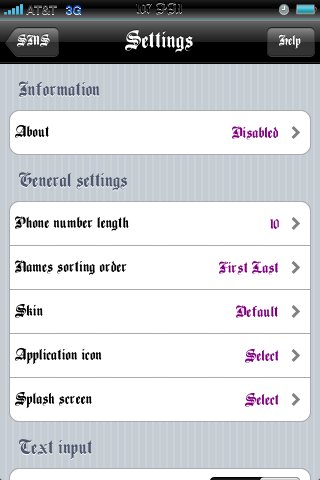
- Open MySmS and go to settings on the bottom left of the app and scroll all the way down. You should see import/export passwords click on that and click on import password from notes and choose my sms backup and vioala your finally finished. Respring your iphone and go to the settings and you should see the about info say disabled meaning you have successfully cracked the app.
Now to install MySmS Secure just download the secure crack and drag and drop the file from the \Applications\MySMS.app crack folder into the \Applications\MySmS.app folder on your iphone.
Now for the other part you should know what to do by now if not comment if you need help, but its all the same as the above instructions but you have to do the above one first.

February 2nd, 2009 at 2:20 am
hi…
please share the files to any other file sharing servers….thanks
February 5th, 2009 at 9:30 pm
MySMS 9.9 Cracks
http://www.mediafire.com/?lkvndyjvwy2
http://www.zshare.net/download/55173972878be6d5/
February 8th, 2009 at 8:56 am
Hi,
Can you help me to explans your tips more clearlier? I don’t know YOUR RIGHT YOU GUESSED is mean, I have copied 4 .plist files in var/mobile/library/MySmS folder and note.app in var/mobile/library/notes to var/mobile/library/MySmS/library is corected?
Help me please…
thanks for your tips!
February 8th, 2009 at 3:25 pm
ok for the first part you will copy the two .plist files that are in the mysms.app folder to root/applications/mysms/
now for the other part open the folder you downloaded from here and go to var/mobile/library/mysms and copy those files to var/mobile/library/mysms on your iphone
now for the notes .db file that you downloaded from here you will have to put that into
var/mobile/library/notes and overwrite the notes.db file you see with the one you downloaded from here.
The easiest way to install mysms cracked on your iphone is to go to http://www.xsellize.com and add their cydia repo and just install it from there through cydia.
February 14th, 2009 at 4:27 pm
I could crack it well but didn’t reach secure version… what do i have to do for secure vesion?
please explain clearly…
THanks
February 18th, 2009 at 11:42 pm
Thanks man, but you weren’t too specific for the secure version. What do i do?
February 19th, 2009 at 1:17 am
Guys do not install mysms the developer put a time bomb in it and it makes your phone crash and you will have to restore.
March 2nd, 2009 at 7:27 am
Hi Admin,
I did the above, but could not see the disable option in about(settings). And still my app is a demo version. Please help
March 2nd, 2009 at 10:52 am
Thanks a million