iPhone OS 3.0 beta 2 Download, Bypass the UDID registration for OS 3.0

March 31, 2009 :: Posted by - SoSly :: Category - News

=========================================================

Apple has released the second beta of their iphone os 3.0 software. I know a lot of you have itchy update fingers as they call it so I have posted links to the new update firmware and how to bypass the udid registration enjoy ;) .

***Download iPhone OS 3.0 for 3g part 1***

***Download iPhone OS 3.0 for 3g part 2***

iPhone 3G

Download Part 1
Download Part 2
Download Part 3

==============================
iPhone (first generation) :

Download Part 1
Download Part 2
Download Part 3

==============================
iPodTouch (2nd generation) :

Download Part 1
Download Part 2
Download Part 3

==============================
iPod Touch (first generation) :

Download Part 1
Download Part 2
Download Part 3

Thanks to mahood over at xsellize forums for the links.
======================================================

Bypass the UDID registration on mac and windows 7.

I don’t know if you can do the same on xp or any other version of windows but i’m guessing that just blocking itunes to access the internet during the update process of the iphone to 3.0 will work.

Windows Vista or Windows 7 Users

1.Click on start

2.type in “Search programs and files” firewall.

3.Try to find windows firewall

with Advanced Security if you are in windows 7 otherwise try to get on the advanced settings of windows firewall.

4.Create a new outgoing rule that blocks iTunes.exe from using the internet.

5.Enjoy

This will just stop iTunes from accessing the internet which prevents it from checking if ur UDID is on the Developer List.

After doing that you can unblock it and use itunes with the internet but if you connect your iphone be sure to block itunes access to the internet.

Mac Users

1. Disconnect the internet once you plug in ur iPhone

Skype for iPhone ipa, Safari Tab Closer

March 30, 2009 :: Posted by - SoSly :: Category - News

====================================================

Note: I have put the 900+ iphone movies link back up above. Enjoy 8)

====================================================

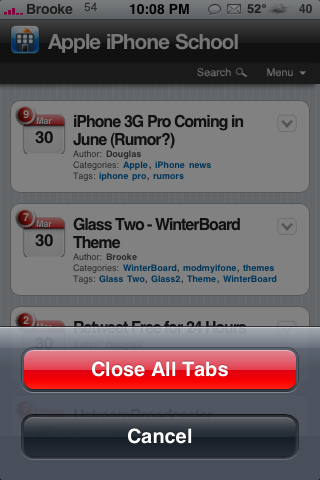
Have you ever been surfing the web on your iphone and you have multiple tabs open but for some reason you just open the tabs and close them all to get all neat and organized. Well Safari tab closer has been released on cydia and it lets you close all the tabs with one tap.

To install the mod open cydia and search safari tab closer and install,

The installation will not put an icon on your springboard it automatically enables the mod so all you have to do is when you are browsing using safari go to  the bottom right corner which is the tab icon then tap and hold it. a pop up notification like the one below will appear and viola ;) have fun.

pic via appleiphoneschool

====================================================


In terms of navigation, Skype’s VoIP app for iPhone looks more like your traditional iPhone app than it does Skype 4.0 for Windows. For many who already prefer Apple’s sleek interface archetype, that’s a triumph, but those who enjoy Skype’s branding may feel disappointed.

Skype’s screens are well organized and use the iPhone’s ability to add filters, for instance, to sort your contacts alphabetically, or by who’s online. There’s chatting as well, though Skype’s flagship feature is its VoIP calling that’s free to other Skype users and an inexpensive per-minute fee to landlines. Calls on Skype for iPhone work only if you’re in range of a Wi-Fi network, so your call quality will in part be at the mercy and strength of wireless networks nearby–calls will not work over the cell phone network on the iPhone (but chatting will.) Assuming your connection is solid, you can dial a number or quickly call a contacts stored in your address book. iPod Touch users will need earphones with an embedded mic to talk. During a call, you can mute the line, go on hold, or put the call on speakerphone. In the My Info window, you can follow a link to buy more SkypeOut credit online. **Article via cnet**

It is suppose to come out some time tomorrow but someone got a japanese itunes account and got it earlier.

Download Skype ipa ***HERE*** or ***HERE***
Note: It crashes when clippy is enabled so disable it if you want to use it. It may also conflict with other apps I just haven’t filly tested it out yet.

Icy vs Cydia

March 30, 2009 :: Posted by - SoSly :: Category - News

=======================================================

Ripdev released icy which is a new cydia package manager. Icy still has some flaws and bugs in it but it looks promising. I warn you guys again to stick with cydia until ripdev upgrades icy. Below is a video brought to us by iphoneil.net on testing the speed or cydia and icy so lets so who gets beat to the punch!!

Ripdev Releases ICY an alternative to Cydia but Cydia Still on top

March 29, 2009 :: Posted by - SoSly :: Category - News

====================================================

Jay Freeman aka Saurik Cleared things up in one of the comments and I agree, I have tested this and it actually is a living hell for the user also jay ;) thanks for the heads up about it ignoring conflicts.. Something bad coulda happened. Below is what Saurik had to say about it and I have also found and had these exact same problems people are posting.

“One thing that should be noted: they decided to reimplement APT, and they didn’t reimplement it well. They only support package dependencies, for example: they ignore any information on conflicts. The sad part of this whole thing is that Icy, like Installer, is something that users occasionally find interesting for some reason or another, but which makes the lives of the people running the repositories where you get your software, and the developers they work with, a living hell.”

PROS:

  • Simple interface
  • Installing process looks VERY cool.
  • Automatically imports all sources/settings from cydia.
  • Shows version number in package list.

CONS:

  • Must refresh sources manually.
  • No way to hide command line sources (Makes going through installed packages section very difficult)
  • Search function does not work after installing packages.
  • Kinda hard to read.
  • Slow launch times.
  • No way to queue packages like in cydia.
  • Updating sources is INCREDIBLY slow.
  • Crashes, and reboots (not resprings) your phone.
  • While uninstalling, it tells you that it’s removing essential system components.
  • If you have the ripdev source added to cydia, Icy always shows up as an available upgrade, even if it’s not installed.

In the end stick with cydia because it is a lot safer and you get the cydia store 8) and look above, who wants an app that has more cons the pros…. I know I don’t.

Only a few hours ago we were wondering what was the app in the mysterious video on youtube. Now we have an answer from RipDev, the developers who created Installer app, through their blog: “Icy is our take on the freeware package manager that uses APT repositories to install and remove packages available in another free iPhone installer application, Cydia. The goal was to create a fast, lightweight and more slick solution that is easy and cool to use.”

Icy works in landscape, following the trend enstablished by 3.0 upcoming iPhone firmware, and it is extremely reactive, even at the first startup, when it imports all your Cydia sources and installed packages. Sources autorefresh is now manual.

Icy works well (remember, it uses only Cydia compatible sources), but it misses a “Changes” tab: RipDev is planning to introduce it in the next 1.1 update, along a with dependency graph for the packages and other things.

The app will be available on iSpazio’s repository, at the moment you could find it adding to Cydia RipDev’s repo: http://apt.ripdev.com

news via ispazio. If any of you guys try this let me know how it works. Thanks ;)

Grabulous Gui

March 28, 2009 :: Posted by - SoSly :: Category - News

======================================================

Ok just so you guys know here is the story behind grabulous and mega4i. Mega4i.com is a website someone made to charge people for installing cracked apps he has a program called Mega installer which lets you install over 4000 cracked apps for your iphone directly on your iphone, did I mention it has an appstore app look to it so it looks legit. Now the guys over at hackulo didn’t like this and well neither did I. How is someone going to charge a monthly fee to install cracked apps… You might as well go into the legit appstore app or itunes and purchase every app you desire instead if giving this idiot your money. Anyhow the guys at hackulo made a command line program called grabulous. Grabulous lets you download apps from mega4i for free without having to pay. I know many people aren’t good with command line and such so below is a gui for grabulous brought to us by:
Andydam for GUI, Kyek for making the Grabulous script, Keddyfish for testing, Reilly4CPDA for helping, Chappoisgone for the icon and splash screen

More info on Grabulous HERE

More info on mega4i HERE


Note: you have to have installous from the cydia.hackulo.us repo installed
How to install Grabulous GUI

  1. ***Download Grabulous GUI*** and extract Grabulous.app
  2. SSH into your iPhone
  3. Copy Grabulous.app in /Applications
  4. CHMOD Grabulous.app to 777 or 755 using putty or terminal go to this directory 0755/Applications/Grabulous.app/Grabulous and press return/enter.
  5. Reboot/respring your iPhone and you should see Grabulous

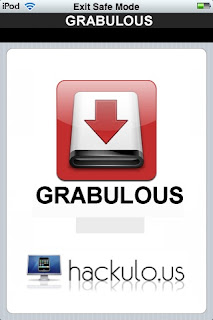
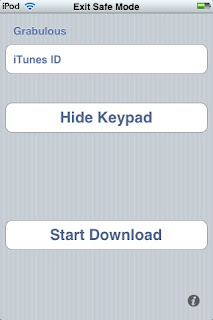
After all of that is done open Grabulous and you should see this

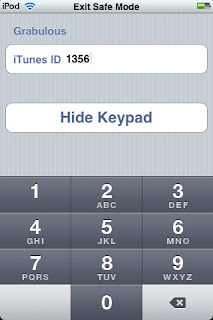
Next Enter in an iTunes ID (there is a list of different iTunes ID on the bottom of these post). For example put 1356 for IVCalc v1.1

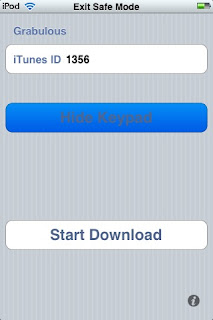
Next Press Hide keypad to see more options

Next tap on start download and Once you are done downloading open Installous, press downloads and you should see your app in there. ivcalc-1.1 was this app so tap it and press install!

There are many iTunes ID’s but we don’t know what ID each application is since Mega4I changed the code.

Here is a list of iTunes ID’s thanks to thecheschat’s topic on Hackulo.us. If you have any ID’s please keep posting and updating in comments.

iTunes ID use these!

  • 1733: Earth Day -phil123
  • 1577: Robo -me
  • 1386: iBreathalyzer -me
  • 2698: Ants village -me
  • 1734: Edge -jupina
  • 4010: iChm -lucaspeed
  • 0519: FastFigure Financial Calculator Code
  • 1773: Sway-1.1.0 0523: Checkbook
  • 7562: Fillpro
  • 1337: Kaplan Medical Terms For Nurses Flash Cards and Reference Guide
  • 1338: The Human Body 2 v2.4.0-2.4
  • 1340: iCare Tracker v1.05
  • 1344: Sanders Q&A: Review for the NCLEX-RNA Examination 1.0
  • 1346: Color Skeletal System
  • 1364: RSI 1.1
  • 1370: Jaundice 1.0
  • 1372: Medical Drugs 1.0
  • 13670: Whip 1.2
  • 4985: iDownload
  • 8562: Downtown Disney Mini Guide
  • 1312:Microbiology Flash Cards
  • 1236: BP-Charter
  • 2211: Big Two
  • 2213: Place your Bet

All of this info was brought to you by mr. haklab over at haklab.com thanks man.

Apple used a jailbroken iphone in one of their patents

March 28, 2009 :: Posted by - SoSly :: Category - News

====================================================

Uh oh Apple — it looks like even your attorneys are dirty, thieving jailbreakers. Tipster a|e§ was poring through that iPhone biometric security patent application we posted earlier and noticed that the images show a jailbroken phone, complete with Installer.app, SMBPrefs, and the iWood Realize theme from the iSpazio repository. We’re guessing the fine folks at Kramer, Levin Naftalis & Frankel are going to have some ‘splainin to do on Monday morning — but at least they get to run apps in the background.

via engadget

Dexter For iPhone Preview

March 27, 2009 :: Posted by - SoSly :: Category - News

=============================================

At GDC, TouchArcade met with Marc Ecko Entertainment who is publishing the Dexter iPhone game that is due out this summer.

This high profile game has received a lot of attention ever since its original announcement back in July and generated even more buzz after some high quality screenshots were released. While there had been some doubters about the possibility of such high quality renders on the iPhone, after seeing the game ourselves, we have to admit the graphics quality of the 3D rendering engine is remarkable.

The game engine was developed by Icarus Studios and is a port of their MMO engine. This engine is said to be rendering the full 3d environment with 30,000 polygons at 30 frames per second on the iPhone/iPod Touch platform. The high definition video embedded below offers a peek at the game.

Meanwhile, the game itself seems to remain very true to the brand and television series with close tie-ins to the first season of the show. The game revolves around the main character Dexter who is a serial killer governed by a strict moral code. For every action you take, it may adversely or positively affect your “Mask” level, which must be maintained or you’ll be exposed. If you are entirely unmasked, the game ends.

Dexter plays as a 3rd or 1st person perspective adventure game in a fully 3d environment. Both “joystick” and tilt/button controls are offered and appear to provide a solid control system to the game. Also key to the gameplay is the collection evidence in different storylines to capture more victims. Stealth also plays a major role in the game and you find yourself sneaking behind obstacles in order to avoid detection while stalking your prey.

Once Dexter gets his victim back to his lair, you must try to force them to confess to their own crimes before killing them. The tools available to you include a clever, knife and bone saw, each with their own unique iPhone accelerometer gestures to use them.

This video shows several of the environments and control systems:

Overall, we were very impressed with what we saw. There is typically a bit of a stigma against these officially licensed games, but Marc Ecko Entertainment appears to be delivering a very high quality game in both iPhone experience as well as loyalty to the television show itself.

The game will be delivered in 4 episodes with the first out this summer. The first episode will deliver 8-10 hours of gameplay. All four episodes will be delivered by September, when the next season of Dexter begins. If you are interested in a further walkthrough of the game, another YouTube video looks at additional features of the game.

news via touchArcade

More IPA’S

March 27, 2009 :: Posted by - SoSly :: Category - Cracks

===================================================

Xvaders is bringing back the old nes feeling. You have to shoot all these things before they get to you Cmon.. Does this game ring a bell?? ;)

****Xvaders**** Rar Pass is: http://iapplications.ru

3d hunting is the first of its kind. It offers obiviously as you can tell by the name a 3d hunting experience on the iphone. The game is ok but if your a hunting game fan than this will please you.

****3d Hunting****

This is a crazy skyscraper construction game. The game is more about reflexes and puzzles so if your into these then give it a go, I liked it. 8)

****Tower Bloxx 3D Deluxe****

Cool New Games & Updates

March 26, 2009 :: Posted by - SoSly :: Category - News

======================================================

HeavyMach has finally been updated to version 1.13 and added 3 more missions. This is one of my favorite games so check it out guys.

****HeavyMach**** Rar Password is: http://iapplications.ru


=====================================================

A classic megaman game. I was a fan back when it came on tv and I also had the gameboy games. Have fun guys 8)

****MegaMan**** Rar password is: http://iapplications.ru

====================================================

The old classic, I know some of you will be looking for this so here you go.

***Wolfenstein 3d*** Rar Password: http://iapplications.ru

======================================================

iShoot has been updated to 2.0 and it has added network play over wifi. It runs smoothly and i’m sure everyone will enjoy blowing their friends up to smitherenes  enjoy.
***iShoot2.0***

CyDelete 1.0.1 Delete Cydia Packages Like Appstore Apps

March 25, 2009 :: Posted by - SoSly :: Category - News

===================================================

Since the dawn of Cydia, users have been struggling to remove applications they’ve installed with it. Uninstalling a package is a seven-step operation at best: Start Cydia, Manage, Packages, (locate package), Modify, Remove, Confirm.

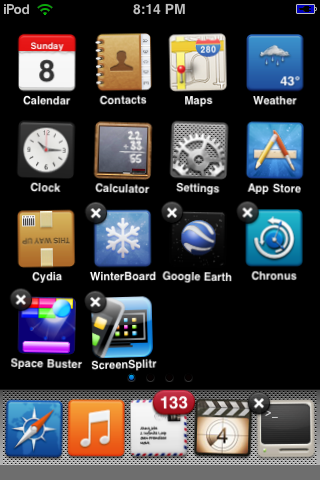
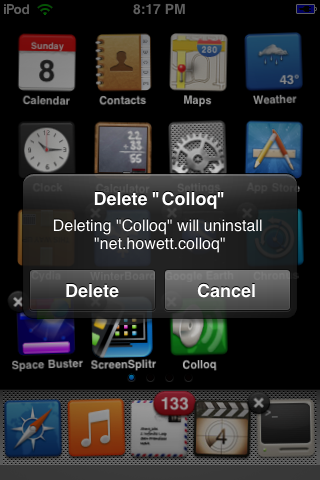
With the advent of CyDelete, however, Cydia packages can now be removed like any App Store applications- hold down the icon, wait for them to start wiggling, and tap the X. What was once cumbersome is now integrated into the standard iPhoneOS workflow. It is a lightweight MobileSubstrate plugin that only does anything in Wiggle Mode.

CyDelete will not remove applications that are not managed by Cydia, though they will be branded with an X. From SpringBoard’s standpoint, applications managed by Cydia and applications just sitting in /Applications are one and the same. CyDelete will also not remove Cydia itself, for safety reasons.

Via thebigboss