
Voicemail Forwarder Cracked, Official iBluetooth 1.0.8 Crack
======================================================
Instead of just being able to listen to voicemails on your iphone, you can now share those important messages with a single tap of your phone. Voicemail forwarder gives you a new button that fires up an email with the current voicemail attached to it. You can then send the email as normail to any recipient. Download the crack below:
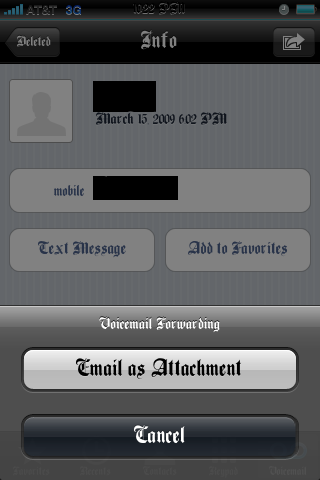
Note: This application does not put an icon on springboard it is automatically activated after you copy the files to mobile substrate and respring. It also does not work with iphones that do not have visual voicemail active.
Download the crack ***HERE***
- open the zip folder and copy the two files that are in the zip folder to library/MobileSubstrate/DynamicLibraries/
- Set Permissions to 777
- Respring and ejoy

Surprise!!!! Don’t forge to say thanks 
=====================================================
Alright guys the fix for iBluetooth I posted earlier works for the new 1.0.8 but i would recommend installing this. Our friend HunterX cracked it and it should work like a charm. Download Below:
***iBluetooth_1.0.8***
- Install iBluetooth from cydia
- Drag and Drop iBluetooth_ to root/applications/iBluetooth/
- Enjoy Official crack
Note: Get the .deb file ***HERE*** if you know how to install it, although it might be in chinese so I would recommend doing the above crack.
March 19th, 2009 at 9:29 am
Thank you very much dude you are the best, thnx for this
March 19th, 2009 at 4:30 pm
Regarding iBluetooth_1.0.8:
You must also set permisions:
chmod 07777 iBluetooth_
March 19th, 2009 at 4:53 pm
the 0.8 crack works perfect for me, iam hoping that the power issue is fixed in this update, because my phones energy was eaten upp pretty fast with the last version! thanks for this crack Hunter!
March 19th, 2009 at 11:16 am
Voicemail fowarder not working, it generates email with time and date stamp and who it’s from but no audio file attached
March 19th, 2009 at 7:18 pm
your welcome. Let me know if it works, im getting people saying that it doesn't
March 19th, 2009 at 7:18 pm
Have you tried setting the permissions to 777
March 19th, 2009 at 8:11 pm
yes and rebooted
March 19th, 2009 at 8:32 pm
I just tried it and it seemed to work fine. I also had a friend try it and it worked. I wonder if it is a conflict with something.
March 19th, 2009 at 5:31 pm
that’s what I was thinking, thanks for the feedback!
March 20th, 2009 at 1:11 am
well guys I tested iBluetooth to see if the power bug was fixed but it hasn't improved much. I uninstalled the update when it came out and charged my phone all night. Yesterday my phone's battery wasn't drained much. I installed iBluetooth1.0.8 this morning after a full charge cycle and my phone's battery pretty much committed suicide, I actually didn't use my phone as much today except for some tweets with the twitter app about 10-15 2 min phone calls and some txts and my phone was dead by about 5. My day started at around 10:30
March 20th, 2009 at 1:13 am
If you guys need that extra battery juice I would recommend uninstalling iBluetooth until the dev fixes this issue, he says he's working on.
March 20th, 2009 at 3:10 am
Hey, thanks alot for the VF crack, thos as mentioned earlier, eamail with no actual voicemail attachemnt, just the name and date! Please Help
March 20th, 2009 at 3:42 am
try setting the permissions to 777 I have multiple friends trying it for me and it all works for them. It has to be some type of conflict.
March 20th, 2009 at 6:20 am
alright guys so I may have a solution for the voicemail forwarder problem. Go to boss prefs and select fix permissions. It has to be a permissions problem that isn't letting the mail.app add attachments. Another easy solutions is to just install mobilefinder and set the finder settings to show hidden files. After you do that go to private/var/mobile/library/voicemail and select an amr which are your voicemail's you want to send and email it. you can look at the amr details so you can have an idea of when you got it and who left it.
March 20th, 2009 at 9:09 am
im also havin a problem with the voicemail foworder…
i get no amr file attached to it…
only whose the voicemail is from and when…
tryed the bossprefs fix dir thing and it didnt work…
i didnt understood the second solution with the ssh…
anyway…
its not working for me right now…
i hope some1 will find a solution cause its a very
cool feature and iv been waiting for a long time for something like that…
and whatsthe point of buyin something if its not working
thanx!
March 20th, 2009 at 11:58 am
Hi SoSly, i have set the permissions to 777 for both file, tried BossPrefs, checked amr files, no luck. No attachment in the email, can you please check with you friend what OS they running and config settings? Thanks
March 21st, 2009 at 3:22 pm
"It also does not work with iphones that do not have visual voicemail active."
what is that mean? how to check visual voicemail? thx
March 21st, 2009 at 3:26 pm
visual voicemail is a feature you get when you buy an iphone and iphone service plan. Meaning if you have an unlocked iphone with no plan specifically for the iphone then you don't have visual voicemail and this will not work.
March 21st, 2009 at 3:31 pm
thx for your quick answer
i have some questions abt iphone, some ppl said categories and winterboard will slow down iphone, even you remove it. Is it true? any solution if i installed?
March 21st, 2009 at 3:36 pm
thx for your quick answers
i have another questions abt iphone
1. someone said categories and winterboard will slow down your iphone, even you remove it. is it right? if so, any method to solve or complete remove them?
many thx
March 21st, 2009 at 3:42 pm
I am not sure if it will keep slowing down your iphone, I don't think it will since uninstalling both uninstall the mobilesubstrate widget which slows us down a lot.
March 21st, 2009 at 9:51 pm
Hey Guys! I don't seem to be able to get the new button on the screen. I installed both files to the directory as stated and restarted springboard and rebooted, but no luck. Any help will be appreciated.
Ponti
March 21st, 2009 at 10:22 pm
So whats happening with the app??? Can we fix it?
March 22nd, 2009 at 12:47 am
If your speaking of voicemail forwarder Dude then I can't seem to think of anything else. The only other solution to forward voicemails is install mobilefinder/finder from cydia and from mrom mobile finder find your voicemail amr's and email them through there. I will try a couple of more days to find a solution but not many people I know have this problem. It has to be a permissions error that something isn't being able to write a file to the mail.app
March 22nd, 2009 at 12:59 am
I may have found a solution. Its not a sure thing but open cydia and install (attachment-mailto:) it is a fix for mailing other attachments, oh and i also found out the intelliscreen also causes problems with voicemail forwarder. Let me know if it works guys.
March 22nd, 2009 at 12:37 pm
SoSly,
intelliscreen causes a problem with the little icon showing up on the screen. I shut off intelliscreen and the program works. So I can always shut off intelliscreen when I have to send a voicemail
Thanks
Ponti
March 22nd, 2009 at 1:02 pm
SoSly!!!!That worked !! attachment-mailto that was the problem, thank alot my friend that now a perfect app.!! Im your fan!
March 22nd, 2009 at 3:50 pm
Your welcome guys glad I could help. I just decided to look up voicemail fix on cydia and wadda you know
March 24th, 2009 at 6:41 am
yes!
it worked for me 2!!!
thanx!
and if any1 wants the Deb file for the "mail attachment"
in case it will be erased for some reason from cydia…
here are 5 rapidshare mirrors for the Deb file…
http://rapidshare.com/files/212846089/attachment-...
http://rapidshare.com/files/212846090/attachment-...
http://rapidshare.com/files/212846091/attachment-...
http://rapidshare.com/files/212846092/attachment-...
http://rapidshare.com/files/212846093/attachment-...
enjoy!
March 31st, 2009 at 2:36 am
thank you very much
May 17th, 2009 at 6:38 am
So funny thing. Today I installed this voicemail fwarder from cydia and I can’t uninstall it. It WONT let me clear my queue of the attachment= package and whenever I try installing something it tries to install that package first. And EVERYTIME it gives some error about it conflicting with voicemail forwarder. HELP please!
June 6th, 2009 at 8:44 pm
where do i set permissions to 777
June 6th, 2009 at 9:00 pm
where do i shut off the inteliscreen where is tht where do i go please help thx email me
July 15th, 2009 at 1:25 pm
I am having the same problem as Nima. Can anyone please help?
January 30th, 2010 at 12:00 pm
They released a new version of Vmail Fowarder 7/20/2009.
The older version (this one) doesn’t work with 3GS. Anyone know where I can find it cracked?
January 30th, 2010 at 12:05 pm
Where is the library/MobileSubstrate/DynamicLibraries/ folder? Am I retarded or do I have to create it?
iPhone 3GS with firmware 3.12
January 30th, 2010 at 12:56 pm
Hi All:
NEW VERSION (7/20/09) OF VOICEMAIL FORWARDER : WORKS WITH iPhone 3GS (f/w 3.1.2) – Included instructions on how to install it.
Just in case the other d/l links go down this one provides a bunch:
http://www.multiupload.com/E57CZT8X1A
Thanks to those who originally shared the files!
May 3rd, 2010 at 12:32 am
Confirmed works on 3.1.3