
Grabulous Gui
======================================================
 Ok just so you guys know here is the story behind grabulous and mega4i. Mega4i.com is a website someone made to charge people for installing cracked apps he has a program called Mega installer which lets you install over 4000 cracked apps for your iphone directly on your iphone, did I mention it has an appstore app look to it so it looks legit. Now the guys over at hackulo didn’t like this and well neither did I. How is someone going to charge a monthly fee to install cracked apps… You might as well go into the legit appstore app or itunes and purchase every app you desire instead if giving this idiot your money. Anyhow the guys at hackulo made a command line program called grabulous. Grabulous lets you download apps from mega4i for free without having to pay. I know many people aren’t good with command line and such so below is a gui for grabulous brought to us by:
Andydam for GUI, Kyek for making the Grabulous script, Keddyfish for testing, Reilly4CPDA for helping, Chappoisgone for the icon and splash screen
More info on Grabulous HERE
More info on mega4i HERE
Note: you have to have installous from the cydia.hackulo.us repo installed
How to install Grabulous GUI
- ***Download Grabulous GUI*** and extract Grabulous.app
- SSH into your iPhone
- Copy Grabulous.app in /Applications
- CHMOD Grabulous.app to 777 or 755 using putty or terminal go to this directory 0755/Applications/Grabulous.app/Grabulous and press return/enter.
- Reboot/respring your iPhone and you should see Grabulous
After all of that is done open Grabulous and you should see this
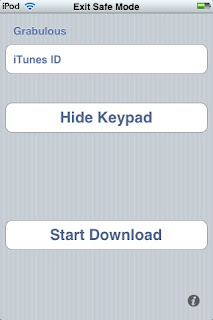
Next Enter in an iTunes ID (there is a list of different iTunes ID on the bottom of these post). For example put 1356 for IVCalc v1.1
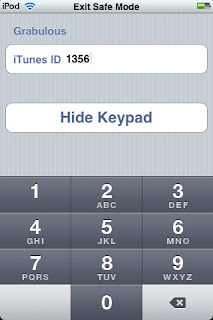
Next Press Hide keypad to see more options
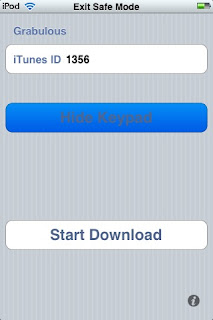
Next tap on start download and Once you are done downloading open Installous, press downloads and you should see your app in there. ivcalc-1.1 was this app so tap it and press install!
There are many iTunes ID’s but we don’t know what ID each application is since Mega4I changed the code.
Here is a list of iTunes ID’s thanks to thecheschat’s topic on Hackulo.us. If you have any ID’s please keep posting and updating in comments.
iTunes ID use these!
- 1733: Earth Day -phil123
- 1577: Robo -me
- 1386: iBreathalyzer -me
- 2698: Ants village -me
- 1734: Edge -jupina
- 4010: iChm -lucaspeed
- 0519: FastFigure Financial Calculator Code
- 1773: Sway-1.1.0 0523: Checkbook
- 7562: Fillpro
- 1337: Kaplan Medical Terms For Nurses Flash Cards and Reference Guide
- 1338: The Human Body 2 v2.4.0-2.4
- 1340: iCare Tracker v1.05
- 1344: Sanders Q&A: Review for the NCLEX-RNA Examination 1.0
- 1346: Color Skeletal System
- 1364: RSI 1.1
- 1370: Jaundice 1.0
- 1372: Medical Drugs 1.0
- 13670: Whip 1.2
- 4985: iDownload
- 8562: Downtown Disney Mini Guide
- 1312:Microbiology Flash Cards
- 1236: BP-Charter
- 2211: Big Two
- 2213: Place your Bet
All of this info was brought to you by mr. haklab over at haklab.com thanks man.
March 29th, 2009 at 11:38 am
if i do as the tutorial says, i cant get Grabulous to work.
i copied Grapulous.app into the Applications Folder and set Permissions to 777, for every file into Grapulous.app and the folder itself, but as i restarted my iphone3g there was no Grabulous App on my Springboard. also i cant find Grabulous in cydia after i ve added the cydia.hackulous Source. What did i make wrong?
March 29th, 2009 at 1:28 pm
I did everything as it should, I 777 and all permits, the icon appeared on the screen but the application to enter and opens and closes automatically not go! it can be? I am sorry for the English in Argentina! not handling very well the English
March 29th, 2009 at 1:47 pm
I did everything as it should have permissions 777 all! restart and the icon appeared when I enter the application is closed, does not open and close walk alone! any response?
> cambiar
March 29th, 2009 at 3:14 pm
all you have to do is respring using boss prefs or sbsettings so the icon can show up.
March 29th, 2009 at 3:16 pm
You should try using terminal or putty to chmod the app to 777.
March 29th, 2009 at 3:33 pm
trate de usar putty or terminal i ponga los permisos a 777 o 755 pero use chmod.
March 29th, 2009 at 5:56 pm
I do not appear in the repo grabulous of hackulous
March 29th, 2009 at 3:24 pm
I figured it out. All you have to do is chmod the app using terminal or putty to "chmod 0755/Applications/Grabulous.app/Grabulous". After that it should work. If it doesn't let me know and I will look more into this.
For windows do this
After copying Grabulous.app in Applications leave the persmission to 0755 go to commands which is in WINCP menu then open Terminal where you have to write this command chmod -R a+x /Applications/Grabulous.app start from chmod click Execute after reboot your iphone.
March 30th, 2009 at 7:36 am
All those who CANT see grabulous icon after following this steps carefully, please ensure u dun reboot/respring while the folders are open. I got the same problem. i went back to the 'root' folder and did a respring accidentally, and i saw grabulous. this was after many failed attempts rebooting. gd luck!
March 30th, 2009 at 4:15 pm
But if I get in Cydia grabulous file to install
September 3rd, 2009 at 11:17 pm
where is the permisions?(where can i change that?)i have done all that but it still does not download the file it only says it did,but nothing is in the instalous
December 18th, 2009 at 2:50 pm
i did everithing but when i try to open termial say no file foun, and i have the icon on my spring board but i can’t openit what i have to do to make it work :0
January 29th, 2010 at 8:37 am
just right click the grabulous.app file not the folder, and type 777 then ok.
January 29th, 2010 at 8:38 am
I have done every thing. I use grabulous to download games, but I can’t find it at installous when I want to install. Some one please help me!!!!
March 31st, 2010 at 11:21 pm
I download the app and extracted the .zip and then i draged that file in to iTunes and synced and i opened it on my iPhone and it WORK!! but i cant get it to download ANY apps (Everytime i try to type in the id then i click “hide keyboard” then “Start Download” and then it closes out of the app(Grabbulous). Could ya try this and get back with me. THANKS A LOT
June 3rd, 2010 at 12:12 pm
I’ve the same problem as Teddy I think. Grabulous is installed (on a 2G) iphone, dragged onto iphone using DiskAid), and chmod 777. Opens and says it has downloaded file but when I look in Installous it is not there.
Have tried using mobile terminal su root p/s then grabulous 222222 but this results in an error
Can anyone help?