Haptic Pro 1.0.6 Cracked

April 19, 2009 :: Posted by - SoSly :: Category - Cracks, News

.

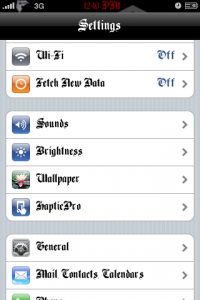
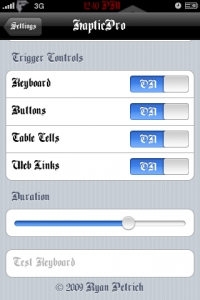
As you guys may now there are a lot of add ons that make your iPhone vibrate every time you press a key, icon, web link, etc. So far from what I know Haptic Pro is one of the best out there so far

haptic16 haptic-162

Instructions On how to install below:

Download the .deb file ***HERE***

  • Download ***HapticPro1.0.6***
  • After you unzip the folder go into the haptic pro folder and you should see 3 different folders which are named spcifically to where you have to copy the file inside the folder to, such as the stuff in the library folder goes into the library folder in your iphone.
  • Now Open the library folder and you should see another one called HapticPro, Copy the Haptic Pro Folder to root/library/
  • Now Open the MobileSubstrate Folder and copy the .dylib & plist to root/library/mobilesubstrate/dynamiclibraries/
  • Now open the usr folder and copy the HapticPro Folder into root/usr
  • Respring and Enjoy

Note: I didn’t set permissions to any folder or files and it worked but if you get errors such as settings not saving then go back and set the permissions to each folder and all the files in the folders to 777.

AppIncubator: Become an iPhone Developer Instantly

April 18, 2009 :: Posted by - SoSly :: Category - News

.

If you have a great idea to build an iPhone app but don’t have coding skills at all, don’t worry, there’s an app to help you. Thanks to MEDL Mobile’s AppIncubator, you can be an iPhone developer instantly and get paid for your innovation and creativity.

Their website explains:

Using the simple interface, you can submit your ideas directly to the incubator. If it passes a series of tests and reviews, we’ll pay one of our development teams to build it. Then we’ll promote and market the application. And we’ll share the profits with you.

We make our decisions based upon five factors: Originality. Functionality. Simplicity. Revenue Opportunity. And Fun.

The AppIncubator application is the first of its kind. You can download the AppIncubator [iTunes link] from iPhone App Store for free.

It’s worth trying, isn’t it? Welcome new iPhone developers!

Via iPhone Buzz

Congrats Babe On Making It To Modeling

April 18, 2009 :: Posted by - SoSly :: Category - News

.

babe

Hey Megg I was just wanting to let you know how proud I am of you and I hope you reach your dreams. I will help in any way I can. Yes guys this is my girlfriend and I don’t post stuff like this but this is special. Love you Babe

iRealSMS 2.0.8.3 Cracked, iRealQuick 1.0.0.1 Cracked Update Easy Install

April 18, 2009 :: Posted by - SoSly :: Category - Cracks, News

.

irealsmscropped Phoenix3200 has once again made a keygen for the latest Irealsms releases. I swear this guy must be a bad a programming/decrypting machine…. Thanks Phoenix over at xsellize forums.

Alright guys these instructions are for those who have time on there hands and know what they are doing. Instructions Below:

Update: Phoenix made a keygen that runs on your iphone you don’t have to do anything else.

  • Download the keygen that runs on your iPhone ***HERE***
  • Install any version of ireal
  • Go home do not  open or tap on any registration info for ireal
  • ssh/iphonebrowse the downloaded keygen to your phone anywhere is ok and set permission to 700
  • In terminal or putty connect to your phone and run      ./iRealKeygen
  • enjoy ireal

Note: Add a line to the end of /etc/hosts to block key checking:
127.0.0.1 www.irealsms.com

Old way to do it

  • Download the Keygen ***HERE***
  • Install SQlite Manager add on for firefox from ***HERE***
  • Copy your sms database from your iphone from var/mobile/library/SMS/sms.db
  • Get your iphone serial number which is 11 digits long by going to settings/general/about
  • Run the keygen inside command prompt (Start-Run, Type in cmd) or open command prompt from start-accessories-commad prompt and you should see something like
  • Now Read what command prompt says such as the example above it says C:\users\John
  • Drag and drop the downloaded keygen into the directory command prompt shows such as on vista it might say C:\users\Home\ so you would go to the home folder on your computer and drop the keygen inside that, the same goes for xp
  • In the command prompt window type in without the quotes “irealkeygen.exe iphone-serial-goes-here then press enter and you should get your serials” and yes that is a space between the serial and irealkeygen.exe so an example would be        C:\user\john>irealkeygen.exe 000000000000
  • Open your sms.db in SQlite manager
  • Under tables look into qsettings (for irealquicksms) and settings (for iRealSMS)
  • Now edit the app serial values with the serial you made in command prompt
  • Now copy the modified sms.db back to your phone to var/mobile/library/SMS/ and overwrite the original ( make a backup of the original)
  • Reboot your iphone. This is a must, and if you keep getting trial errors you should delete the ireal.plist and the sms.db then copy the modified one.

Enjoy ireal

Detailed Tutorial by anonymous angel

1. Download the keygen.exe for the pc http://www.sendspace.com/file/wzg98f
2. Download SQLite Manager.
3. SSH your iPhone and copy the file sms.db from var/mobile/library/SMS/sms.db
4. On your iPhone, Go to Settings -> General -> About
5. Look for your serial number and write it down if you want.
6. On your PC open up command promt, Start -> Run -> cmd.exe
7. Okay, this is what I did, I typed the path of where the keygen.exe is then clicked SPACE then typed the serial (11 digits)…
EXAMPLE: C:UsersXXXDownloadskeygen.exe 12345678910
8. Hit Enter and poof you have your serials! Yay!
9. DONT CLOSE THE COMMAND PROMT!!!
10. On your Mozilla Firefox, Open Up SQLite Manager, Tools -> SQLite Manager
11. When it opens click, Database -> Connect Database.
12. When the open file window pops up, the sms.db doesn’t show up right? Make sure instead of “SQ DB Files (.sqlite)” you change it to “ALL FILES”
13. Now the sms.db should open up! :D / YAY!
14. Now depending what iReal App you wanna crack, under Tables you should look for qsettings (iRealQuickSMS) or settings (iRealSMS)… Click It…
15. Then Click on the “Browse & Search” Tab
16. look for appSerial, right-click -> edit selected
17. Copy the serial of the keygen that you opened in command promt (the serial depends on the app you’re cracking!) on the Values (TEXT)
18. Hit Ok
19. Back Up the original sms.db just in case you fuck up the iPhone ;)
20. SSH the iPhone again then copy the modified sms.db (the one you cracked) to var/mobile/library/SMS/
21. Reboot the iPhone and YAY!!! YOU CRACKED IT!! :D /

A LONG BUT DETAILED TUTORIAL BY ANONYMOUS ANGEL

QuickBoard/QuickSMS Adds QuickChat On Beta Release 1.5.7

April 17, 2009 :: Posted by - SoSly :: Category - News

.

As you guys may know quickboard/quicksms has been out for quite some time and is a good txt messaging app. I personally use irealsms but what I was wanting to post about this is that quickchat is a new app that runs in the background along with quicksms, quickboard, quickbirthday and is a possible good instant messaging app. QuickChat supports  Instant Google Talk, Jabber, ICQ, AIM, and Msn. As some of you guys may know quickboard is a platform that runs inside your iPhone springboard which holds all of the apps such as quickchat, quicksms and so on meaning you will have an actual instant messaging app running in the background at all times  Isn’t that what everyone has always wanted.

Warning!!!

warning-sign If you are using a cracked version of quicksms then  I would not recommend using the new quickchat app. The problem with quickchat if your using the cracked version is that it uses isofts servers so they will definately be getting your iPhone’s serial number, Passwords to your favorite im services, and Maybe even have access to your conversations you have with people…  Thats an invasion of your privacy.. Although I am not sure this is all fact, it makes sense and i’m pretty sure they can do that as they can already check your serial when you receive your license for quicksms & etc… What I would do is just deactivate the app from within quickboard, I think there is a setting in which you can choose which quick app is activated and which isn’t.

Firmware 3.0 Beta 3 Download and Quickpwn

April 17, 2009 :: Posted by - SoSly :: Category - News

.

Firmware 3.0 Beta 3

Direct download links :
iPhone 3G OS 3.0 BETA 3 build 7A280f
http://www.novaup.com/download/65kdvbdbdd7qw
———————————————————————————————–
iPhone OS 3.0 BETA 3 build 7A280f
http://www.novaup.com/download/c2saqdi46vj8a
———————————————————————————————–
iPod Touch first generation OS 3.0 BETA 3 build 7A280f
http://www.novaup.com/download/jiazemsyg5t5x
———————————————————————————————–
iPod Touch SECOND generation :
http://www.novaup.com/download/2ovxacl5fn0pk
———————————————————————————————

Thanks to mahood1 for the uploads. You can visit his website for tweaks and more iphone.ipod info @ http://mahmood1.com/iPhone_OS_3.aspx

QuickPwn 3.0 Beta 3

Very similar to the previous jailbreak for the 3.0 beta firmware this Jailbreak fresh out from Russia allows you to install Icy on your iPhone, iPhone 3g, or iPod Touch 1st gen running 3.0 Beta 3 firmware that was released the other day. As with the previous beta 3.0 jailbreak Cydia has not yet been prepared for iPhone 3.0 leaving the option of Icy which isn’t nearly as awesome but it is something. Once again this is not a dev team release — it is independently compiled files packaged inside of the dev teams QuickPwn software.

For those wanting to theme (manually) or work at it to get some things working (like the old days) or just want to play around inside the latest firmware release from Apple here ya go. Oh, one lasst thing, if you upgrade to iPhone Firmware 3.0 you will not be able to use yellowsnow to unlock (maybe forever). iPhone 3g user you’ve been warned.

Download Below:

QuickPwn 3.0 Beta 3 (Windows Only)
RapidShare
MegaUpload
QuickPwn.com

Via ModMyI

NOTE: Do Not Click On Unlock Or Activate, Because It Makes You Not Get Any Signal. Just Click On Jailbreak And All Should Work Well.

Keep All Your Apps & Stay Unlocked & Activated. Look At Note 2 Below:

NOTE2: You can also click on shift/option + Upgrade and choose firmware 3.0 and you will keep all of your apps other than the cydia installed apps and you will be unlocked and activated. Make sure you take all of your apps out of categories before you upgrade if you do otherwise the apps will be installed but not show up.

Click Here for a Guide to Activate MMS and Tethering On AT&T

Auto Downgrader For iPhone 3g Baseband For Mac

April 15, 2009 :: Posted by - SoSly :: Category - News

.

This is a new tool released that automatically downgrades your iphone 3g’s modem baseband to 2.28 which in turn lets you run the iphone 3g unlock codenamed yellowsn0w released by the iphone dev team.

Advanced Way to Check Your Bootloader Version HERE

Download ***HERE***

Note: This only works if your iphone bootloader is 5.8

News via xsellize and thanks to whoever made this program.

Assassin’s Creed For iPhone ScreenShots

April 14, 2009 :: Posted by - SoSly :: Category - News

.

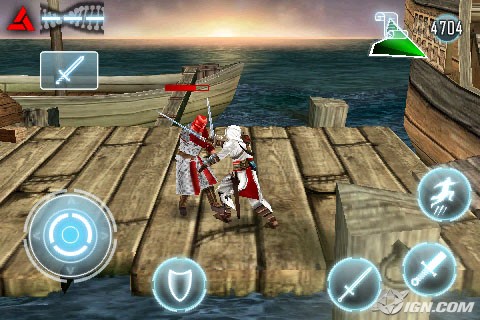
IGN publishes the first screenshots for Gameloft’s upcoming Assassin’s Creed for the iPhone. The game is set to be released “in just a few weeks” and will be largely based on Altair’s Chronicles for the Nintendo DS.

“You must rely on a medieval form of parkour — think urban gymnastics with minaret flair — to clamber up walls, scurry along rooftops, and generally avoid detection from numerous guards, thugs, and vicious Templar knights. Altair’s acrobatics are controlled with on-screen virtual controls that look quite a bit like the successful set-up from Gameloft’s Hero of Sparta.”

The game will be released in the next few weeks and we’ll provide a closer look when it becomes available.

Via TouchArcade

How Many Apps Do You Have Installed

April 13, 2009 :: Posted by - SoSly :: Category - News

.

So after a long time of having my iPhone I know that I have installed well over 100+ apps on my phone and deleted them. I currently have about 30 apps on mine as of right now but you guys know that number is sure to change daily. I know everyone if is always finding some app they like or want to try and bam its installed. My question here is how many apps do you have installed.

[poll id="3"]

Whoah  most of the votes are for 50 + apps. I’m surprised, lets see how it goes until the poll is closed tomorrow.

MasterPrefs Coming Soon

April 13, 2009 :: Posted by - SoSly :: Category - News

.

So Your tired of FiveIRows and you decide lets uninstall it, so you go and open up cydia(35 Secs) and uninstall it. Sometime later that day a friend wants to see what its like or you want it back so you have to open cydia(35 Secs) install it and you have to wait for the respring blah blah blah, but wait you don’t like the font you have anymore and you want to take it off.. This whole opening cydia and uninstalling is getting very annoying and time consuming. Well fear no more, MasterPrefs is being developed and hopefully will be released soon. With MasterPrefs you will be able to activate and deacvtivate certain .dylib based  add ons such as five column rows, fiveirows, and fonts without the uninstalling them and going through the whole time consuming cydia openings. As you can see in the video above you have many different options to choose from, whether it is turning off the wiggle on your icons when you move them, to hiding icon labels, or even hiding all of your icons I don’t know why you would want to do this but hey it’s an option. This app looks nice so lets hope it lives up to what it is suppose to do.