Which sms app do you guys use

April 06, 2009 :: Posted by - SoSly :: Category - News

.

I have always had a big problem on choosing the right sms app. I have purchased everyone listed except bitesms, and I was wondering what you guys use and why. To me if it’s not one thing it’s another such as irealsms has landscape and quickreply on lockscreen but doesn’t show a full txt app like quicksms does. iRealsms lets you customize the background and bubbles, but it uses about 15 mb of ram and quicksms only uses about 5 to 10 mb but it does not allow full cusomtization. You guys get the picture, but as of now iRealsms 2.8 has my heart ;) which app do you use???

irealsmscropped mysms bitesms-logo quicksms

[poll id="2"]

New iPhone To Get Better Camera

April 06, 2009 :: Posted by - SoSly :: Category - News


so there has been some reports about apple placing orders for new 3.2 megapixel cameras and 5.0 megapixel cameras for the next upcoming iPhone that is rumoured to be realeased in June. Some of you may have seen a picture or a video of an iPhone imitation having a camera in the front and one on the back. That would make sense if apple was to enable live video conferencing and video recording capabilities to the iPhone which again has already been speculated. I personally think the new iPhone will come with one camera which will be 3.2 megapixels and will allow video recording and that’s it… I mean after the new iPhone release apple has to find a way to make us upgrade to the next best thing right and that is why they are adding some new features now and saving the best for the next best upgrade :)

Were going back to the old one for now

April 06, 2009 :: Posted by - SoSly :: Category - News

I obiviously made some minor changes to the theme and was wondering what my readers think. Comment on if I should revert back to the old one, keep this one, or search for another theme. Let me know what you guys think about the theme and what you would like to see. I want to make everyone happy :)

Alright thanks zuz, ricky, and nam. I will be changing the theme to another. I appreaciate the opinions.

HapticPro Updated 1.1 Cracked, Icy Installer Updated to 1.1.1

April 05, 2009 :: Posted by - SoSly :: Category - Cracks

================================================

I Finally got the new files and again thanks to carrbone and mritel from xsellize.

Download ***HapticPro Update 1.1***

Download ***HapticPro Update 1.1 .deb*** If you don’t know how to install debs google it.

  • Extract the folder to your desktop
  • Copy the HapticPro Folder to root/library/
  • Go to the other folder called mobile substrate and drag and drop both of those files call HapticPro.plist & HapticPro.dylib to root/library/MobileSubstrate/DynamicLibraries/
  • Respring and Enjoy

==================================================

Icy Updated to 1.1.1

What’s New in 1.1.1?

  • Added 13 new localizations, so now Icy supports 15 languages (big thanks to everyone who contributed):
    • Brazilian Portuguese
    • Danish
    • Dutch
    • English
    • French
    • German
    • Greek
    • Hebrew
    • Italian
    • Romanian
    • Russian
    • Serbian
    • Spanish
    • Swedish
    • Ukranian
  • Fixed a problem with dependencies not supporting version clauses correctly.
  • Fixed a problem with “missing” firmware package dependency.
  • Reworked threading on source refreshes for better performance.
  • Recent Packages now show a category next to the package name for easier navigation.

From Cydia: Add a new source http://apt.ripdev.com and then install Icy from the Packaging category.

HapticPro Cracked

April 05, 2009 :: Posted by - SoSly :: Category - News

=================================================


  • Download Files ***HERE***
  • Unzip Folder and extract the files inside.
  • Now ssh/iphonebrowse and copy the folder named HapticPro you Downloaded to root/library/
  • Now ssh/iphonebrowse the files that are in the MobileSubstrate folder you downloaded which should be HapticPro.dylib & HapticPro.plist to root/library/mobilesubstrate/DynamicLibraries/

Note: I don’t know if you should set permissions but I did anyways to be safe, I would set permissions to the files in the HapticPro Folder to 777 and the HapticPro.dylib to 777.

Big thanks to mritel for the files and Carrbone for the instructions over at xsellize forums.

Some Ipa’s

April 03, 2009 :: Posted by - SoSly :: Category - Cracks, News

=================================================

Aurora Faint II: The Arena is a great puzzle game, if you played the first one then you are sure to love this one.

Download ***Aurora Faint II: The Arena***

Password for archive is: http://iapplications.ru

Tank-o-Box is an arcade combat game in which you operate a tank during intense battles that unfold on an imaginary writing desk between amusing children’s sketches and office stationery. Completing your assignment won’t be easy because you’ll have to fight off a deadly onslaught of eight different types of tanks and armored vehicles out to turn your desk into another Stalingrad. Survival techniques include taking advantage of the terrain and maneuvering between numerous obstacles while lining up your next shot.

Features:
• Outstanding 3D graphics and sound effects
• 55 awe-inspiring game levels with addictive gameplay
• 30 types of terrain; four seasons; daylight, and night effects
• New tanks, rocket launchers and pillboxes

Download ***Tank-O-Box***

Twitterrific’s award winning user interface is clean, concise and designed to take full advantage of your mobile device. Keeping in touch while on-the-go has never been easier.

This premium version includes an extra theme and does not show advertisements.

• Displays posts, replies and direct messages
• Post messages, photos and location updates
• Mini-browser for showing links
• Easy access to user profiles
• And much more!

Download ***Twitterific Premium***

MySMS 1.0.2-1 Cracked, Simple Program To Make Your Own Themes For Windows

April 02, 2009 :: Posted by - SoSly :: Category - Cracks, News

===================================================

Download ***MySMS 1.0.2-1 Cracked*** this is a .deb file so you will have to install it using putty or terminal. Make sure any auto update feature is turned off if there is any.

Easy install for .debs-

1.You should create a folder /var/root/Media/Cydia/AutoInstall
2.Put in folder /AutoInstall deb app
3. Reboot AND Respring

Alternative Method

run terminal and access to the folder that holds the xxxxxx.deb file

type : dpkg -i xxxxx.deb

u can install terminal in your iphone or run the terminal from WINSCP.

If that doesn’t work go here for a different method and also don’t forget if the icon doesn’t show up respring using bossprefs or sbsettings

Thanks to DSMkilla over at xsellize forums

===================================================

Easy Theme Maker for iphone Program called Totone Theme

Download ***Theme Maker***

Totone Theme is an application for Windows that allows you to create complete themes for iPhone and iPod Touch. Operation is very simple and intuitive, and in this way we can customize any component as graphics: wallpaper, icons, the lockscreen, the slider, battery, and all other images.

The only obstacle may be represented by the location in French, but I must say that it is very intuitive and certainly able to use it while not knowing the language. Theme Totone lets you customize the fonts and export the theme to a folder, ready to be transferred into your device.

News from xsellize forums

Mjoy Ipa, Use Pocket Tunes to listen to sirius/xm radio, Agile Messnger

April 02, 2009 :: Posted by - SoSly :: Category - Cracks, News

===================================================

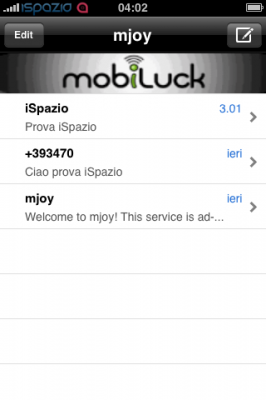
Download ***MJoy***

Note: You must create an mjoy account over at Mjoy.com
This app lets you login to your mjoy account and send free txt messages on your iphone, Apple pulled it off the appstore because it literally lets you send free txt messages and it competes with at&t’s plans.
=================================================

Download ***Pocket Tunes 5.20***

For more info on pocket tunes and clearer instructions on using sirius/xm on pocket tunes go to their official site http://www.normsoft.com/products/iphone/pockettunes/


Installation For Sirius

As of version 5.2 of Pocket Tunes Radio, you can play Sirius Internet Radio. We added support for Web-based stations and this allows you to play stations that normally require you to be using a PC rather than a mobile device.

Here are the steps to do that:

**Note: You must have a paid subscription to Sirius Internet Radio to use this with Pocket Tunes Radio
Go to the “Web” tab in Pocket Tunes Radio and enter www.sirius.com

- Enter the username and password you use to access your Sirius channels on-line.
- Enter the appropriate security characters and tap “Sign In”
You are then taken to the top level listing of the Sirius stations available on-line.

You then see the sub-listings for the selection you made, in this case Music
Tap on the station you want to play. In this case we will tap on “Classic Vinyl”
Now the station loads, you will see the “Loading Audio” message.
- You can leave the window up or press “Hide” to dismiss it. Either way the station will load
- Press “Now Playing” to go back to the main screen.
The station should start playing shortly and if you go to “Now Playing” you should see it listed there
Tapping the “Add to Favorites” icon will add the station to the “Web” section of your Favorites. You can then load the station with one tap. Due to the unique way we support this type of station, Pocket Tunes will go to the Web tab but it will load the station automatically.

Installation For XM

Open Pocket Tunes Radio and tap on “Web”
Enter this web address: http://mobile.musicdock.com
- Enter your email address for your XM Radio on-line account
- Enter your Password
- Tap the “Remember Me” box so that you do not have to log in again
tap “Login”
You are now presented with a list of stations by Genre
- This is a good time to tap the “+” sign to sasve this main page to your Web favorites, that way you can easily get to it with one tap.
- Scroll through the list until you find a station you want, then tap the link for it.
You will then see a pop up that says “Loading Audio”
- You can leave the window up or press “Hide” to dismiss it. Either way the station will load
- Press “Now Playing” to go back to the main screen.
You will now see the XM station playing on the main screen, and of course you should be hearing it as well.
- Tap the “Add to Favorites” icon to add the station to your favorites. this allows a single tap to load the station next time you want to play it.
When a Web Based station like an XM station is added to Favorites, it is placed in the new “Web” section of the Pocket Tunes Radio Favorites.
- Note that when you select a station from here, it will automatically load the station but unlike other favorites, the web tab will be opened in Pocket Tunes Radio. However the station will automatically load, there is nothing you need to do once you have selected the station fro your Favorites.

=================================================

Download ***Agile Messenger***

Agile Messenger is the worlds most feature rich and user friendly all-in-one MSN®, AIM®, Yahoo!®, ICQ® & GoogleTalk® instant messaging client for your iPhone!

Send instant text and picture messages to anyone on your MSN®, AIM®, Yahoo!®, ICQ® & GoogleTalk® contact list directly from your iPhone!


iPhone Firmware 3.0 beta 2 Jailbreak Windows Only

April 02, 2009 :: Posted by - SoSly :: Category - News

===================================================

Its that time again guys, the whole trying new things and restoring to another new firmware. Below is a list of what will happen and what works and what doesn’t if you do update and jaibreak to firmware 3.0.

Disclaimer: This is not made by the official Iphone dev team so do not go to them if you have problems and your iphone goes transformer’s on you and starts shooting rockets at you ;) this patch was developed by som russian hacker named vortex over at iphoneapps.ru. So far a lot of people are happy with this that is the only reason I am posting this.

  • You lose cydia if you update and jailbreak to 3.0, but you do get icy installed
  • You lose winterboard, quickgold, sb settings, Cydia, and plenty more apps
  • You lose 5 icon dock and pretty much anything winerboard related
  • You lose all Cracked ipa’s no patched mobile installation file for 3.0 yet

The things below still work, but i don’t know if they are stable.

  • SSH + SSL
  • MakeItMine
  • iBluetooth
  • MXTube
  • dTunes
  • xGPS

How to jailbreak 3.0

Files needed:

Firmware 3.0 beta 2 for your device
QuickPwn 030-2
Windows Only
THIS WILL UPGRADE YOU BASEBAND, SO IF YOU NEED TO UNLOCK IN THE FUTURE YOU WILL BE OUT OF LUCK

Download QuickPwn 030-2

Note: You keep your iphone 2g Unlock if you have it.

To install and jailbreak do the following:

1) Making recovery (Shift + “Restore”) for the firmware 3.0 beta 2;
2) Run patchenny QuickPWN;
3) Choose:
iPhone 2G – Jailbreak, Activate, (Logo)
iTouch – Jailbreak, Activate, (Logo)
iPhone 3G to register. UUID – Jailbreak, (Logo)
iPhone 3G not registered. UUID – Jailbreak, Activate, (Logo) – will not catch the network

People are saying that you still have to be a registered dev to activate the phone but i am not sure because some say you do and some say you don’t anyhow thats about it for now. I adivse try it if you have nothing to do all day because in the end it is not worth it.

Ok The Crack Was An April Fools Joke

April 01, 2009 :: Posted by - SoSly :: Category - News

===============================================

  1. Download the crack ***HERE***
  2. extract the file to your desktop
  3. Now before you uninstall anything go to root/applications/ and copy your irealsms.app folder just to make sure you have a back up
  4. copy the extracted irealsms.app to root/applications/ and set permissions to 777 and then go into the .app folder and set all the files permissions in there to 777

:) Enjoy Ireal Cracked ;) 8) I mean really Enjoy it