xyflash v1.0 Cracked Divx On The iPhone

May 22, 2009 :: Posted by - SoSly :: Category - News

.

Download xyflash deb cracked ***HERE***

Copy into: Var/root

Open terminal and type

dpkg -i yxflash.deb

Respring and your done

Thanks to schnedi for the crack and deb over at xsellize
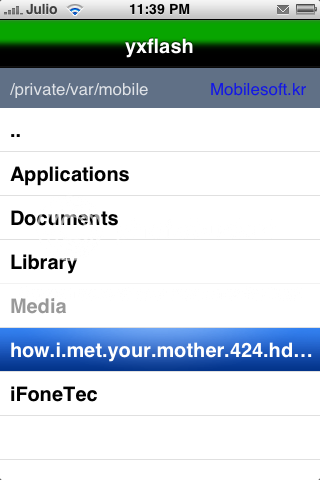
pics from dmi

YXFlash player for iPhone is a usable xvid, divx player which can also view downloaded flv videos.

YXFlash player is out for iPhone and released in our repository. This marks the first actually usable xvid / divx player for the iPhone. Finally you can watch that collection of avi files you have laying around without having to convert them into Apple’s annoying format first. While the converted videos do play a bit smoother due to hardware acceleration, but xvid videos are watchable, at least the ones I tested.The player also plays flash content if you have downloaded flash flv videos to your device. (It is not a web based flash player).

To add videos to your iPhone for playback you can use SSH (Mac Tutorial, Windows Tutorial) to transfer files.

Article Via iClarified

Fight The T-Rex With The Pygmies

May 21, 2009 :: Posted by - SoSly :: Category - News

.

The newest update of Pocket God has arrived. Episode 17 gives the Pygmies a speer to fight the T-Rex. There’s also Pocket Goda God custimization screen added. And there appears to be an easter egg hidden in this update. With “Return of the Pygmy” the trilogy is complete and the price will soon go up to dubble its previous price.

The next update is called “Surfs Up” and will probably introduce a tsunami. Sounds like a fun uodate as well. Bolt Creative has done a very good job once again. They said the new updates could take some longer, because the creators want to take more time to perfect each new update. They are still hoping to get a new update out every week.

You can buy Pocket God here.

Via iPhoneFreakz

Or download Pocket God Cracked ***HERE***

iPhone 3.0: Push Notification Settings Redux

May 20, 2009 :: Posted by - SoSly :: Category - News

.

As we mentioned yesterday, Apple has begun load testing of their Push Notification Service. Certain developers have been given promo codes to a special version of AP News that, when installed, can be configured to utilize Push Notification. This means that screens we’ve seen previously via code digging can now be seen for real, and there are a few interesting things therein.

The setup seems not dissimilar to how GPS was handled on the iPhone 3G. A popup identifies the app and requests permission to send you Push Notifications, and you can choose “Don’t Allow” or “OK”. A Notifications panel in Settings lets you choose to globally turn the service On or Off, and lists the apps using the service so you can individually toggle Sounds, Alerts, and Badges On or Off as well for each one. (i.e. if you want Twitter to badge but not alert, IM to sound but not badge, etc. you can have it your way).

More screenshots after the jump, and check out our massive iPhone 3.0 Walkthrough for even more!

Via Xsellize

New iphone spec/date leaked ???

May 20, 2009 :: Posted by - SoSly :: Category - News

.

Engadget Tweets the new iPhone Specs

Recently we were approached by a source who is closely connected to Apple’s hardware development team. The source was willing to provide detailed information on the specs and release date of the next generation iPhone.
We have checked the source’s credentials to the best of our ability and at this point deem the source as reputable. Of course we cannot guarantee the accuracy of the source’s claims since Apple will neither confirm nor deny any future product releases, including if a new phone will even be released! Many of the specifics proposed by our source have been discussed in recent weeks, but many intriguing details revealed by the source have yet to be reported. Here are the specifics:

  • 32GB and 16GB to replace current capacities
  • $199 and $299 price-points to be maintained
  • 3.2 Megapixel camera
  • Video recording & editing capabilities
  • Ability to send a picture & video via MMS
  • Discontinuation of the metal band surrounding the edge of the device
  • OLED screen
  • 1.5X The battery life
  • Double the RAM and processing power
  • Built-in FM transmitter
  • Apple logo on the back to light up
  • Rubber-tread backing
  • Sleeker design
  • Built-in compass
  • Revolutionary combination of the camera, GPS, compass, and Google maps to identify photo and inform about photo locations.
  • Turn by turn directions
  • July 17th, 2009 release date

Let’s examine the feasibility of these features in the next iPhone.

Via Xsellize

Free Movies, The Easiest Way to Get Any Movie on Your iPhone!

May 20, 2009 :: Posted by - SoSly :: Category - News

.

The iTunes Store is great… Right? You can download entire music albums, audio books, full television shows, even full length movies and much more. But there is only one problem, it costs money. With the new Free Movies application you can download almost any movie, released or unreleased for free. The app is available through Cydia in the BigBoss repository. You will need the Safari Download Plug-In.

It has a clean user interface and is very easy to use. Once you run the app it will start with a list of movies that can be downloaded. There are around 1000 titles as of this article but many are being added all the time. There is no search feature as of now but it will probably be included in the next release.

Once you have found the title that you want to download all you have to do is click on it and a new window will appear and you will be at the download page for the movie. Some sites require you to fill out some random characters so you can prove you are a human. Then you can proceed to the download page. Some sites will also require you to wait a minute or two to actually start the download. It will eventually start to download and once it has completed you will be able to watch it on your iDevice.

All in all Free Movies is a great app for downloading you favorite movie without having to sync with your PC or purchase it from iTunes. It is still in its early stages but should prove to be a very solid application.

Via Planet-iPhone

The Sims 3 Trailer For iPhone

May 19, 2009 :: Posted by - SoSly :: Category - News

.

I swear this keeps looking better and better. I can’t wait till it comes out!!!

McAfee and Symantec making iPhone Virus/Security software?

May 19, 2009 :: Posted by - SoSly :: Category - News

.

It has been awhile since we’ve run antivirus software on our Macs. Most Mac antivirus software has traditionally been buggy or slowed our machines to a crawl. That’s not to say that we’re complacent on security issues. In fact, we have ClamAV sitting in our applications folder ‘just in case’. We’re probably not alone in this sense.

McAfee and Symantec are taking the unnecessary protection one step further by readying security software for the iPhone. We’re not sure what specific advantages this software would provide as there hasn’t even been a proof of concept iPhone virus yet and Apple already allows you to adjust security settings on the iPhone. Furthermore, the API’s probably won’t allow the low level access that these types of applications traditionally require. (Last year a fake version of McAfee also came out for Jailbroken iPhones – see image)

We don’t really feel the need. With Android Linux hitting photo frames, perhaps antivirus makers should focus their attention there.

Intego also released iPhone antivirus software last year. We’re not sure how well it is doing.

via 9to5mac

BackToUp iPhone Backup

May 17, 2009 :: Posted by - SoSly :: Category - News

.

Many people know that the iTunes backup is not good. Sometimes, you lost your contacts, SMS, etc. Thinking about this, I developed a tool called BackToUp. What it do, is create an alternative backup of your iPhone that is independent of iTunes.

The program is pretty good and make the backup of:

  • Contacts
  • Text Messages (SMS)
  • Bookmarks and History of Safari
  • Call History
  • Calendar
  • Notes
  • Bookmarks and History of Maps
  • General Preferences (ringtone, etc)

Also, BackToUp can:

  • Create a backup
  • Restore a device using a backup
  • Erase backups
  • Update a backup

Download link:

BackToUp 1.0 – Mac OS X – Binary

Via TheBigBoss

Vote for the New iRealSMS icon! iRealSMS Update to be released within 2 weeks

May 16, 2009 :: Posted by - SoSly :: Category - News

.

I was recently reading on the irealsms forums and kinda found an interesting post made by the moderator reznor9 that was hinting about the irealsms update. Below is what he posted, which says in around 10 days there will be a new icon picked for irealsms and that the 2.0.8.4 update will also be released Finally!!! For now vote on what numbered icon you would want irealsms to be changed and updated to.

irealsmspost

[poll id="7"]

1 – Image – reznor9
2 – Image – reznor9
3 – Image – reznor9
4 – Image – Rocky5
5 – Image – Rocky5
6 – Image – Rocky5
7 – Image – Rocky5
8 – Image – Rocky5
9 – Image – reveritt
10 – Image – darrenwall

Email ‘n Walk: Keeping an Eye on What’s in Front of You

May 16, 2009 :: Posted by - SoSly :: Category - News

.

CNET highlights Email ‘n Walk [App Store, Free for a Limited Time], a new application that utilizes the iPhone’s camera and a transparent window to allow users to compose e-mails while keeping an eye on what’s going on front of them.

The idea is simple: start up Email ‘n Walk, type in your subject, and start typing a message. While you write, Email ‘n Walk uses your iPhone camera to show you what’s in front of you so you don’t run into anyone. I took it for a test run outside our offices here in San Francisco and even though it felt a little silly, the app works as advertised. When you’re done, hit send and you’ll be transferred to the iPhone mail app to add recipients and send your e-mail.

As the application’s developers note, users should obviously observe caution while using the application and remain aware of what is going on around them at all times. While the application could certainly be of some use while stationary or possibly walking, attempting to use the application while biking or driving, for example, would be incredibly unwise, needless to say.

Via marumours