
Enable Tethering On 3.0 Easy
June 18, 2009 :: Posted by - SoSly :: Category - News
- Open safari on your iPhone
- Go to http://tr.im/oGhq (Case Sensitive)
- Scroll down and you will a tethering and internet settings section
- Tap on Mobileconfigs Download>
- Find your country and tap on it
- Tap on your service provider it should download
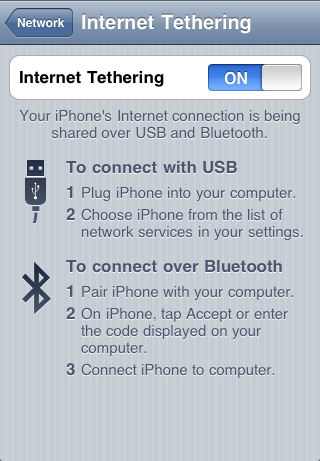
- Go to Settings>>General>>Internet Tethering Bluetooth or USB and activate

June 18th, 2009 at 7:29 am
thanks a lot!!
June 18th, 2009 at 3:27 pm
after I installed the program, in the Settings>>General>> it says "Set Up Internet Tethering". Then it gives the message "To enable tethering on this account, contact AT&T". Did I do something wrong????
June 18th, 2009 at 4:17 pm
Retry doing the steps above, something may have gone wrong. I'm going to look into this problem
June 19th, 2009 at 1:04 am
Thanks. But after i doing in this step in my Setting>>General>> don't have menu Internet Tethering. What did i do wrong? or in this case only use in 3G because i'm 2G.
June 19th, 2009 at 1:57 am
Yes this only works on 3g
June 19th, 2009 at 3:40 am
I retried the steps and I still get the message "To enable tethering on this account, contact AT&T". We will check back and hope you have a solution..Thanks!!
June 19th, 2009 at 7:14 am
Tethering is enabled, but the mms do not work anymore!!!
any suggestion ???
thanks
June 19th, 2009 at 10:15 pm
is this for Jail Break Ph only? or is this a way to bypass the ATT delay for all ph for now
June 20th, 2009 at 4:17 am
Yep its a bypass, you don’t have to be jailbroken
July 3rd, 2009 at 1:37 pm
i have the same error on 2nd install from help.benM.at:
"To enable tethering on this account, contact AT&T".
the first install gave me no option at all for tethering.
July 19th, 2009 at 12:22 pm
just a query but will u nt have to pay for data usage fron your select carrier