
Nes 3.0 & Cyntact 1.2-1
 As you guys may know nes is the first and I think the most smooth running emulator for the iPhone. The nes emulator came out back in the 1.1.X days and I tell you it was something elese, over time when 2.0 came out it was improved and kept getting better and better. I’ve enjoyed playing roms on my phone till 3.0 that is, I actually went to install nes right after I jailbroke my iPhone on firmware 3.0 and came to a bad realization… It was in the cydia store for $5.99, and that is when i started realizing that cydia is going to change a bit. Ever since the cydia store opened people have been wanting to charge for apps that use to be free and i’m afraid of that it may affect all of us. Below is nes 3.0 thanks to the uploader so follow the instructions and get to playing
- Download Nes 3.2 from ***HERE***
- Unzip it and you will see nes.app
- ssh/disk-aid into your phone and copy the nes.app folder to root/applications/
- set folder permissions to 777 and enjoy (Note: If it crashes trying to open ssh into the nes.app folder and set the file NES’s permissions to 777)
Cyntact:
pic courtesy of pineappleiphone.com
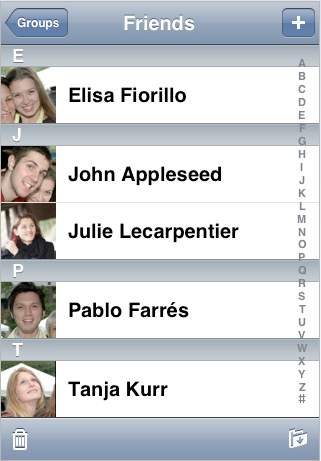 Cyntact was the first package to appear in the cydia store and it is very useful for those of you who have lots of contact pics. I myself don’t have any but i’m sure some of you just have to have pics for every person in your phonebook . This is the new cyntact update 1.2-1 which was recently updated to be compatible with 3.0 download it below (Note: this is not an application it is a feature added in phone.app that puts your iphone contact pics by there names)
- Download Cyntact 1.2-1 ***HERE***
- Unzip it and navigate to both files that are in the folder which should be named Cyntact.dylib, Cyntact.plist
- Drop those two files into root/library/MobileSubstrate/DynamicLibraries/
- You may have to respring pr reboot your iphone for the changes to take affect
- Enjoy
June 23rd, 2009 at 8:55 pm
How do you set the permissions for nes app ? I'm so stuck!!!!!!!!!!!!!!!!!!!!
June 23rd, 2009 at 9:20 pm
ssh into your iphone if you know how to do that which i assume you do since you put the ness app in. Anyhow just go inside the app folder while your ssh'd in your phone and right click the file you want to set the permissions for then on the bottom you should see properties, click on that and then you should see some numbers and such 644. Change that to 777 or you can click on all of the check boxes till the number becomes 777 set them and your done
June 24th, 2009 at 5:37 am
Hi,
I followed all the directions, but the NES.app icon isn't showing up. Can you please help?
June 24th, 2009 at 1:39 pm
don't forget after you extract the nes folder you have to take out the folder thats inside the nes.app folder because it has two.
June 24th, 2009 at 9:03 pm
thanks! i restarted my ipod twice and the app works great.
June 26th, 2009 at 6:28 pm
For some reason NES 3 doesn't find my ROMs in my private/var/root/media/ROMs/NES/ directory. I have 3 .nes roms in there. Emulator runs fine, just doesn't find any installed games. Any help would be appreciated!
June 26th, 2009 at 6:31 pm
Actually let me try and set the NES permissions to 777 see if that works.
June 26th, 2009 at 6:32 pm
Double check to see if you have the folder in your iPhone called ROMs which is case sensitive
July 3rd, 2009 at 11:57 am
0777 NOT WORKING FOR YOU?!!! If NES Emulator crashes and will not open check permissions for other files in the application directory. All my other Applications were set to 0775. I changed my permissions to the same thing everything else was set for (0775) it worked perfectly for me.
July 3rd, 2009 at 11:59 am
(Clarification to last comment) I changed my permissions for NES Emulator to match permissions of other Applications. Everything else was 0775 so I NEC Emulator to 0775.
July 10th, 2009 at 10:49 pm
works fine

im on 3gs
cheers for this
July 15th, 2009 at 9:52 pm
Having some major issues with this app.
I'm running OS 3.
I've installed the NES.app and have it showing up properly amongst my other apps.
I've got 3 ROMs installed in /private/var/root/Media/ROMs/NES/
Exact file names – "Super Mario Brothers 1.nes; Super Mario Brothers 2.nes; Super Mario Brothers 3.nes"
All 3 of the ROMs have permissions set to 0777.
NES + ROMs folder are set to 777.
When I attempt to open NES, the window begins to open, but the app crashes, or closes, or something within a second. I can open the app repeatedly and it continues to do this every time, even after multiple reboots.
Help?
July 16th, 2009 at 4:01 am
Go to the newer post a couple of pages up and you should find the newer version of nes and it should work oryou need to make sure you take the ness.app folder our of the folder it’s in
July 15th, 2009 at 11:57 pm
Thanks a ton! I didn't know there was a newer version.
August 20th, 2009 at 8:23 pm
I'm having the same problem with the games showing up. Maybe the games folder belongs in another folder?
August 21st, 2009 at 2:29 am
Alright there should be a ROMs folder in var/mobile/media/ROMs make sure that ROMs is spelled exactly as i am spelling it because it is case sensitive. Now go into the ROMs folder and there should be a folder named NES and yes all capitalized, no go into the NES folder and drop your roms in there. respring your phone and they should all appear
August 20th, 2009 at 9:49 pm
I put them here: /private/var/mobile/Media/ROMs
and everything is fixed =/
August 20th, 2009 at 9:51 pm
weird, you didn't put them in the NES folder
September 9th, 2009 at 8:01 pm
Hi i have iphone 3g v3.0.1
i can start nes but dont find any roms
i has put my nes games in var/mobile/media/ROM/NES i using iphonebrowser for copy the nes roms… pls any can help me
December 3rd, 2009 at 1:30 am
Here’s what I did, and it worked:
-Downloaded NES 3.2 from the above link
-Unzipped, showed package contents and discovered NES (.app)
-Used Cyberduck to SSH it into Applications in Root directory
-Changed permissions of NES (not NES.app folder) to 777 by checking all the boxes
-Rebooted
December 8th, 2009 at 6:24 am
installed cyntact but now i can’t ssh or open cydia!
any ideias?
December 8th, 2009 at 6:27 am
use ssh over usb diskaid works well on windows and mac
December 8th, 2009 at 6:33 am
thanks man, gonna try that out!
December 22nd, 2009 at 12:54 pm
Thanks, did exactly as you said and it worked… I was setting the folder permission to 777, which was wrong of course. Set the NES file inside of NES.app folder to 777 and away we go. Thanks for the info.