UltraSnow 3.0 Unlock Out

June 23, 2009 :: Posted by - SoSly :: Category - Cracks, News

Ultrasn0w for iPhone 3G is ready!

  1. Jailbreak your iPhone 3G using redsn0w or PwnageTool (this will also install Cydia/Icy)
  2. Ensure you have upgraded to iPhone OS 3.0
  3. Run Cydia or Icy
  4. Please add the repo repo666.ultrasn0w.com to Cydia or Icy. That last “o” is actually the number zero “0”! If you use the letter “o” you’ll get an error.
  5. Search for ‘ultrasn0w’ in cydia or icy and install ultrasn0w
  6. Reboot your iPhone 3G
  7. T-Mobile USA users should disable 3G before using ultrasn0w
  8. Enjoy but if you have problems here is a detailed way over at iclarified Read More

Stack Version 2.2 For Firmware 3.0

June 23, 2009 :: Posted by - SoSly :: Category - News

Stack is one of the oldest and most popular additions to your iPhone or iPod touch that adds a quick-launch menu to your Dock, giving rapid access to your favourite applications. Now compatible with iPhone 3.0! First released in October 2007, Stack has several hundred thousand users.

Simply tap the Stack and it will unfurl across your screen, then tap any icon to open it. Drag & Hover an icon (but don’t let go!) across the Stack to add an application to it; drag an icon out of the Stack and let go to remove it. Drag the Stack in the dock to reposition it, then tap anywhere on the screen to finish.

Stack also has a Grid View mode, for those times when the Stack has too many items to fit onscreen at once.

Simply install using ‘dpkg -i stack2_2.deb’. Requires MobileSubstrate.

Note: I don’t understand the directions below and I didn’t enable the Preferences Bundle and my stacks still works. I’ve have read that just installing the deb without doing anything else works but for other users it keeps respringing. Use this at your own risk as I am and it worked just fine. If anyone knows how to run the command below please enlighten me.

You’ll need to enable the Preferences Bundle after installing Stack. Use: Read more…

Nes 3.0 & Cyntact 1.2-1

June 23, 2009 :: Posted by - SoSly :: Category - Cracks, News

As you guys may know nes is the first and I think the most smooth running emulator for the iPhone. The nes emulator came out back in the 1.1.X days and I tell you it was something elese, over time when 2.0 came out it was improved and kept getting better and better. I’ve enjoyed playing roms on my phone till 3.0 that is, I actually went to install nes right after I jailbroke my iPhone on firmware 3.0 and came to a bad realization… It was in the cydia store for $5.99, and that is when i started realizing that cydia is going to change a bit. Ever since the cydia store opened people have been wanting to charge for apps that use to be free and i’m afraid of that it may affect all of us. Below is nes 3.0 thanks to the uploader so follow the instructions and get to playing ;)

  • Download Nes 3.2 from ***HERE***
  • Unzip it and you will see nes.app
  • ssh/disk-aid into your phone and copy the nes.app folder to root/applications/
  • set folder permissions to 777 and enjoy (Note: If it crashes trying to open ssh into the nes.app folder and set the file NES’s permissions to 777)

Cyntact:

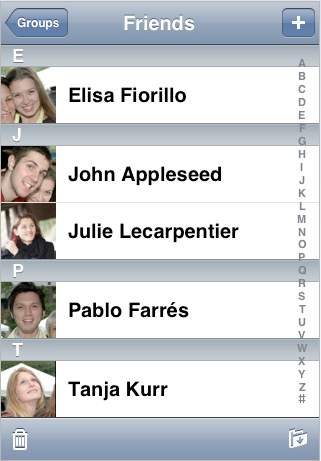
pic courtesy of pineappleiphone.com

Cyntact was the first package to appear in the cydia store and it is very useful for those of you who have lots of contact pics. I myself don’t have any but i’m sure some of you just have to have pics for every person in your phonebook ;) . This is the new cyntact update 1.2-1 which was recently updated to be compatible with 3.0 download it below (Note: this is not an application it is a feature added in phone.app that puts your iphone contact pics by there names)

  • Download Cyntact 1.2-1 ***HERE***
  • Unzip it and navigate to both files that are in the folder which should be named Cyntact.dylib, Cyntact.plist
  • Drop those two files into root/library/MobileSubstrate/DynamicLibraries/
  • You may have to respring pr reboot your iphone for the changes to take affect
  • Enjoy

22Moo Reveals GameBone Pro iPhone Controller Peripheral

June 23, 2009 :: Posted by - SoSly :: Category - News

Little has been said about the iPhone OS 3.0’s support for third-party gaming accessories, as no such peripheral had yet been announced at the time of the firmware’s release. Today, Australian iPhone accessory manufacturer 22Moo revealed one of the first controllers to take advantage of the iPhone’s new functionality — the GameBone Pro.

As seen in the mockup above, the GameBone Pro features an eight-way d-pad, four face buttons, and two shoulder triggers. The controller connects to iPhone OS 3.0-equipped iPhone and iPod Touch devices through either the 30-pin connector port or through a wireless Bluetooth connection. When using the 30-pin port, the GameBone will use an internal lithium-ion battery to provide additional power to the connected device.

The GameBone has a set of built-in speakers, a microphone, and a headphone jack. Each controller will also come bundled with a dual-function stand that will display the connected device horizontally or vertically.

Apple notes there will be no native support for any iPhone controller accessory — applications will need to be updated to add support for the GameBone or any other peripheral. 22Moo plans to have the device ready for sale in September, and is currently polling site visitors to determine a recommended pricing point.

via fingergaming

iPhone 3G S Disassemble and Repair Video

June 23, 2009 :: Posted by - SoSly :: Category - News

Directfix.com recently posted a video on how to disassemble and repair an iPhone 3G S. If you are the fix-it type and you break your touch screen or you want to replace your battery or LCD…here are step-by-step instructions on how to do that! I honestly would never try this (Doug might) but, it is interesting to watch.

I also found that if you are willing to give it a shot, you can purchase the touch screen (IP-2320) and the LCD (IP-2321) for $69.99 each on their website. Below is the video demo.

Over a Million iPhone 3GS’ Sold, 6 Million OS 3.0 Downloads Served

June 23, 2009 :: Posted by - SoSly :: Category - News

Apple’s latest press release reveals the sales numbers for the iPhone 3GS the last three days – and they’re pretty good. In fact, it seems that they’ve beaten last year’s sales record.

Apple claims to have sold “over” one million iPhone 3GSs – no wonder the activation servers were being hit THAT hard! This is a huge milestone for Apple, not just because it has proved the claims of all the Big Daddy Analysts wrong – who expected only about 500k units to be sold – but they’ve also beaten any speculation made by most of the media who were worried about the minimal changes in design.

Also announced was the download numbers for the OS 3.0 which was no small achievement. Read more…

Find My iPhone Used to Chase Down Stolen iPhone

June 23, 2009 :: Posted by - SoSly :: Category - News

These icons are for my man Andrew ignore these, although if someone can make the 3.0 sms app icon to a tenuis icon but keep it the same that would be nice as im using that theme right now and the sms icons sucks.

text mms

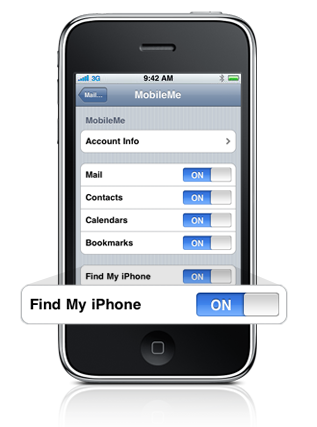
Kevin Miller managed to use Find My iPhone, a laptop, and a mobile Internet connection to track down his stolen iPhone.

raced back into the bar, not even particularly concerned, but it was gone like baby. In less than five minutes, with very few people in the small place, my beloved JesusPhone had managed to vanish into a black hole. Our waitress was sympathetic, and I left a number, but I was immediately glum about my prospects of seeing it again.

So I felt like about zero cents, but then we giddily realized that I had *just* activated the brand-new Find My iPhone service. Even better, Mark had a Sprint (yes, Sprint) USB dongle giving him Internet access over 3G on his MacBook Pro. Excited to try it out, we hopped onto me.com and clicked the Find My iPhone link.

To learn how to use Find My iPhone to protect your device you can read/watch This tutorial.

Read More

findmyiphone

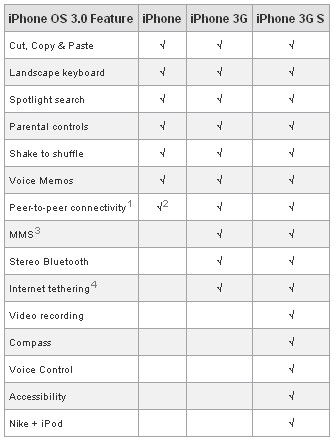
Apple Posts iPhone Feature Compatibility Chart

June 22, 2009 :: Posted by - SoSly :: Category - News

New Website Same Posts

June 22, 2009 :: Posted by - SoSly :: Category - News

I have made a new site, go check it out and get it up and lively looking with users going to it :) . It took me quite a while so I wouldn’t mind some suggestions if you guys have any to make it a better experience. I will continue to update this and that site with the exact same content, its just up to you guys which layout you prefer and like. This was all for my readers who keep this site alive full of comments and won’t let it die down

Website changed adress due to legal issues 

www.pwnmyifone.com

pwnmyiphone.com

Bitesms 4.0 Time Patch

June 22, 2009 :: Posted by - SoSly :: Category - News

bitesms4.0

Thanks to the fellas djghost, croboy, and niou over at xsellize

Part 1

* Open Cydia and download BiteSMS
* Open BiteSMS and get your licsense
* Close BiteSMS (hit Home Button)
* SSH into your iphone and find the BiteSMS.app folder (/Applications/BiteSMS.app)
* Inside the biteSMS.app directory, find the BiteSMS file and rename it to BiteSMS_
* Set permissions to BiteSMS_ to 755

Part 2

***Download this file***

* Once the file is downloaded, open the file via wordpad, notepad, text editor, etc.
* Find where it says x=exec “date” “-s 2009-06-06″ and change the date to todays date
* Save the file AS A UNICODE file (file should not have an extension, no .txt or anything!)
* SSH back into the BiteSMS directory (/Applications/BiteSMS) and place the file you just edited (BiteSMS – should have no extension)
* Set permission to 777 on the newly uploaded BiteSMS file
* Reboot your device

Via Dmi