Apple Stuck Apologizing For AT&T Yet Again With A $30 iTunes Credit

June 22, 2009 :: Posted by - SoSly :: Category - News

We’ve received a few tips of people saying they’ve gotten an email from Apple offering them a $30 iTunes Store credit due to the problems activating the new iPhone 3G S. Apple claims it is still working with AT&T to resolve the issue that has caused some new iPhones to still not be activated 2 days after the launch of the device. And it warns that it may be another 48 hours before it’s resolved. For those affected, check your inbox Monday for the $30 credit.

Find the email below:

Dear Apple Customer,

Thank you for your recent Apple Store order. We appreciate your patience and apologize for the inconvenience caused by the delay in your iPhone activation.

We are still resolving the issue that was encountered while activating your iPhone with AT&T. Unfortunately, due to system issues and continued high activation volumes, this could take us up to an additional 48 hours to complete.

On Monday, you’ll receive an email from Apple with an iTunes Store credit in the amount of $30. We hope you will enjoy this gift and accept our sincere apologies for the inconvenience this delay has caused.

Thank you for choosing Apple.

Sincerely,
Apple Online Store Team

Via TechCrunch

IPhone 3G S plagued by sound issues?

June 22, 2009 :: Posted by - SoSly :: Category - News

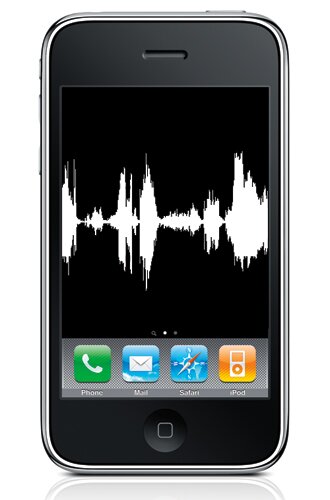
Are you enjoying your brand new iPhone 3G S? Did you get a 16GB or a 32GB? Well, that won’t matter if people are experiencing what we are. There seems to a problem with sound files on the 3G S and the result after they’re triggered. After they are done playing — like the unlock sound, SMS sound, for instance — the iPhone emits a high-frequency tone. No, we’re not kidding. Something pretty high around 15KHz. We’ve confirmed this isn’t a local isolated issue with our phone, and since some people can’t hear these types of high-pitched tones, your iPhone might produce it yet you’d never notice.

We’re 99% sure it’s software related because if you set the phone to vibrate, big surprise, no high-pitched tone. So, anyone out there experiencing this? It’s amazing this was skipped over in the many reviews published, but oh well. Hopefully Apple fixes it soon because this is kind of painful and pretty outrageous. Hit us up and let us know!

iphone3gsaudio

Should This Theme Stay Or Go

June 22, 2009 :: Posted by - SoSly :: Category - News

I gave it a month almost and was wondering what my readers thoughi so here we go again. This poll will determine whether we go back to our old theme we use to have or keep this one or go to the new one posted in the image below I also note that I will change the layout soon so hurry and vote for your favorite layout below:

[poll id="15"]

Site1 Below

Site1

Site2 Below

site 2

Site3 Below

Site3

ZodTTD: iPhone 3GS – Call it a comeback!

June 21, 2009 :: Posted by - SoSly :: Category - Cracks, News

Gpsphone150fps

Hi everyone!

I’ve been laying low for a long time now. But I am back and coming full steam ahead!

I just received my iPhone 3GS, and to many it may seem like a rediculous upgrade…But wait til you see this video!

You see, the iPhone 3GS has had a large upgrade in the performance department. It’s very powerful CPU and GPU, its guts are very similar to the OpenPandora.org’s Pandora project. They both have an ARM Cortex A8 processor, and they both have the PowerVR SGX video chipset. The iPhone 3GS clocks in at 600MHz too!

These similarities have me quite excited! While working with my Pandora MK2 devkit I have made psx4pandora, which has many games running fullspeed (60 FPS for NTSC) with sound @ 500MHz. The iPhone 3GS sounds suited for psx4iphone now!

The catch? There’s currently no jailbreak for the iPhone 3GS.

The temporary solution? I’m codesigning my emulator binaries for my own use.

The result is shown in the video below where you can see gpSPhone running at a minimum 150 FPS and maxing out at about 225 FPS, with sound and 0 frameskip! This is a HUGE performance increase where the iPhone 3G needed frameskipping just to reach 60 FPS!

Some technical notes on this build: For some reason gpSPhone is able to fit the dynarec memory it uses in executable memory. So I lucked out and was able to get the dynarec working on the iPhone 3GS without a jailbreak. I’m curious as to why this can even occur. Typically you need a jailbroken firmware to allow memory to be made executable for dynarecs to work. I’ll have to see if psx4iphone will work next!

This is an exciting moment for iPhone gaming! Subscribe to my YouTube channel and discuss below!

Thanks,

ZodTTD

Via Zodttd blog

3.0 Compatibility List For 3rd Party Apps

June 21, 2009 :: Posted by - SoSly :: Category - News

Our friend Dallasnights over at xsellize started this list originally from ispazio and started adding apps to this and now all of the members over there are helping report 3rd party apps that work and don’t work. You can also help by posting in the comments section which ones your having problems with and the ones that aren’t working at all.

Not working

Homework Planner
iBirthdays
*iKeyEx and addons.
iRealsms – Being worked on should be done soon.
irealquicksms
Quickgold – being worked on as an integration into spotlight.
Lockdown – being worked on
LogoMe – dev team is too busy
MySMS
Notifier – status bar messages dont go away
*Searcher
SpringJumps
*textreader
SBSettings AutoLock
SBSettings Close Button
*SBSettings User Agent Faker
SBSettings Volume MC Widget

Mcleaner blocks calls, but not SMS’s and you cannot lock the app with a passcode.
iBlacklist has been updated for 3.0 though (although mobile substrate crashes if you receive an MMS from a blocked contact). Everything else works though…

SMS2Mail

Weather Icon

Scrobble

Backgrounder
MobileLog
Cyntact
iMobileCinema
VideoRecorder for 3G
Veency
MobileFinder
Snapture
ikeyex
lockdown
Safari Tab Closer
Fiveirows
FontSwap
five colums
vwallpaper
SwirlyMMS
iReboot
Stack
Volume MC Toggle per SBSettings
ustream broadcasting
QuickGold
QuickSMS
QuickBoard
BOSS Tool
MewSeek Pro
Ikeyex
Autolock Sbsettings toggle- not working (causes “slide to unlock” loop)

Working

Five Dock Icons
BiteSMS
mxTube
cydelete
Iphonevideorecorder (Must have source iphonevideorecorder.com/3/ in cydia
dTunes
Cycorder
Safari Download Plugin
Wiki2Touch
SBSettings
Chronus
Make It Mine
NemusSync
MemTool
WiggleFree
reflective dock
iFile
iblacklist
SwapMode
VoipOver3G
20 second lock screen
rotation inhibitor
qik
Erica utilities
Categories
PDANET – Seems to work
IBlank
open ssh
installous

Recently updated and working:
AptBackup – Updated to avoid overwriting saurik’s repository, but not tested by me.
BiteSMS 4.0 or newer
BossPrefs v3.0.1 or newer
ClearCam 1.1.2
iBlacklist 3.0-1 or newer. (I had a packaging error in 3.0)
Insomnia 3.0.2
MobileDTA 3.1
Mobile Substrate – This is foundation for many apps like SBSettings & Winterboard. Recent bug was causing iTunes store to not load.
SBSettings iPod Widget 1.2-1

Working (not complete):
Categories – confirmed working. No 3.0 compatibility issues. If you have issues with this its not 3.0
CyDelete
Docs – confirmed working. No 3.0 compatibility issues. If you have issues with this its not due to 3.0
Flashlight
SBSettings 2.99-4 or better
SysInfo Plus
Voipoverip3g

Semi Working so far

Winterboard some themes do not show up right yet
iBluetooth
MCleaner
Status Notifier
ibirthday
apt backup – it seemed to import my original sources but none of the packages, which i guess is probably a good thing forcing you to install things back one at a time for troubleshooting..
status notifier works but u cannot access the settings to make any changes at all.

Other Issues/Items noted by some

1) Cydia is slow to respond and missing ABC on the Search
2) Mobilesubrate causes Itunes Store not to work properly
3) Slow reboot after phone is turned off and turned on
4) SBS Setting Much faster

VideoRecorder3 For 3.0 Serial

June 21, 2009 :: Posted by - SoSly :: Category - News

As you guys may know there are a lot of 3rd party iPhone apps in cydia that aren’t compatible with the new 3.0 update. There is a new version of VideoRecorder3  (Formally iPhoneVideorecorder3g). This app lets you record videos on your iphone 2g and 3g on firmware 3.0, I know most of you are like yeah I got cycorder but this app has more features such as, after shooting a video you can either upload to youtube or send it through email right away. It can also encode videos you shoot to .mp4 so that they don’t take much space on your iPhone like cycorder which uses like 80 MBs for like 5 mins of video. Its usually 19.99 but this serial has been going around for a while and it still works for this new version. Follow the instructions below to download and activate it  for free:

  • Open cydia and tap on manage>sources
  • Add this source exactly as it says -  http://www.iphonevideorecorder.com/3/
  • After the source is added tap on the source you just added or search cydia videorecorder
  • You should see videorecorder3 so install it
  • Now open it and use this serial to register it xumiqdikni
  • Enjoy

Note: A fellow reader hegel394 posted a fix for the users having an authentacation error trying to upload on youtube, another reader slim confirmed that this method works.

  • You need to have a gmail account and a youtube account
  • Now link those accounts together if you don’t know how tutorial is HERE
  • Shoot your video and choose to upload to youtube
  • Fill in the info using your gmail account not your youtube account

iPhone 3G S Benchmarks Show 54% Improvement

June 21, 2009 :: Posted by - SoSly :: Category - News

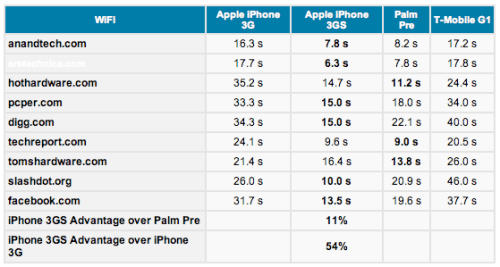
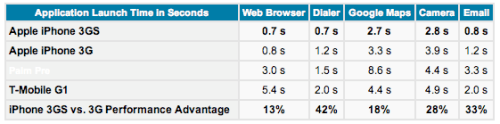
Benchmarks of the new iPhone 3G S compared to the iPhone 3G, Palm Pre, and T-Mobile G1 have been published by AnandTech.

To test for Wi-Fi the load times for 9 common websites were recorded. The iPhone 3G S saw a 54% improvement over the iPhone 3G and a 11% advantage over the Palm Pre.

Application launch time measured over Safari, MobilePhone, Google Maps, Camera, and Email was 13 – 42% faster for the iPhone 3G S. Notably the Camera launches 1.1s faster. The slow load time for the Camera application is common problem with older iPhone devices.

Swagbucks Giveaway, Plus iPhone Bluetooth Headset

June 21, 2009 :: Posted by - SoSly :: Category - News

Its been a while since I have had a giveaway and I thought why not now, with these tough times and what not I know everyone out there wouldn’t mind something for free so lets get down to business. This time instead of me picking what I want to give away and paying for it im going to use swagbucks to do this giveaway. Swagbucks is a website that gives you points for searching the internet using their search engine which uses google/ask. The cool thing about this is that I am going to let you the readers choose what prizes to give away. Watch the video below compliments of ty so you can learn how it works. Please continue reading to see how the contest is going to work out and to vote on what prizes you want to be given away.

Join Swagbucks Through My Referral Link To Get The Prizes Faster

Here

Win My iPhone Bluetooth Headset

I will be giving away my iPhone bluetooth Headset complete with original box, usb sync/charger and instructions to the person who signs up through my referal link and makes the most swagbucks thus helping me make swagbucks for the giveaway. I will ship to the U.S. only, but don’t worry my foreign readers if the poll that gets chosen below has an itunes gift card in it I will send a lucky winner the card code to redeem in itunes.

Alright well now that your convinced and you want to win some free prizes join through my referral link above or the swagbucks banner on the sidebar. Once I reach 3000 Swagbucks the prizes with the most votes will get SwagBought :) and I will give away the free prizes to all the users that comment on this post or anywhere on the site. Most of the prizes in the poll are about 3000 Swagbucks or a little less and a note to everyone, the more prizes that are bought the more of a chance you have to win. Now what are you waiting go go go

[poll id="14"]

redsn0w in june

June 20, 2009 :: Posted by - SoSly :: Category - News

Read the whole post in full before attempting anything!

redsn0w is an easy to use, multi-platform, multi-device jailbreaking and unlocking (iPhone 2G only) tool for the iPhone 2G (original iPhone), the iPhone 3G (but not the 3GS) and also the iPod touch (first and second generation). Currently it is available for Windows and Mac OS X (there are some issues using redsn0w with OS X PPC, please use an Intel Mac until we have this problem resolved).

REDSN0W PROVIDES SIMILAR FUNCTIONALITY TO QUICKPWN.

If you want to build custom firmware files with more flexibility it is suggested that you use ‘PwnageTool’ on Mac OS X.

  1. GOLDEN RULE: If you are using a 3G iPhone with yellowsn0w and rely on yellowsn0w to obtain cellular service, then you should NOT use redsn0w right now. Ultrasn0w (the 3G carrier unlock) is not included with this release and therefore your baseband will be locked and unable to use an operator other than the official one it was bought for. UltraSn0w will be released via APT (cydia and icy) soon. If you have an original iPhone (1st generation) then 3.0 carrier unlock works with this redsn0w release.
  2. Yellowsn0w in its current form will NOT work with the baseband version that is present in the 3.0 update, you will need Ultrasn0w, which will be released sometime soon, Ultrasn0w will work with all iPhone 3G models (but not 3GS), even ones that were previously unlockable, Ultrasn0w (when available) will be released via APT (this means you will be able to get it via Cydia or Icy).
  3. Please read all parts of this post before downloading and using these tools.
  4. Read items 1, 2 and 3 again and again.
  5. At the bottom of this post are the bittorrent files for the latest version of redsn0w.
  6. This app is suitable for the recent 3.0 release
  7. redsn0w will NOT work for the iPhone 3GS.
  8. redsn0w WILL work for Original iPhone (1st Generation), Original iPod touch, iPod touch 2G and the iPhone 3G (not the iPhone 3GS).

To use redsn0w simply upgrade the device in iTunes to firmware version 3.0 and run redsn0w to activate and jailbreak the device (and if you are using an original iPhone 2G, it will unlock it too!)

SHA1 SUMS

  • SHA1(redsn0w-mac_0.7.zip)= 284639d37fd6675056814b6c8a5b0583ad91c370
  • SHA1(redsn0w-win_0.7.1.zip)= e264e44954aa417a3eb12ed29770790a30f85a66

Official Bittorrent Releases -

  • Mac OS X torrent
  • Windows torrent

Unofficial Mirrors

The following links are unofficial download mirrors, you download these at your own risk, we accept no responsibility if your computer explodes or if it becomes part of a NASA attacking botnet or even worse if your hands fall off mid-way during the use of these files. We do not check these links or archives and we accept no responsibility with regard to the validity of the files, or with other content these links provide or with the content that is on the linked site.  Always check the published SHA1 sums. We would prefer that you downloaded the official bittorrent release that is linked above, but you are welcome to try these if you really must. Mirror owners should email direct links only to [email protected] , please don’t place mirrors in the comments as they will be deleted.

Mac

  • http://www.chemicalwebs.com/redsn0w/redsn0w-mac_0.7.zip
  • http://download.server-land.com/redsn0w/redsn0w-mac_0.7.zip
  • http://therepository.binarytide.com/redsn0w/redsn0w-mac_0.7.zip
  • http://www.bielsipod.de/Daten/redsn0w-mac_0.7.zip
  • http://necoda.com/redsn0w-mac_0.7.zip
  • http://g.appleguru.org/redsn0w-mac_0.7.zip
  • http://download.desteini.com/mac/redsn0w-mac_0.7.zip
  • http://schaffnerd.com/redsn0w/redsn0w-mac_0.7.zip

Windows

  • http://www.chemicalwebs.com/redsn0w/redsn0w-win_0.7.1.zip
  • http://intern.datentankstelle.at/iphone/redsn0w-win_0.7.1.zip
  • http://www.gotokohsamui.com/redsn0w-win_0.7.1.zip
  • http://www.bielsipod.de/Daten/redsn0w-win_0.7.1.zip
  • http://cligs.ee/assets/redsn0w-win_0.7.1.zip
  • http://72.14.179.250/Downloads/redsn0w-win_0.7.1.zip
  • http://www.andygo.de/redsn0w-win_0.7.1.zip
  • http://linhsex.net/data/redsn0w/redsn0w-win_0.7.1.zip
  • http://download.server-land.com/redsn0w/redsn0w-win_0.7.1.zip
  • http://asifzia.com/redsn0w-win_0.7.1.zip
  • http://g.appleguru.org/redsn0w-win_0.7.1.zip
  • http://iphone.h4ck.org.il/redsn0w-win_0.7.1.zip
  • http://bentkowski.com.pl/redsn0w-win_0.7.1.zip
  • http://theiphoneproject.org/windows/redsn0w-win_0.7.1.zip
  • http://begolli.com/downloads/win/redsn0w-win_0.7.1.zip

Via blog.iphone-dev.org

iRealSMS 2.0.9.0 Beta Released

June 20, 2009 :: Posted by - SoSly :: Category - News

Reznor9 the admin of the ireal forums posted this Below, You can go check it out yourself HERE

Firmware 3.0 and iRealSMS 2.0.9.0:

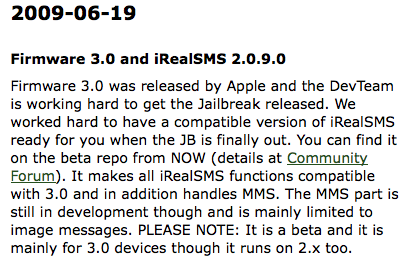
Firmware 3.0 was released by Apple and the DevTeam is working hard to get the Jailbreak released. We worked hard to have a compatible version of iRealSMS ready for you when the JB is finally out. You can find it on the beta repo from NOW (details at Community Forum). It makes all iRealSMS functions compatible with 3.0 and in addition handles MMS. The MMS part is still in development though and is mainly limited to image messages. PLEASE NOTE: It is a beta and it is mainly for 3.0 devices though it runs on 2.x too.

For 2.0 users, you may have to remove the beta repo from your sources and then add it again…

ireal 3.0