Dev-Team Releases PwnageTool 3.0 Mac

June 19, 2009 :: Posted by - SoSly :: Category - News

Use any of the downloads below at your own risk

Download Mirrors Pwnage 3.0 Mac:
Compliments of Bod Fast Direct Download – HERE
http://www.4shared.com/file/112902112/e37a06fd/PwnageTool_30.html
http://www.2shared.com/file/6374960/aa65affd/PwnageTool_30.html
http://rapidshare.com/files/246363264/PwnageTool_3.0.dmg.html
http://www.megaupload.com/?d=ZKOSRE5Q
====================================
Custom Restore Firmwares With 3.0 Jailbreak thanks to smcrack at Xsellize:

iPhone 3G Custom
Restore has:
595MB Partition Size
OpenSSH installed
SBSettings Installed
Does NOT have:
ICY installed. If you want it, just go into Cydia and install it from there.
There are no custom Boot images, you can also uninstall ssh and sbsettings.

This firmware will not activate your phone. You have to be a legit ATT user for this firmware
http://www.megaupload.com/?d=BT9WRLFI

=================================

iPhone 2G Custom Firmware:

Only Cydia Installed
Also, this WILL NOT activate or unlock your iPhone. This is only for valid ATT users…
http://www.megaupload.com/?d=QDMAGWGC

=================================

iPhone 2G Custom Firmware
Only Cydia Installed

Will Unlock and Activate your iphone 2g if your not on official AT&T plan
http://www.megaupload.com/?d=DHDTBXX0

=================================

Ipod Touch 1G

1 gig partition and cydia
http://www.megaupload.com/?d=83P0F4NP

trois, drei, три, három!

This is the low down on our tools for use with the 3.0 firmware from Apple, read the whole post in full before attempting anything. Because of some bugs and unexpected changes this will be a multipart release, starting with the release of PwnageTool for Mac OS X. QuickPwn for Mac OS X and Windows will follow sometime soon, please don’t bug us about it, we are working flat out to get everything finished to release them.

  1. GOLDEN RULE: If you are using a 3G iPhone with yellowsn0w and rely on yellowsn0w to obtain cellular service, then you should NOT use PwnageTool right now. UltraSn0w is not included with this release and therefore your baseband will be locked and unable to use an operator other than the official one it was bought for. UltraSn0w will be release via APT (cydia and icy) soon. If you have an original iPhone (1st generation) then 3.0 unlock works with this PwnageTool release.
  2. Yellowsn0w in its current form will NOT work with the baseband version that is present in the 3.0 update, you will need Ultrasn0w, which will be released sometime soon, Ultrasn0w will work with all iPhone 3G models (but not 3GS), even ones that were previously unlockable, Ultrasn0w (when available) will be released via APT (this means you can get it via Cydia or Icy).
  3. Please read all parts of this post before downloading and using these tools.
  4. Read items 1, 2 and 3 again and again.
  5. At the bottom of this post are the bittorrent files for the 3.0 capable version of PwnageTool.
  6. This app is suitable for the recent 3.0 release.
  7. PwnageTool will NOT work for the iPhone 3GS.
  8. PwnageTool WILL work for Original iPhone (1st Generation), Original iPod touch (1st Generation) and the iPhone 3G.

Baseband 101

The ‘baseband’ is the generic nickname given to the internal components of the iPhone that handle the phone calls and Internet access. This ‘baseband’ is a tiny and unique independent computer system that runs inside your iPhone, it is separate to the main system that handles the applications (such as email and google maps) and it talks to the main part of the phone over an internal communications network. Think of it like a cable modem or other peripheral that is attached to your home PC that needs occasional updates. When a software update is released and presented to you within iTunes the baseband is sometimes updated (to fix bugs or add new features). The 3.0 update for the iPhone 3G contains such an update, so running the vanilla updater straight away with iTunes will reprogram and update the baseband.

SIM Free/SP Unlocked/Factory Unlocked iPhone 3G

This applies if you bought your iPhone 3G for $$$$$$$. This model of iPhone 3G doesn’t have an Service Provider lock (aka factory unlocked) and you are able to put any SIM card into the phone and get service. Your phone is already unlocked so you do not need to worry about baseband updates, simply upgrade to 3.0 using iTunes and then use PwnageTool to create an ipsw and then use this to jailbreak your phone.

iPhone 2G (1st Generation)

Use PwnageTool to do the magic and then restore with iTunes using your newly created .ipsw ‘nuff said, you don’t need to worry about anything, the baseband will be unlocked, the phone jailbroken.

iPod Touch 1G (Original iPod Touch)

Use PwnageTool to create a firmware image and restore with that .ipsw using iTunes.

iPod Touch 2G (New iPod Touch)

Sorry, no support at this time within PwnageTool, use Redsn0w for an earlier (pre 3.0) firmware release instead.

Official Bittorrent Releases -

  • http://torrents.thepiratebay.org/4963802/PwnageTool_3.0.dmg.4963802.TPB.torrent SHA1 = 2e19d39398233f88ae0782fd82462a9223791f7f

Unofficial Mirrors

The following links are unofficial download mirrors, you download these at your own risk, we accept no responsibility if your computer explodes or if it becomes part of a NASA attacking botnet or even worse if your hands fall off mid-way during the use of these files. We do not check these links or archives and we accept no responsibility with regard to the validity of the files, or with other content these links provide or with the content that is on the linked site.  Always check the published SHA1 sums. We would prefer that you downloaded the official bittorrent release that is linked above, but you are welcome to try these if you really must. Mirror owners should email direct links only to [email protected] , please don’t place mirrors in the comments as they will be deleted.

Via blog.iphone-dev.org

iPhone 3G S Distribution Video

June 19, 2009 :: Posted by - SoSly :: Category - News

At&t has also gotten into the iPhone hype and posted this video on youtube of the iPhone 3G S getting packaged and ready to ship. If you look at all of those phones and multiply that by 500 thousand which are suppose to be sold by this weekend plus the ones that get sold without contracts you get a large heap of money, probably more than some people make a year… My comment on this video is SWEET JESUS :)

Can iPhone 3G S Record 720p Video ??

June 19, 2009 :: Posted by - SoSly :: Category - News

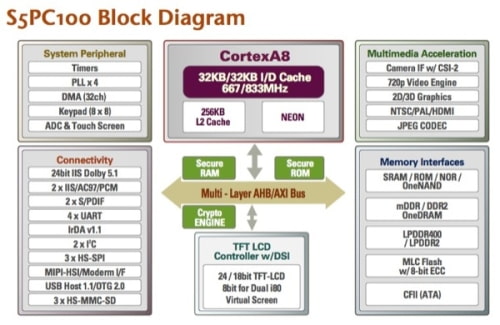
Rapid Repair has done a teardown of the new iPhone revealing a Samsung chipset and the capability to record 720p video.

The chipset has been identified as the SoC S5PC100 from Samsung meaning an ARM Cortex A8 which runs at 600 MHz (can operate at up to 833MHz). Also discovered was the PowerVR SGX for graphics and 256MB of RAM.

According to Engadget these features give the iPhone 3G S the ability to record 720p video and handle real-time video conferencing should Apple choose to go in that direction.

Read More

Rogers Customers Prepare For A Long Day

June 19, 2009 :: Posted by - SoSly :: Category - News

Upgrading to an iPhone 3G S in Canada? We feel for you, and we fear we’re going to continue to feel for you for a healthy portion of the day. Last year there were activation backlogs and hang-ups all over, but it was especially egregious in Canada, where people were waiting for half the day for Rogers’ system to get up and happy and talking with Apple’s system.

Above, customers at the Montreal Apple Store wait for Rogers to get their systems working


Our esteemed editor Rene Ritchie just called in from his Apple Store to say that their system isn’t showing the 3G S on the Rogers system and it’s unclear how exactly it’s going to be resolved. Last year we heard 6-hour-wait horror stories. This year we’re crossing our fingers that resolution will come more quickly.

On the bright side, we haven’t heard a whiff of a problem anywhere else. From Switzerland to Cincinnati people who didn’t pre-order are finding lines short enough to guarantee everybody will get their phone and activations almost as quick as the iPhone 3G S itself.

Via tipb

Jailbreak For 3.0 Status Update

June 19, 2009 :: Posted by - SoSly :: Category - News

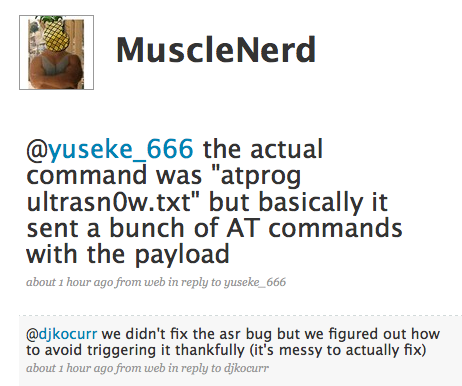
An official update from MuscleNerd was posted about an hour ago at 8:15 Pm on Twitter. He tweeted that they have found a solution to the youtube/hacktivation problem. Instead of fixing the bug they found out how to not trigger the bug which is good towards a sooner release of the 3.0 jailbreak. Now there are two possibilities for the jailbreak release, one the Dev Team will release the jailreak tonight cali time or they will release it tomorrow on iPhone 3G S launch day. Now to just take up some time vote on the poll below:

[poll id="13"]

Musclenerd Twitter Update

Dev Team Update 2 Thursday

June 18, 2009 :: Posted by - SoSly :: Category - News

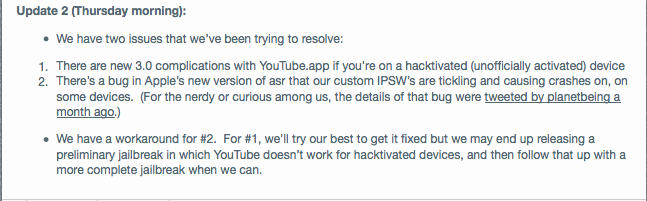
The Dev Team finally let us know what was going on with the jailbreak. It seems believe it or not our never fail Dev Team are having some problems with the jailbreak, it has something to do with youtube not working on phones that get activated by quickpwn or pwnage tool. I wouldn’t worry though because the Dev Team never fail and they never give up. As you can see below they may release a preliminay jailbreak which is good enough for me because I don’t have to hacktivate my phone.

Dev Team update 2

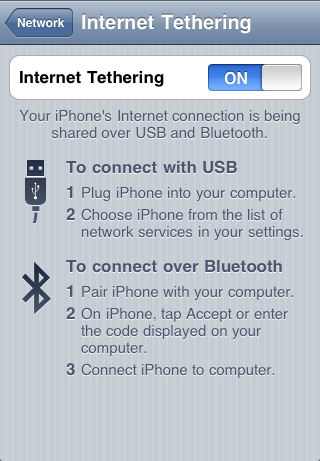
Enable Tethering On 3.0 Easy

June 18, 2009 :: Posted by - SoSly :: Category - News
  • Open safari on your iPhone
  • Go to http://tr.im/oGhq (Case Sensitive)
  • Scroll down and you will a tethering and internet settings section
  • Tap on Mobileconfigs      Download>
  • Find your country and tap on it
  • Tap on your service provider it should download
  • Go to Settings>>General>>Internet Tethering Bluetooth or USB and activate

iPhone 3.0 Preparation

June 18, 2009 :: Posted by - SoSly :: Category - News

So Apple released 3.0. I suggest you wait a few hours for a jailbreak (released anytime now) before you update. Here are a few facts about this update:

1) Apt backup probably will not work reliably. Some packages are not going to install on 3.0 and I do not know if it is graceful about failures.

2) If you don’t trust iTunes backup, you should use SCP or iPhoneBrowser and copy /var/mobile/Library/AddressBook to your computer. This contains your contacts. While you’re at it you may want to copy all these:

/var/mobile/Library/AddressBook – Contacts
/var/mobile/Library/Calendar – Your calendar
/var/mobile/Library/Notes – your notes database
/var/mobile/Library/Safari – your bookmarks and cookies
/var/mobile/Library/SMS – your text messages.

3) The jailbreak will be out soon. The unlock soon as well. If you require unlock you should wait for it before your update.

4) Some apps are still not ported to 3.0. Most apps will work. But some things that require some hacking to work will probably not work. Known issues (there may be more):

- Quickgold is replaced by spotlight, but spotlight wont launch hidden apps.
- BiteSMS, MySMS, iRealSMS are not yet updated (BiteSMS and iRealSMS are due to be released anytime though and could be ready by the time jailbreak comes).

5) You will need to be at iTunes 8.2 to update, and iTunes 8.2 will not allow you to revert to an older version.

6) Apps that don’t work will likely cause mobile substrate safe mode to trigger.

7) SBSettings, categories, bossprefs, docs, and all my other apps have been ported and tested on 3.0 b5 and should be ready to go on a proper jailbreak.

8) You should have a pwnage and quickpwn type tool updated for iPhone 3.0. The instructions and usage will be the same. I will update my guides when these tools are released.

9) If you have hidden any apps using poof, sbsettings, bossprefs or such, you should unhide them all prior to updating to avoid issues. Go to settings, enable restrictions, enter a password, then disable restrictions. That should unhide all apps you care about making you update worthy in one easy step.

Updates will be posted here when jailbreak is released.

Jailbird iPhone Tool for Windows Nears Completion

June 18, 2009 :: Posted by - SoSly :: Category - News

Jailbird is nearing completion, those of you who don’t know what it is go to http://getjailbird.com/. As most of you guys know the windows pc has gone without an actual custom firmware making program for the iphone software after winpwn died off six months ago. Us mac users have pwnage tool which lets you create custom firmware packages with anything we want such as custom boot logos, pre-installed 3rd party apps, preserving our baseband and much much more. Don’t fret though as this pc software should give windows users the same features pwnage tool does for mac users.

Installer Discontinued

June 18, 2009 :: Posted by - SoSly :: Category - News

All I have to say is finally!!!

RipdevBy on June 17, 2009

Today, a new iPhone OS, 3.0 has been released. This is obviously a big and long waited for update for all iPhone users. And we believe, it is about time to officially announce that we are discontinuing support of Installer platform for iPhone and iPod touch.

Over past 1.5 years when we were involved in the Installer project (first in 3.x versions, then in 4.x), a lot of things has happened and we believe it’s time to unify the installation platform for the iPhone — and clearly, over the past year this is DPKG, thanks to tremendous effort of Jay Freeman and his Cydia. We have also dropped our two cents by providing our own themeable and lightweight DPKG installer tool, named Icy.
So now you have a choice, which tool to use — and no matter what you choose, it will be compatible with each other. We obviously cannot speak for Jay, but we will do our best to make sure two products play nicely together.
The Installer 4 repositories we manage will be running until July 1st, 2009, then they will be discontinued and brought offline. So if you wanted to get something that is only available in the Installer — this is the time to do so.
We would like to take the opportunity and say “thank you” to everyone who has contributed and supported Installer project in any way. You rock.