
Hacktivate your iPhone 3GS after Geohot’s Purplera1n
So you used purplera1n and jailbroke your iPhone 3GS but you still see the emergency screen huh? We just have to hacktivate your iPhone and then we can unlock your iPhone using ultrasn0w!
Lets get started :
1) Make sure you used purplera1n and jailbroke your iPhone 3GS. If you see the Emergency calls screen, you may follow the next few steps.
2) Download this lockdownd file.
3) Download iPhoneBroswer for Windows. You may try PhoneView/DiskAid for your Mac.
4) Launch iPhoneBrowser and navigate to usr/libexec folder as shown in the picture below. (If you don’t see the following screen, that means your iPhone is not jailbroken yet. You may try plugging back your iPhone to your computer. If that doesn’t work, it is time to run purplera1n again.)
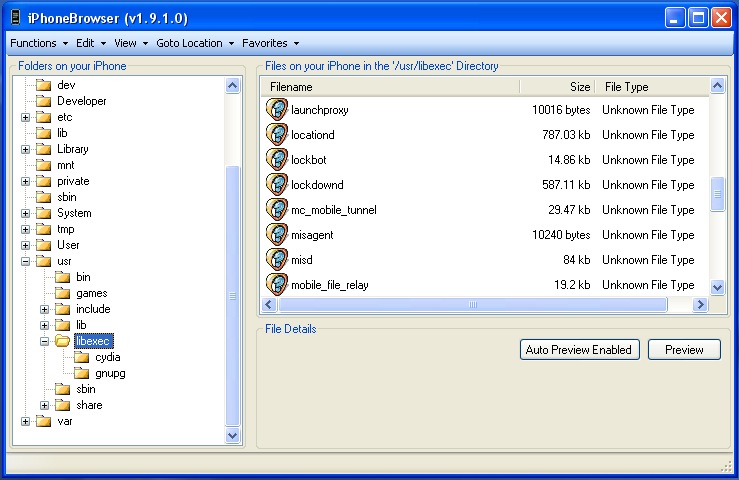
5) Drag and drop the lockdownd file downloaded at step 2 into libexec folder. (We are just replacing the lockdownd file required for hacktivation!)
6) Reboot your iPhone and wait for your iPhone to hacktivate!
7) Turn WiFi on and Launch Freeze app and install Cydia.
 You may then follow this unlock guide to unlock your iPhone 3GS!
Via ilikemyiphone.com
Thanks to Jasom for the tip
July 17th, 2009 at 5:31 pm
Cool I'll try this out ! I'm trying to fix BeejiveIM on my iPhone 3Gs ans I think it's because of RedSn0w 0.8, so if I try with purplera1n, and after I hactivated it, maybe it will work !