
BossPaper – BigBoss Upcoming Wallpaper App

I have been working on a new FREE app called “BossPaper”. This is a very configurable advanced wallpaper app that lets you control what wallpaper shows up on your SpringBoard. You may be saying, “But Winterboard does that!” Sort of, but not like this. BossPaper can work with Winterboard (or without). Read on for details.
Last year, Saurik released Winterboard. This enabled some new features none of us have ever seen before such as rotating desktop wallpapers via Javascript HTML pages. While this was revolutionary for us iPhone owners, it also came at a cost. Performance running these themes sucks. There are a few ways the Javascript based images can be implemented and all of them have problems. If you load them all into memory, Springboard uses a signficant amount of memory. If you fade them, Springboard uses a lot of CPU. Javascript is very memory / CPU heavy. In addition, the Javascript runs behind all applications and while applications run. This impacts performance heavily and causes apps to lag even while you’re using them and not on SpringBoard. In addition, the script continues to run even while the iPhone is locked draining battery.
I have had it on my list to solve this for a while. The result is BossPaper. BossPaper is an advanced wallpaper manager that puts total control of wallpapers into your hands. BossPaper has these features:
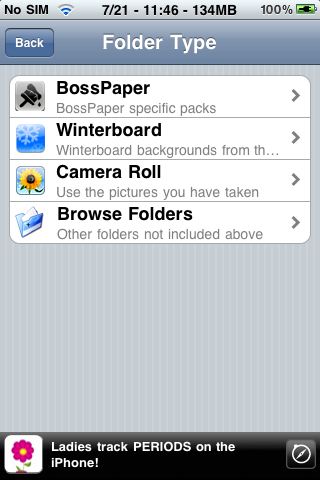
- You control which images are displayed. You can use camera roll, installed themes, or a combination of! With Winterboard, you could only install a theme and use what came with it. Now you can use images from many themes or other sources such as BossPaper packs.
- You can use your own images from the camera!
- BossPaper stops rotating images as soon as an app launches. This prevents battery and CPU drain.
- BossPaper stops rotating images as soon as the iPhone is locked. This prevents battery drain.
- BossPaper uses very little memory and CPU! It does not inject into apps only SpringBoard so you should not notice any application lag running it.
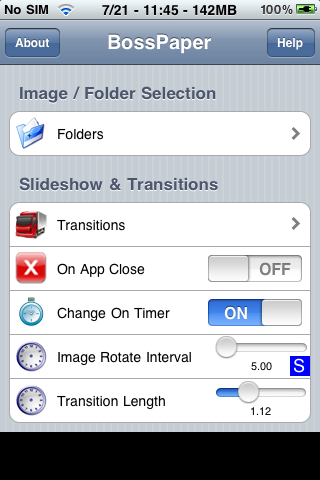
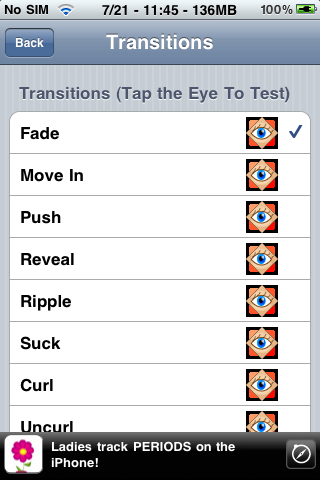
- BossPaper can use one of many transitions such as fade, water drop, page curl – you configure which one(s) you want. Configure how long the transitions last.
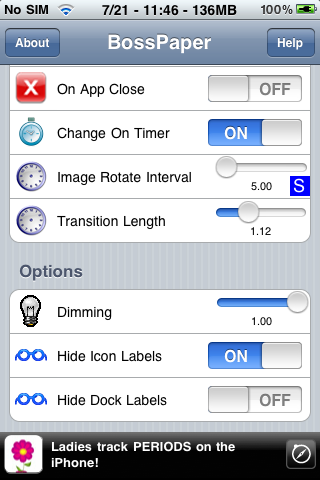
- BossPaper lets you control when to rotate images. You can rotate it on a timer you configure or you can rotate when an app closes, or both!
- BossPaper lets you hide icon labels so those that do not want to install Winterboard can use it without.
- BossPaper lets you dim the wallpaper.
Here are some screenshots of the “in progress” configuration app:
I plan to release a beta of this app in the next couple days in Cydia. Keep on the lookout.
News via thebigboss.org
July 22nd, 2009 at 1:14 pm
I have honestly been waiting and researching on how to create this EXACT type of wallpaper application that can run independent of winterboard and that allows you to choose pictures from camera roll………….THANK YOU BOSS!!!!!!
July 22nd, 2009 at 2:13 pm
Yea this is going to be sweet. Lets just hope its as stable and doesn't lag us out as it is suppose to.
July 23rd, 2009 at 12:41 pm
This looks very cool but what about the icon customizing part? Let's hope this will be included too in the future.
September 1st, 2009 at 12:42 am
yo dude…i reinstall and remove bosspaper and it still wont let me change my wallpaper from the settings TT.TT