Winterboard, MobileSubtrate 3G S Compatible Update

July 07, 2009 :: Posted by - SoSly :: Category - News

Finally what we’ve all been waiting for, Saurik has updated winterboard and mobile substrate to work with the iphone 3G S using the purple rain jailbreak. As you all may know, winterboard is the main app everyone jailbreaks for. Thank Saurik if you like using custom wallpapers as your background, icon themes, and keyboard themes or even whole themes. As of right now it hasn’t been pushed to cydia yet but you can download it and install it manually. Links are below:

Download Updated Winterboard – http://apt.saurik.com/debs/winterboard_0.9.2957-1_iphoneos-arm.deb

Download Updated Mobile Substrate – http://apt.saurik.com/debs/mobilesubstrate_0.9.2957-1_iphoneos-arm.deb

  • Install mobile terminal from cydia
  • download both updates or whatever you like
  • ssh/disk aid or iphone browse the downloaded files to var/mobile/ and set permissions to 777
  • change the file names to something shorter such as mobilesub.deb and winterboard.deb
  • Now open mobile terminal and type exactly what is below with spaces and all

Terminal commands Below:

  1. type the following: su and press return
  2. it will show password so type in: alpine then press return
  3. Type the following: dpkg -i winterboard.deb and press return
  4. Now reboot do not respring and enjoy
  5. do the same process with the other package you want to install. Note: If you changed the name of the packages, type in the name you changed such as winter.deb

enjoy winterboard on your 3gs, and i also want to point out that irealsms 2.0.9.2 works great with landscape on my 3G S
Cyntact Updated To 3.0

July 07, 2009 :: Posted by - SoSly :: Category - Cracks

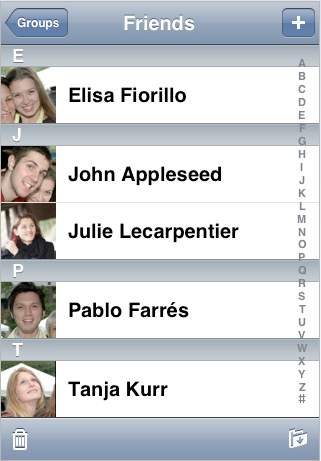
  • Download ****Cyntact 3.0****
  • Copy the two files cyntact.plist and cyntact.dylib to root/library/mobilesubstrate/dymamiclibraries/

Note: This seems to only work on firmware 3.0 with the older iphone 3g and 2g models. The 3gs is having problems with this.

Thanks to carrbone at xsellize

Supreme Preferences 3.0 v1b6 Leaked

July 07, 2009 :: Posted by - SoSly :: Category - Cracks

Warning- this is a beta and you install this at your own risk, I will not be responsible for any software conflicts or problems you have with your iPhone/ipod

REQUIREMENTS:
OS 3.0
Mobile Substrate
WinterBoard
WebViewController
NO MMPFlip installed (this RUINS Supreme Preferences 3.0)

New iPod Models May Be Getting Camera

July 07, 2009 :: Posted by - SoSly :: Category - News

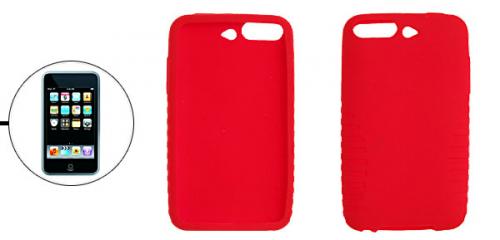
Two new images of cases for the upcoming iPod Touch and iPod Nano have begun circulating. The new cases suggest that the next generation Touch and Nano will indeed include a camera.

The first image from Uxsight is listed as a “New iPod Touch 3G” with “hold for a camera in the back” and comes with the following image:

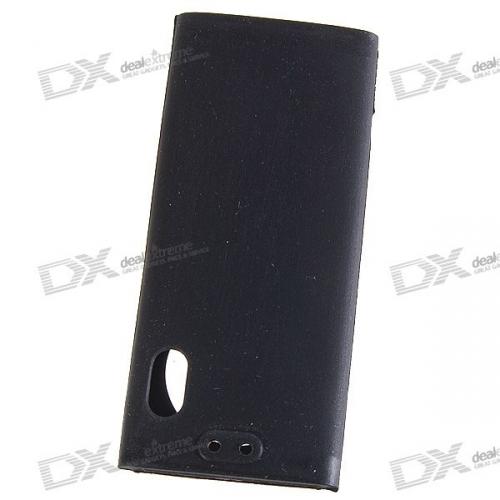
The second case design was posted on DealExtreme and shows an “iPod Nano 5″ case with another hole in the back that is presumably again for the camera:

The reliability of these early case designs has been mixed in the past. While they have been accurate with the iPhone 3G design, they were also responsible for many of the iPhone Nano claims which never came true.

Still, the design of the iPod Nano’s camera location is consistent with sketches provided by iLounge in May. iLounge also reported that the iPod Nano would be getting a camera with its next revision.

Via Macrumors

Thanks to Adam for the tip

Hacktivate your iPhone 3GS after Geohot’s Purplera1n

July 07, 2009 :: Posted by - SoSly :: Category - Cracks

So you used purplera1n and jailbroke your iPhone 3GS but you still see the emergency screen huh? We just have to hacktivate your iPhone and then we can unlock your iPhone using ultrasn0w!

Lets get started :

1) Make sure you used purplera1n and jailbroke your iPhone 3GS. If you see the Emergency calls screen, you may follow the next few steps.

2) Download this lockdownd file.

3) Download iPhoneBroswer for Windows. You may try PhoneView/DiskAid for your Mac.

4) Launch iPhoneBrowser and navigate to usr/libexec folder as shown in the picture below. (If you don’t see the following screen, that means your iPhone is not jailbroken yet. You may try plugging back your iPhone to your computer. If that doesn’t work, it is time to run purplera1n again.) Read more…

Qik On iPhone 3G S

July 06, 2009 :: Posted by - SoSly :: Category - News

Qik is one of those must have apps for us jailbroken iPhone users. To my surprise, Qik has not been approved for the appstore because of AT&T’s bandwidth issues.. These bandwidth issues have not stopped slingplayer and such apps that more than likely use more bandwidth than Qik does. I myself am a qik user and want this approved in the appstore so if you feel the same way sign the twitter petition which is showed in the video below:

iPhone 3G S Jailbreak PurpleRa1n for Mac

July 06, 2009 :: Posted by - SoSly :: Category - Cracks

Our friend Geo Hot and some friends of his from chronic dev have finally released the purplera1n jailbreak for mac. The jailbreak is so simple, just click once and your jailbroken. I’m surpised it doesn’t use much more than 20 mbs. If you can’t wait to jailbreak your beloved iphone 3gs than go ahead and use purplera1in, I do warn people that it is in beta and if you aren’t sure about it then your best bet is to wait for the updated iPhone dev team jailbreak tools as you can always be positive that their work will be the most complete and safe.

JAILBREAK BELOW AT:

http://purplera1n.com/

Choose your OS & make it rain

psx4iphone v1.0.0 released in Cydia

July 06, 2009 :: Posted by - SoSly :: Category - News

With the release of the purplera1n jailbreak for the iPhone 3gs, the time has come to release an updated psx4iphone on my public Cydia repo.

I have made this build of the Sony Playstation 1 emulator, psx4iphone, to support all Apple devices running firmware 3.0 and above. Though keep in mind it will run about 300% faster on the iPhone 3gs, allowing for many games to be played. There are still some things to be worked out in the performance department, namely sound emulation slowing things down. If you can live without sound output, you have a mighty fast emulator.

This package is what I termed a “Donate & Download” Cydia package. Donations are very much appreciated, though are optional. By choosing the free option in the donation amount dropdown, you can receive it for free.

So what’s new in psx4iphone v1.0.0? The user interface is now up-to-date with the likes of the Gameboy Advance emulator, gpSPhone. I have implemented save states in addition to memory card saves. Portrait and landscape modes work. Tons of bug fixes have been made to the emulator itself, and I have been working hard on improving compatibility.

Instructions for installing psx4iphone can be found in the Cydia package info. Basically you place a PSX BIOS file and games that you must provide inside /var/mobile/Media/ROMs/PSX/. The BIOS file must be in all lowercase and be named scph1001.bin. For uploading the files on to your iPhone / iPod Touch / iPhone 3gs, I recommend using DiskAid. It sends files over USB allowing for fast transfers. It is also useful as I was not able to get SFTP working on the iPhone 3gs with the purplera1n jailbreak. Reportedly SCP works.

I would really love to see some nice videos of psx4iphone running on the 3gs! If you make one, let me know and link it here.

Hope you enjoy! Thanks,

Via zodttd.com

SpotBright – Makes Spotlight Search Launch Hidden Apps

July 06, 2009 :: Posted by - SoSly :: Category - News

SpotBright is an application that was created to enhance the Spotlight search feature on firmware 3.0. The app allows hidden apps to be launched and “keeps a list of recently launched applications, so you can use them at a moment’s notice.”

When I tested this app, the ability to launch hidden applications worked great. My hidden applications showed up in my Spotlight search and I was able to tap on them and they launched.

The other feature of SpotBright is that it displays little icons of the six most recently launched applications on the Spotlight search page of your SpringBoard (see screenshot below). This allows you to quickly launch applications that you have just used.

Note: If one of your recently launched applications is SBSettings, it will display as a plain white icon.

The Spotlight application is basically a replacement for QuickGold on firmware 3.0. According to BigBoss SpotBright will gradually be updated to include features that QuickGold has. If you are on firmware 2.x, you will still want to use QuickGold and not SpotBright.

You can get SpotBright via the BigBoss source.

Via appleiphoneschool.com

GeoHot Improves iPhone 3GS Jailbreak (Now Vista Compatible)

July 05, 2009 :: Posted by - SoSly :: Category - Cracks

Vista, Windows 7, International, 64-bit support
Less flakiness in the payload
Cydia tar cleaned up
Improved logging with slightly more useful errors
New kernel patches, codesign errors gone. Props posixninja
Added vm_map +x, passed vm_check
No winterboard yet, but now that ball is in Saurik’s court :-)
Still in beta, use caution
purplera1n

Happy 4th everyone!!!

Via http://iphonejtag.blogspot.com/2009/07/purplera1n-rc2.html