‘Resident Evil 4′ Mobile Edition Video, Accidental Early Release?

July 14, 2009 :: Posted by - SoSly :: Category - News

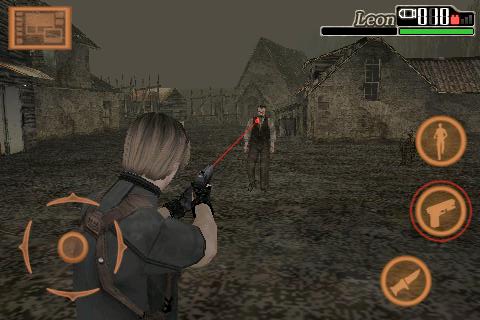
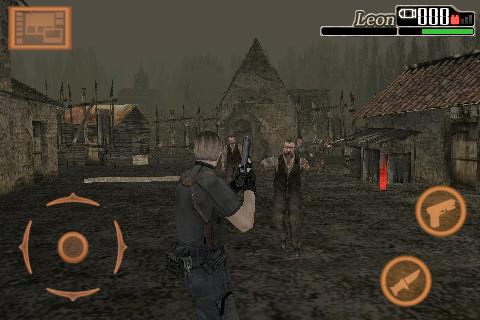
Japanese iPhone site AppBank managed to snag a copy and video of Resident Evil 4 mobile edition which was released into the Japanese iTunes Store briefly. The app has since been pulled for unclear reasons, but not before they managed to get some screenshots and the embedded video below.

The game appears to use a version of Capcom’s 3rd person 3D that was also used in Resident Evil: Degeneration.

Via toucharcade.com

Apple Blocking Push Notifications on Unlocked iPhones?

July 14, 2009 :: Posted by - SoSly :: Category - News

In a blog post over the weekend and a press release issued today, Czech iPhone developer PoweryBase notes that Apple appears to be blocking Push Notifications on iPhones that have been unlocked for use on non-official wireless carriers. PoweryBase is the developer behind NotifyMe [App Store Links: Paid ($3.99), Free], a popular application that utilizes push notifications to offer reminders and to-do alerts to users on the go.

According to PoweryBase, push-enabled iPhone applications contact Apple’s servers to request a unique ID to establish a link for Push Notifications, but Apple’s servers fail to respond to such requests when coming from unlocked iPhones.

Via Macrumors.com

As you guys may know the dev team has been working on this so it should be fixed sometime soon.

Top Game Ipa’s Of The Week

July 13, 2009 :: Posted by - SoSly :: Category - Cracks

**Download Worms**

worms icon

Category: Games

Price: $4.99

Released: Jul 11, 2009

Size: 75.2 MB

Seller: Team17 Software,

**Download Rise Of Lost Empires***

lost empires icon

Category: Games

Price: $4.99

Released: Jun 03, 2009

Size: 56.5 MB Seller: Gameloft S.A.

**Download Rolando 2**

rolando2 icon

Category: Games

Price: $9.99

Released: Jul 01, 2009

Size: 56.1 MB

Seller: ngmoco, Inc.

MCleaner v1.7.1 Crack

July 13, 2009 :: Posted by - SoSly :: Category - Cracks

1) Download Putty
1a) If you dont have SSH on your Iphone Install it (OpenSSH) from Cydia
2) Install GNU Debugger from Cydia
3) Connect to iphone from putty using ssh protocol
login root
password alpine

4) run gdb
5) in gdb type these commands (copy and paste) Read more…

TwitVid – Post Video Taken From Your iPhone To Twitter

July 12, 2009 :: Posted by - SoSly :: Category - News

twitvidI am REALLY excited about this app. First of all, it’s free, but I’d pay for this app in a heartbeat. Very very well done. Ok, let’s get on with it. TwitVid lets you post your videos taken by your iPhone 3GS to your Twitter account. Just install the app, login, either record a new video or chose an exciting one, add your tweet and you’re done! It creates a nice short URL for your tweet like this and adds it to the end: http://www.twitvid.com/0343E The website it takes you too is very nice. It uses your background for your Twitter account and has extra features like live chat embedded in the sidebar. You can also embed this video somewhere else, chat too. The quality is very good and upload speeds on wifi were great. We’ll test more to see how EDGE and 3G workout. Another nice thing is viewers start to stream the video as you’re uploading it. So even if you’re not done uploading, they can see the beginning and it buffers as you upload.

Speaking of them seeing the video, if your on an iPhone, the video will play back right inside of apps like Tweetie, Twitteriffic and TweetDeck! It doesn’t take you to the full site or even a mobile site. It just plays the full thing, full screen! AWESOME!

via appleiphoneschool.com

How to Get an iPhone App Refunded

July 12, 2009 :: Posted by - SoSly :: Category - News

Here are the steps to request an iPhone app refund:

  1. Launch iTunes
  2. Go to Purchase History
  3. Report a problem
  4. Fill out the form with a legitimate reason for your refund request

Apple resolved my issues with a quick turn around time, hassle free, and was really really nice about it, too. And I am not going to lie, it shocked the crap out of me! …It may have helped I was clear and concise: “Beejive is not working out for me because x and x. Therefore, I would like x.” Manners and politeness can be advantageous, too. :)

I had no clue that you could request a refund for an iPhone application, but apparently, Apple gives customers 90 days to claim a refund for any purchase they made in iTunes or in the App Store.

via iphonedownloadblog.com

Macworld: iPhone 3GS Stress Test Video

July 12, 2009 :: Posted by - SoSly :: Category - News

Finally an actual stress test video with normal people using the iPhone 3G S . I myself have had problems with my 3G S calling the wrong people when I ask it to. For example here’s one that didn’t benefit me at all, I was showing off my brand new 3G S to my girlfriend and said call babe, my iphones reply was calling caiti…. Uh Oh

3.0 Battery Consumption Issues, And Tips!

July 12, 2009 :: Posted by - SoSly :: Category - News

Like in every new firmware, many iPhone OS device owners all over the web report battery life issues after upgrading to 3.0. The reason this time however, is mainly because of Apple’s Push Notification feature. I had upgraded to iPhone 3.0 during the beta and I noticed that the battery life drains about 1.5x faster than 2.2.1. But with the public 3.0, I feel as though it’s 3x as fast. It appears as though all the new features that have been implemented into 3.0 are pushing the devices to their limits. I noticed many hang ups and frequent freezes after some moderate usage of the iPhone. Even a great application called FreeMemory doesn’t seem to do the trick.

This is most likely a software issue that came bundled with the new features, settings, interface, etc. Some of the causes for the possible “iDrain” Read more…

The Future of the iPhone: Intelligent Object Recognition

July 10, 2009 :: Posted by - SoSly :: Category - News

How would you like to be able to point your iPhone towards an object – the Eiffel Tower, for example – and instantly see the admission price, working hours, its height and other information? We’ve been hearing about such concepts for quite some time now – and we’ve been able to visualize it better since the movie Minority Report – but Apple’s latest iPhone related patents might make it a reality sooner than one would think.
A patent called ID App does just that; it recognizes an object based on visuals (through the iPhone’s camera), a RFID reader or through GPS, and then fetches the data from related databases. I like to imagine all this happening in real-time, with a layer of visual information superimposed on the actual camera image, but in the beginning it’ll probably just take you to a related Wikipedia page. Still, it’s a start.

Another patent focuses on facial recognition, which can also be used for a variety of purposes. It could bring you info about a person (scary, I know) just by pointing a camera at him; or it could be used for security, enabling only recognized users to use the device (even scarier; imagine your iPhone refusing to work after you’ve had a shave and a haircut). Whatever the implications, I’m really excited about these technologies, which would take the iPhone (and similar devices) to a completely different level.
Finally, Apple filed for patents for better voicemail management, changing the voice output, or filter obscene content from text messages. There’s an exciting future ahead; I just hope we won’t have to wait for another generation of iPhones to see these in practice. Check out Apple’s patent applications here.
[image courtesy of MobVis]

via xsellize

Fuzzyband 3.1b1 Available Now

July 10, 2009 :: Posted by - SoSly :: Category - News

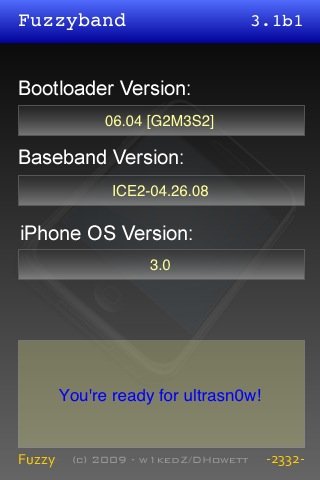
Fuzzyband has been updated and is now 3.0 ready.  It’s feature set has changed a little as yellowsn0w is deprecated.

Features:

Upgrades / Downgrades baseband to 4.26.08 for unlocking with the ultrasn0w tool released by the iPhone

Dev-Team

UPGRADING:

Upgrading is for users that wish to remain on 2.2.1 but also unlock.  Upgrading will put the 4.26.08 baseband from 3.0 on the modem so that ultrasn0w may be installed from cydia

DOWNGRADING:

Downgrading works from any version greater than 4.26.08 (currently 5.08.01 is the newest version available, found in 3.1 beta 1).  It will put your baseband back at version 4.26.08 which is the current unlockable version by ultrasn0w.

Downgrading only works on phones that have the 05.08 (5.8) Bootloader from the factory.  This is a very limited number of phones that were released in the first few weeks of the 3G production cycle.

If you do not know your bootloader then you can run Fuzzyband and it will report the version number for you.