
Popup Blocker 1.1.1 Cracked
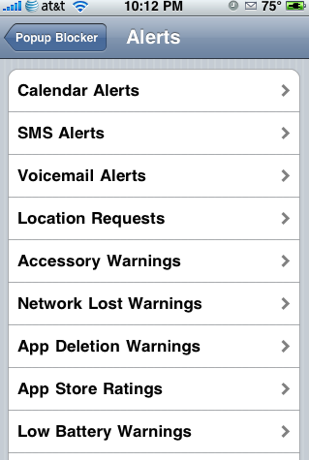
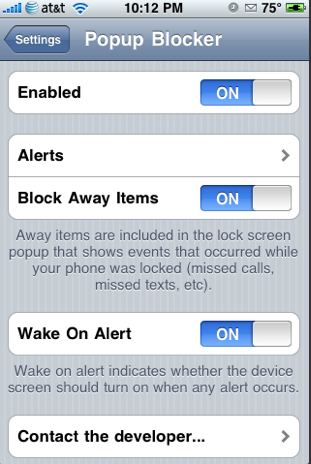
Popup Blocker is an application that allows you to control just about every popup that you could get on an iPhone and/or iPod touch. Once installed, you can get to the app in your stock Settings application. Here you have the options to enable/disable the application, Block Away Items, turn on/off Wake On Alert (this turns on your screen when you receive an alert) and set Alerts.
In the Alerts option you have the ability to turn on/off Block When Unlocked, Block When Locked and Wake On Alert for the following popups;
• Calendar Alerts
• SMS Alerts
• Voicemail Alerts
• Location Requests
• Accessory Warnings
• Network Lost Warnings
• App Deletion Warnings
• App Store Ratings
• Low Battery Warnings
• Low Disk Space Warnings
• Backgrounders Alerts
• Call Failure Warnings
Download Popup Blocker 1.1.1 Cracked HERE and do the following:
- Rename the downloaded file to blocker.deb
- Copy the file to var/mobile
- Open up mobile terminal and do the following:
- Type in su (press return)
- Type in alpine (press return)
- Type in dpkg -i blocker.deb (press return)
- Respring or reboot and enjoy
Thanks again to Studguy over at xsellize for this.
September 6th, 2009 at 8:38 pm
[...] This post was Twitted by TheIphoneSpot [...]
October 17th, 2009 at 1:23 pm
Wow this is really helpful ima have to delete some music so i can get some more of these apps!!
December 31st, 2009 at 6:15 am
Other way is using ssh your iPhone. Make a folder called AutoInstall in /var/root/Media/Cydia/ so you have /var/root/Media/Cydia/AutoInstall which is case sensitive and drop this deb file in the autoinstall folder, respring and reboot your iPhone.