
UDID Faker 1.01

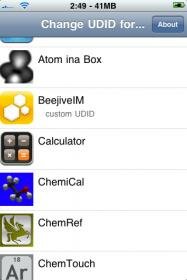
Finally a faker for us users who are paranoid about giving our sensitive iphone data out to people. With the udid faker you can fake your udid. UDID stands for Unique Data Item Description and is used mainly by appstore apps to see who is using the app and to tell if your udid is using a cracked app or not, even cydia apps use it for registration so if an app is registered by udid you can ask a friend who bought a copy to give you his udid so that you can use it too. Thanks to Aulter and Reilly for this one. Below is the download and what they had to say about this:
Download UDID Faker:
http://www.megaupload.com/?d=ZSV2TUVP
http://www.mediafire.com/?idnyujnxzyn
- Rename the downloaded deb to faker.deb
- Copy the file to var/mobile on your iphone
- Open up mobile terminal and do the following
- Type in su (press return)
- Type in alpine (press return)
- Type in dpkg -i faker.deb (press return)
- Enjoy using udid faker and think of the possibilites
Finally!
Here is the initial release of the UDIDFaker. :up:
What it does:
It fakes the UDID (your device’s unique identifier) for every app you select. You can set different fake UDIDs for each app.What is it useful for:
- Many Apps collect data about the user (for example UDID, if the app is cracked, …). Fake the UDID for all cracked apps and the devs will never know your UDID.- Have you been blacklisted by Beejive for using a cracked version? Use the UDID faker and enjoy Beejive (with a fake iTunesMetadata.plist)
- You can even hack into other peoples app accounts if: you know the other ones UDID and the app only uses the UDID for identification
So from now on be careful who you give your UDID.
- ….
Some might find this app useful, some not!
Tags: App, cracked version, D So, faker, i faker, megaupload, mobile terminal, UDID
September 18th, 2009 at 3:17 am
Hi i need help plz i hav installed the deb through the cydia auto install folder i rebooted twice but i cant see any icon for udid faker!! Plz any hint
September 18th, 2009 at 7:51 am
Try installing it the way I tell you and it should work.. If not use spoof to see if that app is actually installed and if it shows up in poof hid it and then unhide it. Maybe that will make it pop up
September 18th, 2009 at 8:05 am
Now how can we make this work with Beejive?
September 18th, 2009 at 8:23 am
change your udid to some random one and then do the metadata plist trick to fake beejive into thinking your a legit or never banned user
September 19th, 2009 at 4:12 am
I hav copied the metadata plst from i drive lite folder and it not working with beejive!! Do i have to edit it! Plz xplain
September 20th, 2009 at 5:31 am
beejive 3.0.2 <<– appulo.us
UDID Faker 1.01
change random UDID
restar the iphone
and =D
September 20th, 2009 at 10:44 pm
[...] Download and install udid faker HERE [...]
September 21st, 2009 at 5:09 am
Thank you it works
September 21st, 2009 at 3:51 pm
i cant see the icon, does this work with 2nd generattion jailbroken ipod>
September 29th, 2009 at 6:53 am
I no I probly sound super stupid but can some one explain this in great detail… I downloaded a cracked beejive and I have the UDID faker… I changed to random UDID and restarted my itouch 1st gen but beejive still knows I’m fake! Can someone plz help me (I have no idea what a metadata plist is??)
September 29th, 2009 at 1:04 pm
I installed UDID Faker 1.01, then Beejive 3.0.2 (the patched version by Reilly), then set a random UDID, rebooted, then ran Beejive. Still get a license key error. :/
I’ve tried it a number of times in a number of ways. Am I doing something wrong?
September 29th, 2009 at 3:10 pm
“Finally a faker for us users who are paranoid about giving our sensitive iphone data out to people.”
Pshhh. Suuuure. That’s why we need a UDID faker: to protect our “sensitive” series of random letters and numbers that distinguishes our device from others. Surely it has nothing to do with the fact that a certain developer is blacklisting the UDIDs of users who installed pirated copies of their software. @_@
September 29th, 2009 at 10:36 pm
I no I probly sound super stupid but can some one explain this in great detail… I downloaded a cracked beejive and I have the UDID faker… I changed to random UDID and restarted my itouch 1st gen but beejive still knows I’m fake! Can someone plz help me (I have no idea what a metadata plist is??) plzzZzzz help me!
September 30th, 2009 at 11:09 am
Fantastic app. Installed no problem. Is it possible to get a console version where I can supply the app name or GUID? I’d like to automate this for some apps I use.
October 1st, 2009 at 1:30 pm
Hi people,
I got the deb file, bn 2 var/mob etc.
installed mob terminal… BUT
When I enter su
it freezes, won’t let me enter alpine.
what am i doin wrong??
please help.
cheerz
October 1st, 2009 at 10:08 pm
have you tried rebooting your iphone before using mobile termina
October 2nd, 2009 at 10:06 pm
I got it to load had to use boss preff to get it to show up but it just crashes when i hit random udid. any help apreciated. I think it is because i am on Version 2.2 (5G77)
October 12th, 2009 at 4:11 am
hey sosly i did everything but when i come to sign in to beejive im it says still invaild thingy any help?
October 20th, 2009 at 1:04 am
are u running on a 3.0 firmware?
it works fine with 3.0 and up.
November 4th, 2009 at 11:24 am
can you update this app to work with 3.1.2
November 4th, 2009 at 11:29 am
can you update this app to work with 3.1.2 F/W
November 4th, 2009 at 7:29 pm
Not working for beejive…
November 15th, 2009 at 4:32 pm
# Copy the file to var/mobile on your iphone
# Open up mobile terminal and do the following
How do I copy the file on my ipod? :/
Mobile terminal?
Better step by step for newbies like me please.
November 21st, 2009 at 11:47 am
Okay for those who are still getting the error after installing the Beejive version off this site, they must be doing something wrong.
After installing UDID Faker and Beejive on your iphone, make sure you copy the SC_info folder in the Beejive App folder under Var/Mobile/App/
Then go back and assign a random UDID for your Beejive app. It should work. It worked for me and i just did the same thing for my girlfriend and it worked for her as well. Good luck
November 21st, 2009 at 10:31 pm
IDIDEVEN, its easy, Download ifunbox at ifunbox.com i think. Then use the application to ssh into your iphone. Once you are in the iphone, click raw files, and you will see a folder called Var,click on it, then click on mobile,then click on applications. You will then see a set of folders with long string of numbers. Click on each one of them until you see the one for Beejive.(assuming you already have Beejive installed. Then copy the SC_info folder in the folder called Beejive app.
Regarding Mobile Terminal, you will need to install that from Cydia. Just log into Cydia and search for Mobile Terminal. Make sure you have renamed and copied the ,deb file in the applications folder per the instructions above
Then follow these instructions
Open up mobile terminal and
* Type in su (press return)
* Type in alpine (press return)
* Type in dpkg -i faker.deb (press return)
And thats it. Your udidfaker icon should appear and ready for use.
November 21st, 2009 at 11:51 pm
Okay, thank you very much. I’ll try that.
November 24th, 2009 at 3:15 pm
Hi, maybe a dumb question but where can i find the sc_info folder that i have to copy into Beejive App folder under Var/Mobile/App/??? Plz help me out with this…
thanks in advanced
November 25th, 2009 at 9:53 am
@Ididteven, you are welcome.
@Dennis, try downloading the complete package with instructions at this link
http://thepiratebay.org/torrent/5175580/Beejive_IM_with_Push_3.0_tested_and_works
November 25th, 2009 at 9:59 am
@Dennis, i forgot to mention this, make sure you uninstall any previous version of BeeJive you have on your phone before installing this.
To verify complete installation, SSH into your iphone and make sure the numbered folder where your previous beejive application was stored is deleted.
Then do a complete installation using the IPA file in the torrent link i posted. Just follow the instructions in the text file and you will be fine.
November 30th, 2009 at 2:14 am
Thanks for this!!! It’s great!
Does this work for Ipod as well?
December 7th, 2009 at 4:10 am
I can’t get Ifunbox to download.please help
December 7th, 2009 at 5:35 am
And I’m just stupid lol. Please help me
December 7th, 2009 at 8:34 am
Find A different download link
December 11th, 2009 at 6:29 am
if i use udid faker and buy an app within the app that i am faking will i get charged for that app?
December 11th, 2009 at 1:37 pm
Yes you will get charged because your using your itunes account to purchase it and that has all of your info.
December 17th, 2009 at 5:22 pm
I’m trying to do this, but mobile terminal keeps crashing on me. Am I able to do all the mobile terminal stuff by SSHing into my phone through my computer’s terminal?
December 17th, 2009 at 5:42 pm
Yes or you can just copy the deb to var/mobile on your iphone and use ifile to install it by installing ifile and browsing to the deb through ifile and tapping on it. Ifile has its own installer so after doing so just respring or reboot
December 17th, 2009 at 5:52 pm
So I got terminal to work, but UNID doesn’t seem to fix my beejive issue. I’ve tried re-springing after using the UNID spoofer, but still nothing.
December 19th, 2009 at 12:36 pm
Help! I installed the app n stuff but when I press random udid and I exit the number changes but app stays same
December 22nd, 2009 at 2:49 am
OMFG! This thing is a God-send!
I just used it on Qik to unban myself! :’)
I Looove it!
December 27th, 2009 at 3:18 pm
Hi intalled the udid but can’t see the icon any help I did do everything as explianed above but still not able to use the udid faker i am trying to use it on iphone 3g running on 3.1.2.
December 28th, 2009 at 3:03 pm
Kick-ass App,
thanks! works like a charm.
January 2nd, 2010 at 6:57 pm
I’ve done everythibg listed but it gets stuck at
:setting up udid faker blah blah
January 4th, 2010 at 3:24 pm
I tried installing this and it crashed my iphone and when it restarted all my data was gone. Beware!
January 6th, 2010 at 10:34 am
im having the same problem as someone before me; when i open up mobileterminal, i type in ‘su’, but when i get to the password, i cant type in ‘alpine’
i hit letters, but nothing comes up on the blackscreen. help?
as to restarting- i have an itouch and if i restart, my itouch will demand a reboot cuz of the jailbreak. anyway around that?
January 6th, 2010 at 11:14 am
nvm i restarted it andjust did blackra1n, errythings back, but the mobileterminal still is not working when it comes to the password.
January 6th, 2010 at 1:48 pm
i am having issues getting the udid on my phone.. it does not show up in itunes for me to sync
January 6th, 2010 at 2:45 pm
my problem is that it keeps saying ‘license.key.erorr.invalid’ .. does these steps solve that?
January 9th, 2010 at 7:38 pm
Guys can u guys please help me and explain to me everything in great detail?
January 9th, 2010 at 9:26 pm
http://www.youtube.com/watch?v=ipDCHoP948s There you go that should explain deb installation
January 15th, 2010 at 11:00 am
I am having the same problem as (Smith) i have done everything as i should but i cant see the udid faker icon? I am running on 3.1.2 has anyone got any ideas as to why i cant see it?
January 17th, 2010 at 2:05 pm
Why wont the file download from safari, for some reason when I try and download UDID Faker it says safari cant download this file….
January 17th, 2010 at 4:36 pm
You have to have safari download manager installed for safari to be able to download files
January 17th, 2010 at 11:34 pm
@Ethan I had that same problem. Its stupid. The file is downloading perfectly, but when it tries to decompress it, it fails since it has a password. Download Zipeg and download the file in Firefox, then decompress in Zipeg. I think the password is dotdoh.com
January 19th, 2010 at 2:45 am
these instructions are really incomplete.
do i need to install it on my computer or iphone?
and how?
whats mobile terminal?
where do i put su?
if on the phone then where do i download it in?
January 19th, 2010 at 10:37 am
Ok install mobile terminal from cydia, google diskaid and download it for your pc or mac and install it on your computer system. Now connect your iphone to your computer and open diskaid. Bottom left corner tap on the tab and choose to go to your root partition, then go to var/mobile on your iphone and drag and drop the udid deb in there, now do the instructions
January 28th, 2010 at 5:28 am
i did all steps u say and i dont get any icon on the iphone
January 28th, 2010 at 5:34 am
says i dont have jailbroken, and it is jailbroken…
January 28th, 2010 at 10:42 am
Don’t forget to respring or reboot your phone
February 2nd, 2010 at 3:12 pm
I did this trying to get back on a app called “powerchat” (I was banned for telling a friend a would bet him 10 dollars the Eagles would lose). …i changed the udid and I’m still banned …smh how else do they know it’s me? …it seems like the only option is buy another phone …the only thing i can imagine is they some how know my IMEI# …does this make sense to anyone?
February 2nd, 2010 at 3:51 pm
…Never mind I simply had to delete the app and redownload. …simply amazing! THANKS!!!
February 5th, 2010 at 7:30 pm
I need help how do I get udid faker
February 5th, 2010 at 9:26 pm
You can get it from cydia
February 6th, 2010 at 8:26 am
I search udid faker in cydia and nothing came up
February 9th, 2010 at 11:28 am
I did wat you said but i dont see the icon! the terminal popped up all those words rebooted 5 times no udid faker =[
ipod touch 2nd gen 3.0
February 9th, 2010 at 11:56 am
Try installing a theme from cydia and that should make it appear
February 11th, 2010 at 8:40 am
i was able to install udid from cydia after adding the source to cydia but it still wont work help me please is there something else i must do
February 11th, 2010 at 8:41 am
IM running on 3.1.3 software 2nd generation ipod touch idk if it works with this software
February 12th, 2010 at 1:29 am
I am having problem installing UDID faker
IT say:-
Package mobilesubstrate is not installed.
dpkg: error processing com.reilly.udidfaker (–install):
dependency problem – leaving unconfigured
Errors were encountered while processing:
com. reilly.udidfaker
February 12th, 2010 at 9:21 am
Open up cydia and install mobile substrate
February 21st, 2010 at 8:36 am
Do u need to have cydia or a jailbroken iPod to do this?
February 21st, 2010 at 11:49 am
YEs
February 21st, 2010 at 1:16 pm
Do u have it should I use blackra1n.com or somthing else
February 21st, 2010 at 2:54 pm
Yes go download blackra1n from blackra1n.com and then jailbreak your iphone. Youtube how to jailbreak using blackra1n you will find a lot of great tutorials.
February 24th, 2010 at 9:19 pm
Does anyone know how to downgrade ur iPod from 3.1.3 to 3.1.2 so I can jailbreak it and get udid faker
March 10th, 2010 at 12:10 pm
i also have problem installing faker.deb
dpkg: error processing com.reilly.udidfaker (–install):
please help
March 10th, 2010 at 4:17 pm
install udid faker from theiphonespotrepo.net/apt add that to your cydia source and you will find it in iphonespot apps section.
March 14th, 2010 at 6:15 am
Just download it from cydia not via terminal.
April 8th, 2010 at 4:21 pm
I want just to say:THANK YOU guys
May 3rd, 2010 at 5:57 am
Hi,
I used to have this program, but now have new phone.
I have installed UDID faker and it shows up fine, i load it, hit random UDID then go to that app and it hasnt changed my UDID, any advice?
Thanks
May 23rd, 2010 at 1:14 am
how do i do this on my ipad?
June 8th, 2010 at 11:50 pm
I heard people said that they could install Udid Faker by using Cyida. Can it be done that way?
June 9th, 2010 at 6:25 am
I downloaded a cracked app and there are in-app purchase which the cracker of the app already unlocked them, although they were unlocked I am not able to enter them, can UDID Faker fake this problem too ??
June 9th, 2010 at 6:29 am
I downloaded a cracked application which have
in-app purchase and the cracker already unlocked them, but although they were unlocked, I am not able the enter them, can UDID Faker fake this problem too ??
June 19th, 2010 at 12:21 am
i am using Custom 4.0 GM but can’t run UDID Faker?
June 19th, 2010 at 1:12 am
It is said to not work on that firmware.
June 20th, 2010 at 9:48 pm
How did you get that firmware can I get it???
June 20th, 2010 at 10:42 pm
You can get firmware 4.0 from the offcial ipsw’s page under the downloads tab on the top bar