I DO NOT CRACK SOFTWARE, I DO NOT HOST THESE FILES, AND I AM NOT RESPONSIBLE FOR ANY DAMAGE DONE TO YOUR IPHONE WITH ANY FILE YOU DOWNLOAD FROM THIS SITE. YOU USE ALL CRACKS AND OTHER DOWNLOADS FROM HERE AT YOUR OWN DISCRETION. Note: If you are a developer and I have posted a crack for your app, I will gladly remove it and all will be done. Just type in a quick message in the shoutbox
September 23, 2009 :: Posted by - SoSly :: Category - News
usbfever.com has released a dual SIM card for iPhone, iPhone 3G, and iPhone 3Gs.
Highlights:
This is a very innovative design, it gives your a DUAL SIM for your iPhone 3G / iPhone 3Gs / iPhone 2G.
With this Dual SIM, you are no longer to hassle with your network problems when you are travelling from one country to another country.
Features:
- One iPhone with 2 SIM Cards (see note below)
- No need to cut your SIM CARD
- STK Menu (see installations below)
This accessory is compatible with:
- iPhone 3G
- iPhone 3GS
- iPhone 2G (1st Generation)
Set-up inside your iPhone:
- Home ==> settings ==> Phone ==> SIM Applications: select your desire SIM card
(If you don’t want it to select SIM card for you when the signal is low, please don’t select “auto/SW)
Note once you’ve chosen to another sim card, it will have a message “No SIM Card installed”, please wait 1 or 2 minutes, it needs aound 1 ~ 2 minutes to search, during this time, “No SIM” will appear in the top right of your iphone’s screen.
Package Contents:
- Dual SIM Card for iPhone / iPhone 3G / iPhone 3Gs x 1
Packaging:
- BULK
Note:
- This Card does NOT support DUAL STANDBY Mode but you can switch between them.
September 23, 2009 :: Posted by - SoSly :: Category - News
Google Sync, released earlier this year, keeps your calendar and contacts synced between your mobile phone and Google account. Now they’ve added that great, final bit of ultimate sync support by pushing Gmail to your phone.
If you’re sporting an iPhone/iPod Touch, Windows Mobile phone, or Nokia S60 phone, you can now set up Google Sync to actively push your email to your device, ensuring you’re never stuck waiting around for an update to see what’s new or wondering if various work-around alternatives will follow through. From the Official Google Mobile Blog:
Sync works with your phone’s native email application, so there’s no additional software needed. Only interested in syncing your Gmail, but not your Calendar? Google Sync allows you to sync just your Contacts, Calendar, or Gmail, or any combination of the three.
Check out the full post at the link below to see how to get Google Sync if you’re not already a user and how to enable Gmail syncing if you’ve already got a Google Sync account.
Go HERE to set up your gmail and start recieving push email for free
September 23, 2009 :: Posted by - SoSly :: Category - News
As you guys may know mms will be activated officially by at&t on september 25th. This has been a long wait for us frustrated faithful att customers. A fellow iphone user received the message below:
That picture above means that att has officially began letting people send mms as of today. Most of you guys don’t even know that all you have to do is go to help.benm.at using your iphone install the correct mms/tethering settings and you will be able to send mms just like that. If you haven’t tried it yet then go ahead because att has activated mms in most areas.
September 22, 2009 :: Posted by - SoSly :: Category - News
Porn and iPhone, it is out there and every once in a while you may even find porn in there. In an Apple Retail Store on one of the iPhone and iPod Touch demos, that is.
That’s exactly what happened just the other day as a mother found her 10 year old girl mesmerized by some X-rated content on one of the Apple Store demo devices:
“I called to complain and was told matter of factly by staff this happens a lot as people come in and download it for a laugh, I don’t find it funny and all my friends think it’s disgusting, but Apple say there is nothing they can do to stop it.”
Apple does a fantastic job of keeping smut out of iTunes and their App Store, surely they can figure something out for their real-world stores.
September 22, 2009 :: Posted by - SoSly :: Category - News
Probably will not sound like a totally unexpected news but according to the opinion of the big companies to Purchase In-App is a real failure.
Was to be expected because usually users who purchase an application are not very responsive to spend more money to get them to function in more than a level pack add-on.The AppStore has accustomed us well, at best, with regular updates and free (read Pocket God) by which the Purchase In-App can not reach that level of satisfaction necessary to motivate developers.
Pangea Software, with one million copies sold in riddles, said that only 20-25 people a day using the in-app purchase and expectations were much larger.
September 22, 2009 :: Posted by - SoSly :: Category - News
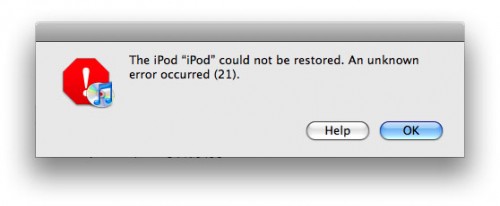
iH8sn0w has released a new update for iREB a new program for Windows and Mac that can solve the mistakes “16xx” and “21″ from iTunes that are displayed after a reset or a firmware downgrade.
The application is only compatible with EDGE iPhone, iPhone 3G and iPod Touch 1G and can be downloaded from here.
When you will be presented such an error will not have to do is start and follow the instructions on the screen.I recommend you download it and keep it somewhere in your computer .. It can come in useful!
September 22, 2009 :: Posted by - SoSly :: Category - News
Live in Australia? Have an iPhone? Do you use the iPhone’s built-in Maps app, Navigon, or TomTom [iTunes links] to navigate? If you answered yes to all three of those questions, then I have some bad news for you: under the Australian Road Rule 8th Amendment, all use of the iPhone in your car is soon to be banned unless you buy a cradle for it, including using it as a GPS navigator.
An article from the Sydney Morning Herald initially makes it sound as though you won’t be able to use such apps at all, especially after reading this quote from a spokesperson for VicRoads, the traffic authority for the Australian state of Victoria: “A phone will only be allowed to be used for its primary purpose. If it’s a phone, it’s a phone.” But once you read farther down the article states, “Drivers will only be able to use mobile phones if they are placed Read more…
September 22, 2009 :: Posted by - SoSly :: Category - News
Were you watching the two-hour season premiere of House last night on Fox? Maybe you were watching one of the other prime-time shows, but if you had your eyes on the screen during some of the commercial breaks, you probably saw at least one of the three new iPhone ads that hit the airwaves last night.
Each of the new ads highlights a total of six apps, up from the three that were formerly the focus of the older ads. The first ad I saw last night, “Dine,” looks at Zagat to Go, QuickOffice, TripCase, New York Subway 09, Epicurious Recipes & Shopping List, and Gap Style Mixer. [Note: all app links will open the iTunes App Store]
The next ad I viewed was “Nature,” featuring iXpenseIt, Daily Finance, Guitar Toolkit, Lonely Planet Mandarin Phrasebook, iBird Explorer Plus, and the ever-popular Pizza Hut app. I didn’t get a chance to see the third advertisement, “Pass,” until I visited the Apple website this morning. It’s a 30-second quick look at Fandango, G-Park, VocabWiz College Vocabulary, 365 Crosswords, Classics, and ABC Animals.
I’m happy to see that Apple is maintaining focus on the number and variety of apps in the App Store, instead of resorting to the narcissistic, touchy-feely, celebrity-filled tripe that T-Mobile has been using for their Android-based MyTouch 3G ads.
September 22, 2009 :: Posted by - SoSly :: Category - News
Thanks to xsemaphorexx for this great program. Below is how to create your own Ecid ShSh server so you can restore your 3GS firmware to whatever you want, even if you don’t have your cydia ShSh Ecid on file, or even worse, sauriks cydia server goes down and we can’t restore our firmwares.
Below is how to do it go here to see the original page:
TinyTSS — All your iphone restores are belong to you
TinyTSS is a small java app that acts as your very own signature service.
When iTunes verifies your restore for your 3gs phone, it ‘phones home’ to see if you are allowed to restore to the version you are requesting. With TinyTSS + the shsh blob file(s) you obtained with Umbrella, you will be able to restore to the version of those shsh files forever!
People may wonder why I did this when Saurik is already doing the same thing. I’ll explain my philosophy. I admire Saurik for what he has done and I thank him for pointing me in this direction. I simply think that I would rather have my shsh blobs on my personal machine Read more…
Make a little donation and help me out, I like keeping this site up to date with the latest iphone news, cracks, and hacks. Any little bit helps so click that button above and Thanks to those who donate. Don't forget to look for your name on the support page.