Bing is King for Browsing iPhone Apps?

September 16, 2009 :: Posted by - SoSly :: Category - News

It sounds like a work of fiction – Microsoft allowing and supporting a way for people to browse and search iPhone apps?! Can’t be true, right? Wrong. If you’re somewhat surprised, you’re not alone. The people at CNET seem a little astonished too.

Quote:
There’s a new way to search for iPhone apps, and it comes from the unlikeliest of sources: Microsoft. The new Bing Visual Search engine, announced yesterday, includes a special gallery section that spotlights iPhone apps.

Almost seems like a sign of the apocalypse doesn’t it?

The new Bing Visual Search engine has the look and feel of a digital jukebox at your local watering hole – complete with jumbo app icons that can be flipped through like a box of old records in the attic. And a description pops up when you mouse over the app of your choice, along with price, category, and other vital info.

I have to admit, both the look and functionality of this feature are really impressive. The obvious drawback, of course, is that only a fraction (500, in all) of the Apple app catalog is available for browsing through Bing. Everything is categorized by Bing’s search filters and broken down into titled chunks like “top ten free” or “top ten paid,” etc.

Quote:
In any case, it’s interesting to see Microsoft putting any kind of spotlight on the iPhone. And it would be more interesting still if this gallery ramped up to, say, 5,000 apps. Then it would be more than just a fun diversion; it would have some bona fide practical value.

Although some are saying today that Microsoft has developed a better interface for browsing iPhone applications than Apple itself, I won’t go that far. But even if Bing isn’t the best place to explore iPhone apps, it may still be the coolest-looking search portal so far.

And, no matter how you slice it, that’s a win-win for consumers.

via modmyi.com
New iPod Touch Speed Tests Up to 50% Faster Performance

September 16, 2009 :: Posted by - SoSly :: Category - News

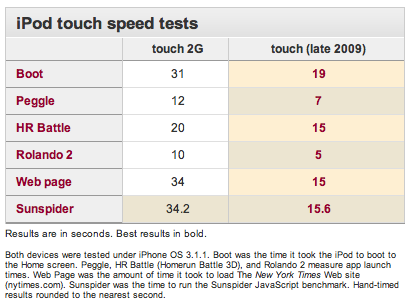
At Apple’s “It’s Only Rock and Roll” media event last week, the company introduced new iPod touch models with 32 GB and 64 GB capacities, advertising the devices as offering “up to 50 percent faster performance”. Macworld has performed speed tests comparing the new iPod touch to the previous-generation model, and found that on a number of tasks the new model does meet or exceed Apple’s performance claims.

The speed tests conducted were similar to ones run in June on the iPhone 3GS, and while the new iPhone running Apple’s just-released iPhone OS 3.1 was not included in the latest comparison, the new iPod touch appears to even be slightly faster at some tasks than the iPhone 3GS.

But it’s not just in benchmarks such as these where the new iPod wins out. Just as the iPhone 3GS was faster than the iPhone 3G at everything, the new iPod touch feels much faster at any task you throw at it: applications launch (and quit) faster, Web pages load more quickly, processor-intensive games and programs perform better — you name it.

We’ll be testing the latest iPod touch’s performance — compared to both the previous touch and the iPhone 3GS — for our official review, but it’s clear that Apple has beefed up its newest touchscreen device.

Via macrumors.com

Custom Pwnage Jailbroken 3.1 ipsws

September 16, 2009 :: Posted by - SoSly :: Category - Cracks, News

Custom ipsw

Custom Firmware Downloads:

iPod Touch 1st Gen 3.1.1 Jailbroken 1gb Partition:

http://www.megaupload.com/?d=OT0DGR2Z

2G iphone 768mb partition, Activated, Unlocked:
http://rapidshare.com/files/28065181…cked.part1.rar
http://rapidshare.com/files/28066104…cked.part2.rar

2G iphone 768mb Partition, Unactivated, Unlocked:
http://rapidshare.com/files/28067532…lock.part1.rar
http://rapidshare.com/files/28066104…lock.part2.rar
Read more…

Dev Team Releases 3.1 Jailbreak

September 16, 2009 :: Posted by - SoSly :: Category - News
3 • fun!

This is the low down on our tools for use with the 3.1 firmware from Apple, please read the whole post in full before attempting anything. Because of changes with Apple’s update techniques (that complicate the 3GS upgrade process) this will be a multipart release. This release starts with PwnageTool 3.1 for Mac OS X – this application supports the iPhone 1st Generation (2G), the iPhone 3G and the iPod touch 1G. NB: THIS DOES NOT SUPPORT THE 3GS OR 2G/3G IPOD TOUCH. redsn0w for Mac OS X and Windows will follow sometime in the near future, please don’t bug us about it – we’ll release when we have something ready.

  1. GOLDEN RULE: If you are using a 3G iPhone with ultrasn0w and rely on ultrasn0w to obtain cellular service, then you should only upgrade to 3.1 with a PwnageTool created .ipsw. – Stay away from Apple’s direct updates as described here and here please get up to speed on the whole subject by reading the information contained in these posts.
  2. If you have an original iPhone (1st generation) then 3.1 unlock works with this PwnageTool release. iPhone 3G users upgrading to 3.1 will need to continue using ultrasn0w with a PwnageTool created 3.1 .ipsw
  3. Please read all parts of this post before downloading and using these tools.
  4. Read items 1, 2 and 3 again and again.
  5. At the bottom of this post are the bittorrent files for the 3.1 capable version of PwnageTool.
  6. This app is suitable for the recent 3.1 release.
  7. This version of PwnageTool will NOT work for the iPhone 3GS.
  8. PwnageTool WILL work for Original iPhone (1st Generation), Original iPod touch (1st Generation) and the iPhone 3G.

Baseband 101

The ‘baseband’ is the generic nickname given to the internal components of the iPhone that handle the phone calls and Internet access. This ‘baseband’ is a tiny and unique independent Read more…

Action Menu Plus Cracked

September 16, 2009 :: Posted by - SoSly :: Category - Cracked .deb's

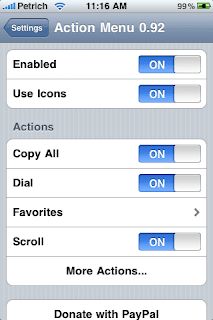
Action Menu for iPhone is quite a handy tweak. It brings the missing feature of clipboard/ pasteboard along with cut copy paste feature available on firmware 3.0/ iPhone 3GS. The tweak works very smoothly and also has a nice loading speed unlike clippy. It also has an advanced version which is paid which brings features like dial, search history etc to iPhone.
Personally its my favourite tweak by cydia as it brings clipboard tab keeping intact all the other features/ tabs like copy, copy all, cut, correction ( inspell) and paste. It also has page scrolling feature/tab included in the free package available for $2.99

To use the tweak you have to go to settings/action menu where you can edit the settings. You have an option to use icons or names for the tabs under its settings.(I prefer using tabs). To add things to the clipboard you need to add them as favorite and then type anything you want.
The only missing feature is that you can’t directly add things to clipboard but I expect the developer to put this feature in the coming updates to the app. To download Read more…

Is the future of Mac…the iPhone?

September 16, 2009 :: Posted by - SoSly :: Category - News

I was chatting with my TUAW colleagues this morning about Mac versus iPhone programming. And as per usual with these conversations, we veered in the direction of unfettered speculation. It’s an occupational hazard.

As someone who regularly develops on both platforms, I declared that the iPhone represents the future of Mac programming. The iPhone, I posited, offers a great new platform without the need to be fully backwards compatible like the Mac. Our own Victor Agreda challenged me to back up that position. After a bit of time and thought, I decided to do so in this post.

My key point is this: Apple’s engineers have learned a lot of important design lessons during the history of OS X. When the iPhone debuted, it gave those engineers the chance to rebuild an OS and an API from the ground up. Those engineers could craft a platform and its libraries that built on the Mac’s successes without Read more…

iPhone Dev: Future Proof Your iPhone 3GS Jailbreak

September 15, 2009 :: Posted by - SoSly :: Category - News

Future-proofing the 3GS jailbreak

If there’s one thing we’ve been stressing the last few weeks, it’s that if you want to keep the jailbreak or unlock on your 3GS, you should resist all urges to install Apple’s official firmware updates without knowing if a jailbreak exists for that version yet.  Unless another (different) bootrom exploit is found for the 3GS that doesn’t require a “foot in the door” with a signed official iBoot, then accepting official updates willy-nilly may cause you to be cutoff from the jailbreak.  And it will definitely cause you to be cutoff from the carrier unlock.

Now, there are ways to ensure that even after taking an official 3GS update (which you really shouldn’t do!), that you’ll nonetheless be able to revert to a jailbreakable 3GS (this is NOT true for the unlock, see NOTE #1 below).  We’ve been explaining these methods (like the iTunes /tmp technique) over the last few weeks, and there’s been some great discussion and feedback for the methods in the comments.

Having said all that, we realize that some of you updated your 3GS to 3.1 anyway.  If you want to come back to the world of the jailbreak (but NOT the sim unlock, sorry!) then saurik’s new “on file” server may be able to help.  He’s Read more…

Downgrade Your iPhone 3GS Using Sauriks Server

September 15, 2009 :: Posted by - SoSly :: Category - News
web server

Thanks to Saurik for all of his hard work. Below is his explanation from saurik.com on how to downgrade your iPhone 3G S and also how to continue using his server for future Apple firmware updates.

Bypassing the Overlord

To this end, I have constructed a server that duplicates the functionality exposed by Apple’s signature server, except using “on file” results rather than live requests.

All we need, then, is to make iTunes use it. Luckily, most operating systems also have the ability to locally define bypasses on specific hostnames through a file called hosts. Using this, we can redirect requests to Apple’s signature server to Cydia.

So, open the file C:\Windows\System32\drivers\etc\hosts (Windows) or /etc/hosts (Mac OS X) and add the following entry to the bottom of the file.

74.208.105.171 gs.apple.com

Now, when iTunes thinks it is talking to Apple, it is talking to Cydia Read more…

Saurik Explains His Ecid SHSH Storage Used By Cydia

September 15, 2009 :: Posted by - SoSly :: Category - News

IMG_0282 IMG_0283 IMG_0284

Caching Apple’s Signature Server

Please, for the love of all that is holy, do not e-mail me if you have problems. Instead, go to ModMyi.com, where there is a special forum called 3G[S] Downgrading, created for the purposes of this article.

Seriously: there is no way I could possibly hope to answer even the number of e-mails I’m currently receiving regarding this, and the article isn’t even out yet. There is this wonderful scene from Bruce Almighty where Bruce sees his e-mail inbox: that happens to me every day. :(

I have very little respect for Apple at this point: I make no secret of this fact. Apple, as a company, has turned into a corporate hypocracy, embodying the very ideals that it claims to be rebelling against. “Think Different”, as a slogan, has become a cold criticism of their own actions with regards to their product lines.

The Next Hope

Apple is not just a computer company: Apple is a movement. This concept was finally and truly cemented in the public mindset when Apple carved itself a lasting place in the history of marketing with its 1984 superbowl commercial for Macintosh.

Styled after the classic Orwellian distopia, 1984, this commercial was set in a future where all aspects of individuality had been stamped out by the overlords, constantly vigilant, watching from their television monitors.

This world, as well as everyone in it, was rendered in a blue and gray: some believe we are to see the overlords as IBM, well reknowned for their corporate beaurocracy, and soon to be hated for trying to control our very thoughts with their bland machinery.

Others, including the creative director of the commercial, Lee Clow, state that the commercial represents the abstract struggle of “the few against the many”: Apple’s Macintosh standing as a symbol of “empowerment”. [Wikipedia]

The True Enemy

However, as time grew on, Apple’s real stance on individual expression and “empowerment” in particular, became clear: they are staunchly against it. Apple’s insistence on controlling the experience of their products sounds very similar to the “garden of pure ideology” expoused by the Big Brother in their own commercial.

Today we celebrate the first glorious anniversary of the Information Purification Directives. We have created, for the first time in all history, a garden of pure ideology: where each worker may bloom, secure from the pests of any contradictory… thoughts.

Our Unification of Thoughts is more powerful a weapon than any fleet or army on Earth. We are one people: with one will, one resolve, one cause. Our enemies shall talk themselves to death and we will bury them with their own confusion. We shall prevail!

The Point of Jailbreaking

This is why many of us (upwards of 10% of all iPhone users, in fact) “jailbreak” our devices: we want choice. We believe that Apple has maintained its lead as the best mobile hardware platform provider, and Read more…

Apple Stores to Get Dedicated iPhone Areas?

September 15, 2009 :: Posted by - SoSly :: Category - News

Apple may be redesigning its retail stores to include dedicated iPhone areas for activation and support, according to MacRumors.

The activation zones will reportedly be staffed by a new category of retail store employee called “iPhone Experts”, who will be denoted by unique name badges and t-shirts. With the move, Apple is clearly looking to streamline the iPhone purchasing experience for customers and provide a dedicated iPhone point of contact within the crowded retail store setting, particularly for new customers whose first experience with Apple products may be the iPhone.

These changes could occur as early as tomorrow…

Read More

Via iclarified.com