
PwnageTool: iH8sn0w Releases Bundles Needed To Jailbreak Firmware 3.1.2
iH8sn0w issued new Bundles for PwnageTool. There are some files within the application that you can add the to the DevTeam’s pwnagetool for Mac, that will enable support for custom firmware 3.1.2 Creation.

There are currently only been issued Bundles for the iPhone and EDGE the iPhone 3G, support for the iphone 3GS is coming soon. So you guys know the bundles that are in this release are not official because they were not issued by the DevTeam. For those of you who don’t mind this isn’t an official Dev Team release dive right in here are the instructions:
Requirements:
- Download Pwnage 3.1.3
- Download Pwnage Tool Bundles HERE
Purpose:
Our goal is to add 2 files within the application PwnageTool to add support Firmware 3.1.2 and its ability to create custom firmware (already inclusive of Jailbreak) iPhone 3G and EDGE for iPhone
Guide:
1. Download the files mentioned in the requirements and unzip to your desktop.
2. Right-click the Mouse on PwnageTool and click on “Show Package Contents”
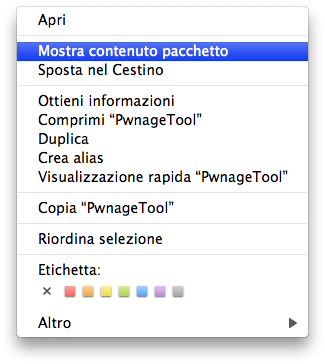
3. Then enter “Contents” then “Resources” and finally “FirmwareBundles”
4. Move the two new bundles you downloaded to the FirmwareBundles folder you opened

5. Launch PwnageTool and proceed normally with the construction of custom firmware, as indicated.
This way, even Mac users (who can not use the GeoHot’s BlackRa1n, which is currently Windows only), can jailbreak the latest firmware.
Tags: 3gs, custom firmware, firmware, iphone, Mac, PwnageTool
October 13th, 2009 at 1:42 am
Not working for my iphone 3G instal only soft 3.1 not 3.1.2 why ???
October 13th, 2009 at 11:41 pm
Doesn’t allow bundles to be moved into folder