
Update: iFile 1.2.0-1 (timebomb fixed)
Download:

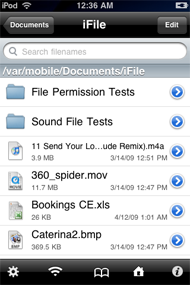
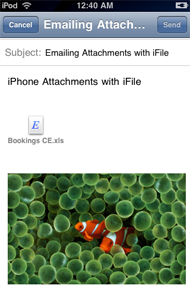
A File Manager and Viewer. iFile is a file manager runnning under user root. It allows fast navigation through the iPhone file system. You can directly view files of various types, e.g. movies, sound, text, HTML, Microsoft types, PDF, various compressed formats. For PDF files direct jumping to pages is possible. ZIP packing and compressed file unpacking is also supported. Files can be sent as email attachments. Text files and property lists can be edited. Folders and files can be bookmarked. In addition, files can be uploaded and downloaded from iFile’s built-in web server.
-More Info Click HERE
Easy Install: Add Theiphonespotrepo.net/apt to your cydia sources, search iFile, install from there.
Manual Install:
- Rename the downloaded deb to ifile.deb
- Copy the file to var/mobile on your iphone
- Open up mobile terminal on your iphone and do the following
- Type in su (press return)
- Type in alpine (press return)
- Type in dpkg -i ifile.deb (press return)
- Reboot or respring and enjoy
Tags: email attachments, file, ifile, iphone, mobile terminal
March 22nd, 2010 at 3:57 pm
the repo is not working
March 22nd, 2010 at 5:49 pm
yes it is, did you type in theiphonespotrepo.net/apt
March 22nd, 2010 at 8:55 pm
I got an error too. Then I made sure I included the ‘http://’ part and it worked fine. Type —>
http://theiphonespotrepo.net/apt
Hope this works for you.
March 22nd, 2010 at 9:36 pm
Why does this version of iFile lose the ability to sort files in ascending or descending?
March 22nd, 2010 at 11:56 pm
repo is nt working on my iphone too..
March 23rd, 2010 at 2:58 pm
its not fully cracked!!!! the search doesn’t work > register for search….
pleas crack this complet not only the register now box delet… thx
(the older version was perfectly)
thx
March 30th, 2010 at 12:20 pm
Yes crack does not work, mine is not registering. Please help.
March 30th, 2010 at 4:07 pm
Uninstall ifile, fgo to var/mobile/library/preferences and delete the heinet.ifile.plist and reinstall ifile then re run and enjoy.
March 31st, 2010 at 8:21 am
SoFly – it still does not work
I uninstalled
Deleted heinet.ifile.plist
installed ifile via terminal and repo
rebooted
Thanks for your help anyways.
March 31st, 2010 at 10:09 pm
Alright try one more thing, install official ifile from cydia and open it up, then use the trial, after doing so you can uninstall ifile and then install the cracked version.. I read around and saw that the cracked ifile uses a keygen to write your unique udid registration code to the heinet.ifile.plist so it needs to be there otherwise the keygen won’t work and won’t register ifile.
April 6th, 2010 at 11:06 pm
it still doesnt work .when i try to add the repo it adds but its not thier . so when i try to go to the repo through manage so i dont have to search for the file it isnt their but it said it added correctly
April 7th, 2010 at 12:15 am
Install it through the iphonspot repo and reboot your iphone and it should apper
May 11th, 2010 at 11:22 am
Hi
Thanks guys, the best repo founded to date. I’m new to iphone world .
.
Italy.
May 11th, 2010 at 12:49 pm
Welcome