I DO NOT CRACK SOFTWARE, I DO NOT HOST THESE FILES, AND I AM NOT RESPONSIBLE FOR ANY DAMAGE DONE TO YOUR IPHONE WITH ANY FILE YOU DOWNLOAD FROM THIS SITE. YOU USE ALL CRACKS AND OTHER DOWNLOADS FROM HERE AT YOUR OWN DISCRETION. Note: If you are a developer and I have posted a crack for your app, I will gladly remove it and all will be done. Just type in a quick message in the shoutbox
June 26, 2009 :: Posted by - SoSly :: Category - Cracks
Download inspell 1.0.1 deb Thanks to let100 for the links
Links removed due to dev asking too.
Easy Install Without Terminal commands:
Create a folder in var/root/Media/Cydia/AutoInstall (case sensitive)
Put the downloaded deb file in the AutoInstall Folder
Reboot your phone
Now after you reboot go into cydia-> tap on sections on the bottom -> go into the system section -> find hunspell and install it
Now in cydia search hunspell and find your languagepack
and install it.
Enjoy auto correct.
If you have problems let me know and ill help you out, and if the autoinstall installation isn’t working try setting the deb permissions to 777 and try the auto install method again. If that doesn’t work use terminal command to install the deb go ***HERE*** for instructions.
June 26, 2009 :: Posted by - SoSly :: Category - Cracks, News
This is from GeoHots blog and if I were you I would do as he says. Thanks GeoHot & Dev Team for all your work!!!
usbdump huh? how?
Apple has added a new layer of security to the iPhone 3GS. I mentioned it several posts earlier; it's the ECID field. When iTunes starts the restore process, they contact Apple servers to generate signatures just for your device. It's important you get these signatures for your phone before a new version of the software comes out. I had previously suggested doing this by dumping usb while the iPhone restores. But this is complicated.
Fortunately, the good folks at purplera1n are here for you, the end user who wants a jailbreak. Follow these instructions to generate a unique certificate for your phones iBSS. And don't delay, Apple may change their minds. To clarify, this is instead of a usb dump. Do this, and you are good!
1. Put your phone into recovery mode and connect it to your computer.
2. Using usbview on Windows(enable Config Descriptors), System Profiler on Mac, or lsusb on Linux, read your phones ECID. It's the 16 digit hex number after "ECID:"
3. Go to purplera1n, type it, and hit enter
4. Save the generated file for a purplera1nyday...
June 25, 2009 :: Posted by - SoSly :: Category - Cracks
Download and install mQuickDo from cydia
Download the Crack ***HERE*** or ***HERE***
Now ssh into your phone and copy the file named mQuickDo to root/applications/mQuickDo overwriting the original. Note: Set permissions to 777
Now ssh the other file named mQuickDo.dylib to root/library/MobileSubstrate/DynamicLibraries/ and replace the original. Note: Set permissions to 777
Respring/Reboot and enjoy
Thanks to gorby.
mQuickDo is the bread and butter for iPhone and iPod Touch.By making use of the (trigger function) of iPhone and iPod Touch,mQuickDo will help you operate iPhone and Touch easily,like exit a program,reboot or power off,switch or quit a task,mute or hang up the incoming call,etc.It will protect “Home”and “Power” button at a high degree, extend the life of your iPhone or Ipod Touch.It’s surely worth a shot!
Functions & Characteristics
Virtual “Home”button As default,to quit a program on either iPhone or Touch,the only way is to press “Home”.As you can think, it will break down soon.If you have mQuickDo,a leftward slide will do to exit a program.
System Tools In default settings,if you want to lock the screen,log-out,reboot or power off,etc. “Power” button is your only choice.But with mQuickDo,a slide at the bottom will take the shortcut menu,and then a click will finish the operation.”Power” button is effectively protected.
Reject Calls If there is an incoming call,with mQuickDo, a slide at the bottom will mute or hangup the call.It’s pretty amazing.
More functions mQuickDo accepts customized gesture,also a light slide will have your operation done.Those shortcuts include:Lock Device,Take a Screenshot, iPod Control and so on.What’s more,there is another eye-catching feature of mQuickDo,that is “App shortcut”,which can make you unlock the screen quickly and start an app.You can directly go to the call screen when it is unlocked, quite convenient!
June 23, 2009 :: Posted by - SoSly :: Category - Cracks, News
Ultrasn0w for iPhone 3G is ready!
Jailbreak your iPhone 3G using redsn0w or PwnageTool (this will also install Cydia/Icy)
Ensure you have upgraded to iPhone OS 3.0
Run Cydia or Icy
Please add the repo repo666.ultrasn0w.com to Cydia or Icy. That last “o” is actually the number zero “0”! If you use the letter “o” you’ll get an error.
Search for ‘ultrasn0w’ in cydia or icy and install ultrasn0w
Reboot your iPhone 3G
T-Mobile USA users should disable 3G before using ultrasn0w
Enjoy but if you have problems here is a detailed way over at iclarified Read More
June 23, 2009 :: Posted by - SoSly :: Category - Cracks, News
As you guys may know nes is the first and I think the most smooth running emulator for the iPhone. The nes emulator came out back in the 1.1.X days and I tell you it was something elese, over time when 2.0 came out it was improved and kept getting better and better. I’ve enjoyed playing roms on my phone till 3.0 that is, I actually went to install nes right after I jailbroke my iPhone on firmware 3.0 and came to a bad realization… It was in the cydia store for $5.99, and that is when i started realizing that cydia is going to change a bit. Ever since the cydia store opened people have been wanting to charge for apps that use to be free and i’m afraid of that it may affect all of us. Below is nes 3.0 thanks to the uploader so follow the instructions and get to playing
Download Nes 3.2 from ***HERE***
Unzip it and you will see nes.app
ssh/disk-aid into your phone and copy the nes.app folder to root/applications/
set folder permissions to 777 and enjoy (Note: If it crashes trying to open ssh into the nes.app folder and set the file NES’s permissions to 777)
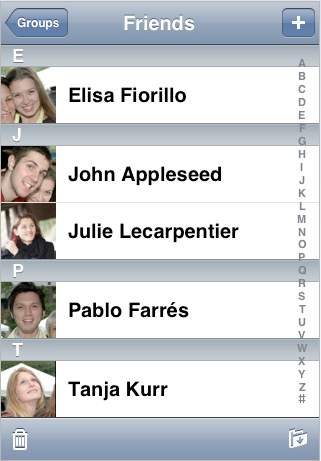
Cyntact:
pic courtesy of pineappleiphone.com
Cyntact was the first package to appear in the cydia store and it is very useful for those of you who have lots of contact pics. I myself don’t have any but i’m sure some of you just have to have pics for every person in your phonebook . This is the new cyntact update 1.2-1 which was recently updated to be compatible with 3.0 download it below (Note: this is not an application it is a feature added in phone.app that puts your iphone contact pics by there names)
Download Cyntact 1.2-1 ***HERE***
Unzip it and navigate to both files that are in the folder which should be named Cyntact.dylib, Cyntact.plist
Drop those two files into root/library/MobileSubstrate/DynamicLibraries/
You may have to respring pr reboot your iphone for the changes to take affect
June 21, 2009 :: Posted by - SoSly :: Category - Cracks, News
Hi everyone!
I’ve been laying low for a long time now. But I am back and coming full steam ahead!
I just received my iPhone 3GS, and to many it may seem like a rediculous upgrade…But wait til you see this video!
You see, the iPhone 3GS has had a large upgrade in the performance department. It’s very powerful CPU and GPU, its guts are very similar to the OpenPandora.org’s Pandora project. They both have an ARM Cortex A8 processor, and they both have the PowerVR SGX video chipset. The iPhone 3GS clocks in at 600MHz too!
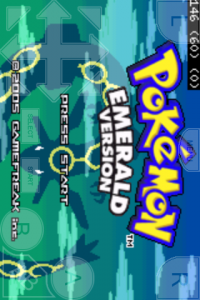
These similarities have me quite excited! While working with my Pandora MK2 devkit I have made psx4pandora, which has many games running fullspeed (60 FPS for NTSC) with sound @ 500MHz. The iPhone 3GS sounds suited for psx4iphone now!
The catch? There’s currently no jailbreak for the iPhone 3GS.
The temporary solution? I’m codesigning my emulator binaries for my own use.
The result is shown in the video below where you can see gpSPhone running at a minimum 150 FPS and maxing out at about 225 FPS, with sound and 0 frameskip! This is a HUGE performance increase where the iPhone 3G needed frameskipping just to reach 60 FPS!
Some technical notes on this build: For some reason gpSPhone is able to fit the dynarec memory it uses in executable memory. So I lucked out and was able to get the dynarec working on the iPhone 3GS without a jailbreak. I’m curious as to why this can even occur. Typically you need a jailbroken firmware to allow memory to be made executable for dynarecs to work. I’ll have to see if psx4iphone will work next!
This is an exciting moment for iPhone gaming! Subscribe to my YouTube channel and discuss below!
June 13, 2009 :: Posted by - SoSly :: Category - Cracks, News
For more info on iSmartDialer Check Out There Website At http://www.ismartdialer.com/
Step 1. Download the latest iSmart Dialer from cydia & activate it to get the 10 day trial
Step 2. Download the patch made by oronav over at xsellize HERE or HERE
Step 3. SHH into your phone and place the crack (iSmartDialerHook_ in rar above) into /applications/ismartdialer.app
Step 4. open ismart dialer and place anything in for email and activation, hit activate and agree to the license
Step 5. when it says do u wanna update, click yes and update. once its update it will break the crack.
Step 6. open ismart dialer again and choose start trial (not activate) it will tell you that you have 10 days left. close ismart dialer
Step 7. place the crack in once more (in /applications/ismartdialer.app) open and close ismart dialer (you should no longer get a trial message, but it will still ask to update Do not update!)
Step 8. enjoy ismart dialer (its will be version 2.2-2, but its free so u cant complain) i have rebooted and the crack and activation both stayed
Thanks to SecretSociety over at Xsellize for the instructions and Oronav At xsellize for the patch.
Make a little donation and help me out, I like keeping this site up to date with the latest iphone news, cracks, and hacks. Any little bit helps so click that button above and Thanks to those who donate. Don't forget to look for your name on the support page.