Adobe: Lack of Flash on iPad Limits Publishers and Consumers

January 28, 2010 :: Posted by - SoSly :: Category - News

Adobe has posted their thoughts on the iPad’s lack of Flash noting that Apple continues to impose restrictions on their devices which ‘limits both content publishers and consumers’.

—–
It was really exciting to see some of the technologies that Adobe has contributed to, like PDF and ePub support, taking center stage in the launch. Adobe technology is at the center of virtually every print and digital workflow, so undoubtedly a lot of what you¹ll see getting delivered to the iPad will have originated in Adobe creative software. Read more…

Five iPad Accessories To Be Available At Launch

January 27, 2010 :: Posted by - SoSly :: Category - News

There will be five Apple-branded iPad accessories available at launch. We already mentioned a few of them earlier, but here is the complete rundown (with official product photos):

iPad Keyboard Dock
The Keyboard Dock is a dock for charging your iPad, integrated with a full-size keyboard. The dock has a rear 30-pin connector, which lets you connect to an electrical outlet using a USB Power Adapter, sync to your computer, and use accessories like the Camera Connection Kit. And an audio jack lets you connect to a stereo or powered speakers. The dock will sell for $69. Read more…

Apple iPad Pricing, Data Plans, Availability

January 27, 2010 :: Posted by - SoSly :: Category - News


Apple has finally released their long awaited tablet. Here’s how much it will cost you and when it will be available.

Hardware Costs
The iPad comes in three sizes: 16GB, 32GB, 64GB.

You have the choice of purchasing the device with or without 3G Internet access.

iPad 16GB: $499
iPad 32GB: $599
iPad 64GB: $699

iPad 16GB 3G: $629
iPad 32GB 3G: $729
iPad 64GB 3G: $829
Read more…

Was The iPad Supposed To Have A Camera?

January 27, 2010 :: Posted by - SoSly :: Category - News

The just released iPad Emulator contains functionality that suggests the iPad was supposed to have a camera.

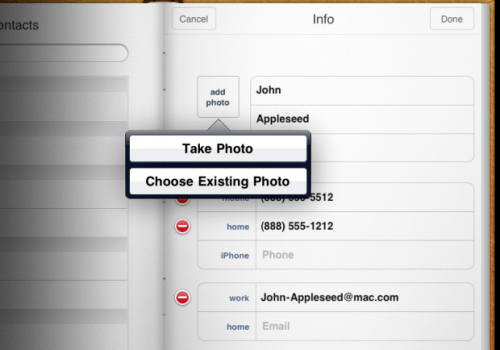
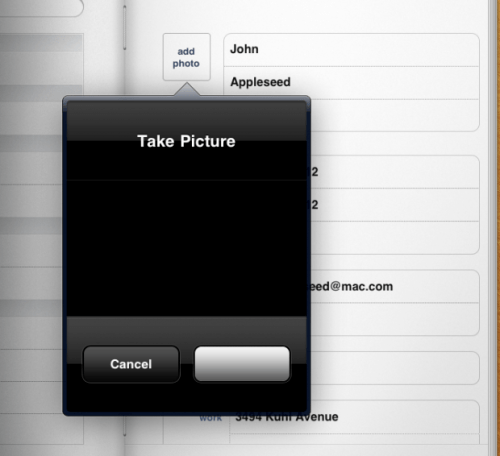
Crunchgear found that within the iPad’s contacts application is an “Add Photo” button. When pressed the button pops up a menu asking you to “Choose Existing Photo” or “Take Photo”. If you press the “Take Photo” button it opens a preview window which is supposed to display what the camera sees.

So what’s going on here? Did the iPad once have a camera, and it was pulled on such short notice that they didn’t have time to strip it out of the software? Read more…

Apple Lifts 3G VoIP Restrictions for iPhone Apps

January 27, 2010 :: Posted by - SoSly :: Category - News

Apple has updated the iPhone developer SDK to allow VoIP over cellular networks, according to a press release from iCall.

—–
iCall is the first and only VoIP application that functions on the iPhone and iPod Touch over cellular 3G networks.

iCall is a market leader in desktop and mobile-based desktop calling platforms, including its highly popular version for the Apple iPhone. Until today, restrictions imposed on developers prohibited VoIP functionality on any 3G network.

VoIP on the iPhone has been the source of many debates with companies such as Google being denied access to the platform and the FCC inquiring as to the restrictions in the Apple App Store; iCall is one of the few VoIP applications that has been permitted by Apple to operate on the iPhone platform. Read more…

Engadget: The iPad Hands On

January 27, 2010 :: Posted by - SoSly :: Category - News

Here it is folks, the Apple iPad. The screen is gorgeous, tilting is responsive, and the thing is super thin. Still, if you’ve used the iPhone before — and you can see the two devices side-by-side here — there’s not a lot of surprises here so far. Here are some initial thoughts on the iPad:

  • It’s not light. It feels pretty weighty in your hand.
  • The screen is stunning, and it’s 1024 x 768. Feels just like a huge iPhone in your hands.
  • The speed of the CPU is something to be marveled at. It is blazingly fast from what we can tell. Webpages loaded up super fast, and scrolling was without a hiccup. Moving into and out of apps was a breeze. Everything flew.
  • There’s no multitasking at all. It’s a real disappointment. All this power and very little you can do with it at once. No multitasking means no streaming Pandora when you’re working in Pages… you can figure it out. It’s a real setback for this device.
  • The ebook implementation is about as close as you can get to reading without a stack of bound paper in your hand. The visual stuff really helps flesh out the experience. It may be just for show, but it counts here.
  • No camera. None, nada. Zip. No video conferencing here folks. Hell, it doesn’t have an SMS app!
  • It’s running iPhone OS 3.2.
  • The keyboard is good, not great. Not quite as responsive as it looked in the demos.
  • No Flash confirmed. So Hulu is out for you, folks!

[Via engadget.com]

Video Demo of iBlueNova 3.0

January 27, 2010 :: Posted by - SoSly :: Category - News

iSpazio has posted a video demonstration of iBlueNova, the update to iBluetooth for the iPhone 3.x firmware

iBlueNova is in beta 4 and will be released very soon. It is an application by MeDevil which enables bluetooth file transfer via iPhone.

[Via iClarified.com]

Firewall IP 1.30 Free

January 26, 2010 :: Posted by - SoSly :: Category - Cracked .deb's, Cracks

Download:

Thanks to sp4m over at xsellize for the upload. If you like it buy it, this is brought to you buy a very respected person in the iphone scene.

  • After downloading rename the deb to block.deb
  • Copy it to var/mobile on your iphone and install using ifile or do the following
  • Open Mobile terminal
  • Type in su (press return)
  • Type in alpine (press return)
  • Type in dpkg -i block.deb (press return)
  • Reboot or Respring and enjoy


Description:
- Block outgoing TCP & UDP connections selectively
- Shows you the hostname for the connection
- Block analytic providers which PrivaCy can’t
- Block unneeded content
- Easy to use interface & control app
- Edit the rules you did set
- Add apps manually
- Low memory & CPU consumption
Cydia itself and Apple’s native apps are excluded for obvious reasons.

The First Unofficial Apple Tablet Software Announcement

January 26, 2010 :: Posted by - SoSly :: Category - News

It had to happen. Somebody had to be the first to announce software for a still-nonexistent piece of hardware.

A lot of us in the business of reporting Apple news and rumors were waiting for the shoe to drop on tablet-related software announcements. Sure enough, developer Ben Gottlieb has taken the bold step of announcing an “iPad” (please let that not be the name…) app in development.

Gottlieb’s Stand Alone, Inc. announced today that they’re working on a larger version of their popular Crosswords iPhone app. As Gottlieb mentioned, “The main constraint in developing a Crossword app for mobile devices has been the distinct lack of screen real estate. We have been anticipating the Apple tablet as the greatest piece of hardware for App developers since iPhone itself, and Crosswords will be even better on the new device.” Read more…

McGraw-Hill Spills The Beans On An Unreleased Apple Tablet??

January 26, 2010 :: Posted by - SoSly :: Category - News


McGraw-Hill’s CEO Terry McGraw is obviously very excited that he’s been asked to work with Apple on a brand new type of computer, and he just couldn’t wait another 24 hours to tell somebody — he showed up on CNBC today to talk about his company’s latest earnings, and he more or less spills the beans, saying that Apple will “make their announcement tomorrow,” that the tablet will be “based on the iPhone operating system,” and that it “will be transferable” (so anything on iTunes now will go straight on the tablet?). Read more…