Dev Team Releases Update To PwnageTool, 3G S Compatible

October 03, 2009 :: Posted by - SoSly :: Category - News

Dev Team Blog
The dev team has finally released an update to their pwnage tool that makes it compatible with the iPhone 3G S. Below is what they posted on their blog.

Here are some details on our latest version of PwnageTool for Mac OS X that adds support for the 3.1 release of the iPhone software for iPhone 3GS and iPod Touch 2G.

SUMMARY:

The iPhone 3GS is now supported in PwnageTool 3.1.3, assuming the phone was pwned at 3.0 or 3.0.1 – PwnageTool does not support the 3GS out of the box. If your iPhone 3GS has 3.1 preinstalled and is not Pwned then there is no tested jailbreak solution at the moment. Read more…

iPhone 3GS 3.1 Jailbreak/Unlock PwnageTool Release Imminent

October 03, 2009 :: Posted by - SoSly :: Category - News

iphone_pirate_2

For those of you who have patiently been waiting to jailbreak your iPhone 3GS with the 3.1 software, your patience is about to pay off. According to MuscleNerd all of the testing is complete and the new PwnageTool is almost ready to be released to the public.

Regarding the iPhone 3GS 3.1 software unlock, if you have already updated to the official 3.1, there still is no known way to unlock your device. In order to unlock the 3.1 software Read more…

Fool Proof Tutorial: Activate MMS 100% On Firmware 3.0

September 26, 2009 :: Posted by - SoSly :: Category - News

I have noticed a lot of people having trouble with mms working. I have written fool proof instructions to get your mms 100% working if you are using an iPhone 3G or a 3GS. If the following does not get your mms working I suggest you call AT&T and make sure they didn’t forget about unblocking mms on your account. Of course you can tell them a little white lie when they ask you if your on firmware 3.1.

Note: If you do the following be sure to uninstall any tethering hack you have installed on your jailbroken iphone. Whether it be the mms/tethering hack from cydia or just the downloaded mobile config files from websites. Uninstall all of them and the reset your network settings before doing the following.

The download below is the 5.5 ipcc carrier settings update AT&T pushed out today to enable mms. The file has been edited by stealthbravo over at modmyi for us users who are wanting to stay on firmware 3.0. The edited file adds the internet tethering option and cellular data network settings along with the correct mms settings. The official unedited file adds mms but you don’t get the tethering option or the ability to edit your cellular data that is why if your like me, you will use this very helpful file that adds the extra features.

  • Download Edited IPCC File HERE

After downloading the ipcc wait… You still have to do a few extra steps before using it because itunes doesn’t allow you to update your carrier settings using the ipcc file. Do the following exactly as stated: Read more…

Flickr App Arrives for iPhone

September 25, 2009 :: Posted by - Thomas :: Category - News

Flickr App

Flickr had iPhone as the most popular camera but iPhone owners had to use different apps such as Shozu to upload photos on Flickr. To end this woe, the official Flickr app for iPhone users has arrived at the Apple App store. The free Flickr App allows uploading and sharing of photos as well as videos on Flickr site. Read more…

TomTom Car Kit for iPhone Appears in Apple’s European Online Stores

September 24, 2009 :: Posted by - SoSly :: Category - News


TomTom’s much-anticipated iPhone GPS car kit has appeared on a number of European Apple online stores, including the UK store. Scheduled to ship in 2-3 weeks, the kit is priced at £99.95 (US$164.10) in the UK and 99.95 Euro (US$147.90) in other European countries, which includes the TomTom iPhone application.

Did you notice?

You get both the TomTom navigation app for your iPhone 3GS or 3G and the docking kit to hold your iPhone securely in place on your dashboard or windscreen.

Details on the car kit, including the user guide, were posted to the U.S. Federal Communications Commission’s site late last month. The kit, which had been expected to be launched this summer, was pushed back to an October release earlier this month.

TomTom’s car kit contains an external GPS receiver and other hardware features and has been claimed to be compatible with the iPod touch and other GPS iPhone applications from other vendors, but Apple’s product description makes no mention of compatibility with those offerings.

Via macrumors.com

3GS Downgrade Assistant

September 18, 2009 :: Posted by - SoSly :: Category - News

Anyone familiar with the “manual” downgrade their iPhone 3GS has from 3.1 to 3.0 times the problems should look at this program, “Assistant 3Gs downgrade” from difrnt.com cares about the hosts file and helps you step by step in activating the DFU modes.

Afterwards you can then proceed according to our instructions (from step 3).

The 800KB great program is only available for Windows and, of course, costs nothing.

Download

Screenshots:

Click the image to open in full size.

Click the image to open in full size.

Click the image to open in full size.

via touch-arcade.com

iTwinge Adds a Physical Keyboard to your iPhone

September 16, 2009 :: Posted by - SoSly :: Category - News

the oddly named iTwinge, an iPhone sleeve that does the trick in the simplest of fashions: it merely covers the software keys with real, physical ones. Cool, one might think for a split second: I can finally type without looking! However, a closer inspection of iTwinge reveals a number of problems.

First of all, it makes your iPhone a lot fatter than such a sexy gadget should be. Furthermore, iPhone’s keyboard has some advantages over physical keyboards: it adapts to different situations (for example, the “.com” key is only there when you need it), it gives you a choice of typing some alternative symbols if you press and hold a key, etc. None of those will really translate well to iTwinge. Not to mention the fact that it won’t work particularly well when you flip the iPhone over to its side.

Still, it might be useful in certain situations. For example, if you must write a blog post or a long email, and the only device you have at your disposal is the iPhone, iTwinge might come in handy. According to the manufacturer, “an average user will improve their speed by 30% to 40% and simultaneously reduce typing errors by 70 – 80%”.

If you’re interested, bear in mind that it must be plugged into the iPhone, and it uses some of its power, but luckily it doesn’t require any software. It works with the iPhone 3G and 3GS and you can get it for the price of $29.99.

Via mashable.com

New iPod Touch Speed Tests Up to 50% Faster Performance

September 16, 2009 :: Posted by - SoSly :: Category - News

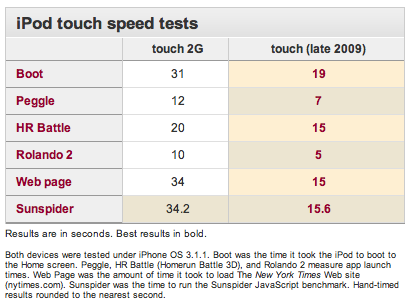
At Apple’s “It’s Only Rock and Roll” media event last week, the company introduced new iPod touch models with 32 GB and 64 GB capacities, advertising the devices as offering “up to 50 percent faster performance”. Macworld has performed speed tests comparing the new iPod touch to the previous-generation model, and found that on a number of tasks the new model does meet or exceed Apple’s performance claims.

The speed tests conducted were similar to ones run in June on the iPhone 3GS, and while the new iPhone running Apple’s just-released iPhone OS 3.1 was not included in the latest comparison, the new iPod touch appears to even be slightly faster at some tasks than the iPhone 3GS.

But it’s not just in benchmarks such as these where the new iPod wins out. Just as the iPhone 3GS was faster than the iPhone 3G at everything, the new iPod touch feels much faster at any task you throw at it: applications launch (and quit) faster, Web pages load more quickly, processor-intensive games and programs perform better — you name it.

We’ll be testing the latest iPod touch’s performance — compared to both the previous touch and the iPhone 3GS — for our official review, but it’s clear that Apple has beefed up its newest touchscreen device.

Via macrumors.com

The Reason New iPod Touch Didn’t Get A Camera

September 15, 2009 :: Posted by - SoSly :: Category - News

ipod-touch-leak-reveal-rm-eng

Everyone, including Steve Jobs, has very reasonable sounding theories as to why the third gen iPod touch camera was removed. Rather than rehash it again, however, we thought we’d let our minds wonder into parody, and consider what might have happened in a world only slightly more cartoonish than ours…

Steve Jobs, fresh from his recent leave of absence, comes crashing back into Apple’s Cupertino campus, and after fixing the typography on the iPhone 3G S 3GS, tweaking some pixels on the Snow Leopard UI, and spending time meditating deep in the iTablet vault, he heads over to the scorched closet that used to be reserved for iPhone A2DP testing…

“64GB a go?” he demands. “Good”

“Is it thinner?” grumble. “Next year…”

“What about those ultra-tiny auto-focus 3 megapixel Read more…

Firmware 3.1 Enables Native Video Editing On iPhone 3G & iPod Touch

September 13, 2009 :: Posted by - SoSly :: Category - News

A few days ago, Apple released the firmware update to version 3.1 to 3.1.1 for iPhone 3G and iPod Touch. Playing with the new version of software, some users have just noticed that the iPod Touch and the iPhone 3G (without jailbreak) integrate all the functions of video-editing, exactly like the iPhone 3GS!

IMG_0005 IMG_0006

Via ispazio.net