Spirit Jailbreak Fixed for iTunes 9.2

June 28, 2010 :: Posted by - SoSly :: Category - News

The easiest jailbreak out to date has been unofficially updated to support iTunes 9.2. Some of you may know that the latest itunes update pushed out by Apple broke spirit, a program to jailbreak all idevices on firmwares 3.x. This update does not jailbreak iPhone 4 nor the firmware ios 4.0, it is just an update for it to be compatible with itunes 9.2.

  • Download: Spirit For iTunes 9.2 Windows

Jailbreak: How To Get Your iPhone 4 SHSH Blobs

June 28, 2010 :: Posted by - SoSly :: Category - News

For those of you with shiny new iphone 4′s this is an important step if your wanting to jaibreak. SHSH blobs are signatures for your iphone that allow you to restore to a certain firmware. When Apple releases a new firmware it stops issuing your signature to restore to that old firmware and only issues the newer firmwares signature so you can only restore to the newer non jailbroken firmware. Having these shsh blobs will allow you to restore to old firmwares, even if Apple isn’t signing it anymore. Read more…

Jailbreakers: Questions Answered Before Updating To IOS 4.0

June 19, 2010 :: Posted by - SoSly :: Category - News

Apple will officially be pushing out ios 4.o on Monday and a lot of you anxious i-device owners are ready to click the update button. For you jailbreakers out there, you should all know that updating to a new firmware will cause you to lose your jailbreak and unlock along with all of your 3rd party cydia apps. Before everyone starts asking questions about when, where, and how you can jailbreak the new firmware, here are a few things to know. Read more…

How To Jailbreak Your iPad, iPhone 3GS, iPod Touch With Spirit

May 02, 2010 :: Posted by - SoSly :: Category - News

To all the new jailbreakers and to all of those wondering how spirit looks and works, I have made a video tutorial on how to jailbreak your i-device with the newly released spirit jailbreak by comex and the dev team.

Note: If using an unlock be careful when restoring, use sauriks server to restore to original 3.1.2 firmware

  • To get an untethered jailbreak if your tethered you must restore to original firmware first either 3.1.2 or 3.1.3 depending if you need your unlock.
  • After doing so you can jailbreak using spirit and you will have an untethered jailbreak

How To Save Your iPad, 3GS, iPod Touch SHSH File

April 30, 2010 :: Posted by - SoSly :: Category - News

To everyone that wants to be sure and get there shsh’s saved before sauriks server gets slammed with shsh requests from every jailbroken user in the world plus the new ipads on the market, I suggest you get your shsh blobs now. The main reason i say this is because saurik can’t handle all requests at one time and sometimes you will get a pending message when you open cydia. Remember that spirit is a user land jailbreak meaning that Apple is going to release a new firmware very soon after it’s release so for those of you who aren’t at the front of the line getting your shsh’s saved with sauriks server using cydia and your pending, say goodbye to your shsh blobs since apple stops issuing those as soon as a new firmware comes out and that is where saurik pulls your shsh’s from.. I apologize for the long rant but I just want my readers to know its better to be safe than sorry.

Dev Team: Calm Before The Spirit Storm

April 29, 2010 :: Posted by - SoSly :: Category - News

At some point after (don’t ask when!) the iPad 3G is actually in customers’ hands, the first “userland” jailbreak since firmware 1.x will be released by @comex.  It’s called “Spirit” and was first demonstrated working on an iPad by @MuscleNerd within 24 hours of the iPad’s release on April 3.

Userland jailbreaks are more troublesome for Apple since they expose security weaknesses that exist even for non-jailbroken owners.  As such, Apple is likely to close them soon after they’re made public. One recent example of this is the SMS vulnerability exposed at Blackhat last summer.  Apple released new firmware to close that hole within a day. Read more…

iPhone Baseband 5.12.01 Exploit Found??

February 11, 2010 :: Posted by - SoSly :: Category - News

So earlier today there was a little rumble in the unlock world,via Twitter, as a new exploit was rumored to be found for the new iPhone 3.1.3 firmware’s baseband 5.12. Sherif Hashim managed to crash the baseband, which in turn could possibly be used for an unlock.

A little while later MuscleNerd of the iPhone DevTeam, confirmed that it was a legit find. Read more…

Tuaw Tutorial: Downgrade Your 3.1.3 iPhone to 3.1.2

February 09, 2010 :: Posted by - SoSly :: Category - News

Last week I downloaded (but did not install) the iPhone OS 3.1.3 firmware for my 3GS. I wanted to have a copy of the firmware on hand, but didn’t want to upgrade right away. I checked “Do not ask me again” and clicked Download Only. I thought that was the end of the matter.

Unfortunately, this Sunday, I plugged in my iPhone and left the room to grab some tea. When I returned, the iPhone was 50% of the way through the 3.1.3 firmware upgrade procedure. It did something I had no idea that it would do: it upgraded me without asking. Read more…

Jailbreakers Do Not Update To Firmware 3.1.3

February 02, 2010 :: Posted by - SoSly :: Category - News

The Apple iPhone Firmware version 3.1.3 is now out. Please do not upgrade until further notice by the iPhone Dev Team.

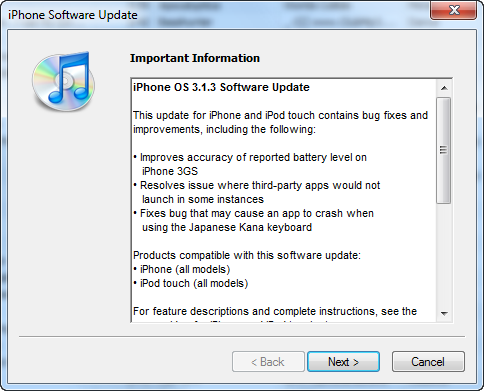
This update for iPhone and iPod touch contains bug fixes and improvements, including the following:
• Improves accuracy of reported battery level on iPhone 3GS
• Resolves issue where third-party apps would not launch in some instances
• Fixes bug that may cause an app to crash when using the Japanese Kana keyboard

[Via iClarified.com]

Fix Cydia Crashing Dec. 28

December 28, 2009 :: Posted by - SoSly :: Category - News

There is a problem with a particular source this morning. Signs point to it being Zodttd’s repo sending data that Cydia has a problem with. This causes Cydia to go into a crashing loop.

You should NOT need to restore your firmware to fix this problem. Please have patience, a fix is being worked on. If the coming solutions do not help there is still the possibility that a restore may be needed.
Update #1: Some good advice and instructions in the comments below. You can also try the FIXES AND SUGGESTIONS HERE, as the problem is the same as it was then. You must remove the zodttd source list that is causing the problem.

Update #2: A quick fix for some (works only if you have apt7 installed)

  • Log-in as root using MobileTerminal or SSH and run this command:
  • apt-get update
  • This will update your lists and then Cydia should work.

Via thebigboss.org