Bing to Replace Google As Default Search Engine on iPhone?

January 20, 2010 :: Posted by - SoSly :: Category - News

Businessweek reports that Apple and Microsoft are currently in negotiations to replace Google as the default search engine on the iPhone with Microsoft’s Bing.com. The talks have reportedly been underway for weeks.

Businessweek cites the increasing rivalry between Google and Apple as one of the reasons behind the discussions.

“Apple and Google know the other is their primary enemy,” says one of the people, who’s familiar with Apple’s thinking. “Microsoft is now a pawn in that battle.” Read more…

G-Fi Puts GPS On Your First Gen iPhone/iPod Touch

January 16, 2010 :: Posted by - SoSly :: Category - News

I love my iPhone, but I have to say that there is one little thing wrong with it: it’s a first generation. That means that I can’t quite play all of the games, or record video, or do all of the cool GPS things you kids can do nowadays. It’s not a really bad thing — I can still do a good 99% of the things that a 3GS can do, and I get plenty of usage out of mine anyway — but it is kind of a pain waiting for my Google maps to update over Edge, or not having turn-by-turn directions when I want them.

Fortunately, there are already ways to get GPS going on my 1st gen, and here’s another one. The G-Fi is a little box that will add GPS to your first generation iPhone or iPod touch. Unfortunately, this one is probably a little too hardcore for me Read more…

Samsung Introduces It’s New 64GB NAND

January 13, 2010 :: Posted by - SoSly :: Category - News

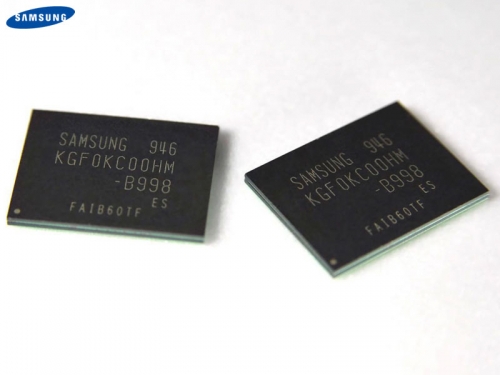
Samsung, has announced a new 64GB memory moviNAND that could be used in next-generation iPhone that may be arriving in the summer like every year.

The new chip measures 1.4 millimeters in height, composed of 16 30nm-class 32Gb MLC NAND chip and a controller. Each presentation of an Apple iPhone has always doubled the size of the maximum capacity. We expect, therefore, that the next generation iphone will have a 64GB model and these could be the chips that could be used.

Toshiba, meanwhile announced the upcoming release of 64GB NAND chip, so Apple will have the opportunity to choose between the two. We’ll see!

[Via ispazio.net] Translated by google

Appsidy New Cydia Store Payment Method and Sauriks Thoughts On It

December 21, 2009 :: Posted by - SoSly :: Category - News

As the iPhone becomes more and more popular to the world there is no doubt that jailbreaking the iphone has also gotten very popular. As a matter of fact jailbreaking the iphone has gotten so popular it has been featured on many reputable websites such as cnet.com, tuaw.com, and the list goes on. My point is that jailbreaking the iphone is allowing us the users to be able to do more than we could have imagined whether it be making our iphone a wireless router, to allowing us to make voip calls using skype and 3g unrestrictor.

Now that you know where jailbreaking the iphone is going we can speak of cydia and the business aspect of jailbreaking. For you the user jailbreaking is to get all of the goods but for developers it is like a gold mine with a lot of revenue potential. A year ago you had to purchase an application from cydia by downloading an app and paying the developer however he wanted you to pay whether it was through paypal or some other payment type. Read more…

Updated Link: Longitude 1.0.4 Cracked

December 10, 2009 :: Posted by - SoSly :: Category - Cracked .deb's, Cracks

Download:

download

Longitude automatically updates Google Latitude with your iPhone’s location on a set interval.
Your Google credentials are transmitted securely to Google, and never sent to our or any third party servers. As Apple does not allow applications to run in the background, and in order to update Latitude on a regular basis, Longitude must run in the background, this application is only available for jailbroken phones.

Note: You have to sign up for google latitude http://www.google.com/latitude/intro.html to use this. Once again thanks to studguy1 over at xsellize the only forum that has crackers!!!!

  • After downloading the deb above rename it to long.deb and copy it to var/mobile on your iphone
  • You can either install it using ifile or by opening mobile terminal and following these directions
  • Type in su (press return)
  • Type in alpine (press return)
  • Type in dpkg -i long.deb (press return)
  • Respring or Reboot and enjoy

- App Sends following user stats to PinchMedia (Disabled in the crack) Thank You Studguy1
– UDID
- iPhone Model
- Firmware Version
- Application Version
- Current Location (Latitude,Longitude)


Should You Use An App That Apple Rejected??

November 17, 2009 :: Posted by - SoSly :: Category - News

It doesn’t happen so much anymore, but not too long ago you’d hear about a new offering arriving in the App Store that would stir up a little controversy (the NetShare tethering app springs to mind). They’d enjoy some fanfare and a ton of purchases for a few days before being summarily removed, never to return and often without a thorough explanation from Apple. A relatively small number of users would retain possession of the app and would take a bit of pride in knowing that they were in the right place at just the right time to snag a copy of the app before it was yanked.
Read more…

Aphonia A6 Chinese iPhone Clone Running Android OS

November 11, 2009 :: Posted by - SoSly :: Category - News

Have you ever tried to imagine the iPhone with an operating system other than Apple’s iPhone OS. The Chinese certainly have and they successfully made an iphone clone as usual running the Google Android OS 1.5, this is quite interesting as it brings ideas and speculation about running other OS’s on the iPhone. Oh how we can only dream of being able to boot an iphone and choose which OS to run such as symbian, Android OS, heck even the Palm Pre’s OS and yet it again it will only be a dream.

Verizon Turns To Android To Compete With Apple’s iPhone

October 07, 2009 :: Posted by - SoSly :: Category - News

Verizon has teamed with Google to bring two Android-powered phones and the Google Voice service to its network, in an effort to fight off the iPhone and its exclusive agreement with AT&T.

Together, the two companies plan to create, market and distribute both products and services featuring Android-powered phones on the Verizon Wireless network. The two companies plan to co-develop handsets that will come with “innovative applications” created by both, as well as third-party developers already seen on the Android Marketplace. Read more…

Is Google Spamming the iPhone?

October 04, 2009 :: Posted by - SoSly :: Category - News

Apple’s recent purchase of PlaceBase, a company that produces a maps API called Pushpin, has illustrated to many Apple’s intention of competing with Google, which, for now, largely dominates the digital mapping landscape.

As the days pass amidst our heightened awareness of Apple’s potential aims, more evidence surfaces as to why Apple may have more reason than ever to “map” out a new, more competitive course for itself. Read more…

Google Sync Updates with Push Gmail Support

September 23, 2009 :: Posted by - SoSly :: Category - News

Google Sync, released earlier this year, keeps your calendar and contacts synced between your mobile phone and Google account. Now they’ve added that great, final bit of ultimate sync support by pushing Gmail to your phone.

If you’re sporting an iPhone/iPod Touch, Windows Mobile phone, or Nokia S60 phone, you can now set up Google Sync to actively push your email to your device, ensuring you’re never stuck waiting around for an update to see what’s new or wondering if various work-around alternatives will follow through. From the Official Google Mobile Blog:

Sync works with your phone’s native email application, so there’s no additional software needed. Only interested in syncing your Gmail, but not your Calendar? Google Sync allows you to sync just your Contacts, Calendar, or Gmail, or any combination of the three.

Check out the full post at the link below to see how to get Google Sync if you’re not already a user and how to enable Gmail syncing if you’ve already got a Google Sync account.

Go HERE to set up your gmail and start recieving push email for free

Via lifehacker.com