PreBrowser Cracked

December 31, 2009 :: Posted by - SoSly :: Category - Cracked .deb's, Cracks

Download:

  • After downloading the deb rename it to pre.deb
  • Copy it to var/mobile on your iphone and install using ifile or do the following
  • Open mobile terminal
  • Type in su (press return)
  • Type in alpine (press return)
  • Type in dpkg -i pre.deb (press return)
  • Reboot or Respring and enjoy

Big thanks to iPhonix 91 over at xsellize for the upload and screenshots

PreBrowser is a Palm Pre themed, full screen, tabbed browser for the iPhone. This will definately look great running along side proswitcher so you palm pre enthusiasts give it a shot.

Once you launch your browser, you can on then click on the Menu button, located in the top left, to do the following:

* link on any website by entering their addresses (Go to ..);
* open a new tab (new tab);
* add to my favorites (Add to bookmarks);
* Favorite show (show Bookmarks);
* send by mail the link you are visiting (Mail link);
* open the link in Safari;
* clear history (Clear History);
* hide the menu (Hide).

PreBrowser is available for purchase from the Cydia Store for $1.99.

Update: Dock 1.0.1 Cracked

December 30, 2009 :: Posted by - SoSly :: Category - Cracked .deb's, Cracks

Download:

  • Rename downloaded deb to dock.deb
  • Copy to var/mobile on your iphone and install using ifile or do the following
  • Open up mobile terminal
  • Type in su (press return)
  • Type in alpine (press return)
  • Type in dpkg -i dock.deb (press return)
  • Reboot or Respring

Thanks to studguy1 over at xsellize for the update and the crack

Description: Dock is a app like Dock of Mac OSX,that can manage the background processes, app shortcuts, quickly switching between apps. Operation simple and quick.

• Multi-task manage,background app quickly switch.
• Customizable app shortcuts, you can add many app as shortcuts.
• Quickly open app and quickly switch between apps, in the lock-screen can also be operational.
• More than one way to show Dock,double-tap Statusbar, left/right corner slide up, QuickDo gestures.
• A variety of display, rotating icons and does not rotate.

Evidence of an 8GB iPhone 3GS?

December 29, 2009 :: Posted by - SoSly :: Category - News

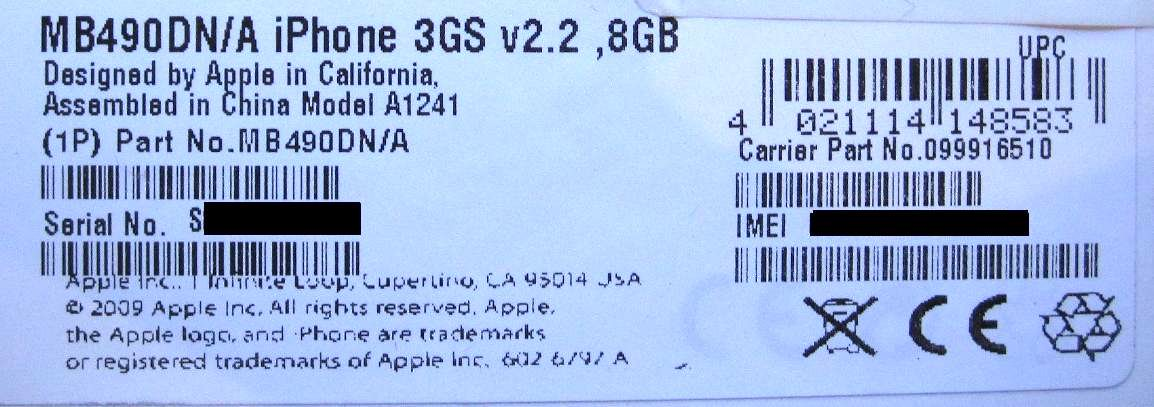
A German iPhone user has reported receiving a refurbished iPhone 3G in a box labeled for an 8GB iPhone 3GS. “David,” a moderator on the apfeltalk forums, has posted a photo (Translated Link) of the box’s serial number/IMEI label, which clearly says “iPhone 3GS v2.2, 8GB;” iPhone 3G S also appears on the box’s contents label. David reports that the phone inside is indeed an iPhone 3G, running software 3.0.1, despite the box’s markings. Evidence of an 8GB iPhone 3GS model appeared as early as this August in a supposed internal Rogers Wireless memo and on the carrier’s website; it is expected that this new low-end model would replace the current 8GB iPhone 3G in Apple’s lineup.

Via ilounge.com

AT&T Resumes Online iPhone Sales To New York City Residents

December 28, 2009 :: Posted by - SoSly :: Category - News

AT&T has resumed taking iPhone orders from New York City residents through its website after blocking the sale of the handsets to New Yorkers this past weekend for reasons the carrier has been unwilling to explain in detail.

The sales suspension drew hundreds of headlines from technology websites on Monday, fueling suspicions that the move was yet another sign that the exclusive US iPhone carrier was unable to support the brunt of the handset’s popularity in dense metropolitan areas.
Read more…

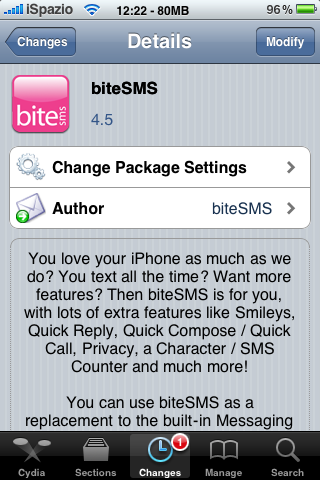
Update: BiteSMS 4.5 Cracked

December 28, 2009 :: Posted by - SoSly :: Category - Cracked .deb's, Cracks

Download:

download

Thanks to studguy1 for this crack.

Install Instructions:

  • After downloading the deb above rename it to bite.deb
  • Copy the file to var/mobile on your iphone, install using ifile or do the following
  • Open up mobile terminal on your iphone and do the following
  • Type in su (press return)
  • Type in alpine (press return)
  • Type in dpkg -i bite.deb (press return)
  • Reboot or respring and enjoy

AT&T Website Stops Selling iPhones In New York City?

December 28, 2009 :: Posted by - SoSly :: Category - News

What kind of Christmas present is this? The Consumerist is reporting that AT&T has stopped selling the iPhone in the New York metropolitan area, at least via the company’s website, due to high data congestion (or possibly due to online fraud). Update: While Consumerist’s post still cites ‘network congestion’ as the reason for the NYC sales hold, we’ve been told by other customer service reps that the real reason is a spike in fraudulent purchases; other sites have gotten the same story.
Read more…

Use a Wireless Keyboard With Your Jailbroken iPhone

December 26, 2009 :: Posted by - SoSly :: Category - News

A few days ago, the BTStack keyboard package was released to Cydia. This package, which we posted about recently, allows owners of jailbroken iPhones to use a Bluetooth keyboard with their iPhone 3G or 3GS, or 2nd generation or later iPod touch. The package is available for US$5.00 from Cydia.

Since the iPhone was first introduced, there have been efforts to bring support for external accessories. The iPhone 3.0 external accessory framework allowing accessories that connect to the universal dock connector or use Bluetooth has been closed, and only a few companies have developed accessories using the framework. The BTStack project by Matthias Ringwald offers a more complete and open Bluetooth stack for jailbroken iPhones. The stack has even been used with an iPhone and a Wii Remote over Bluetooth. Read more…

Augmented Reality: iPhone In An iPhone

December 25, 2009 :: Posted by - SoSly :: Category - News

Here’s a nice post-Christmas mind bender for you — it’s created by a company named Ogmento (they specialize in augmented reality applications — get it?) and is an iPhone app that creates an augmented reality version of the iPhone. In other words, they put an iPhone in your iPhone so you can iPhone while you iPhone. Dawg.

Why did they do this? Apparently it’s a promotion for the iPhone launch by Orange Telecom in Israel. But it’s pretty crazy — the iPhone inside the app even runs apps, though they’re just still pictures. And it’s a little disappointing that you interact with the fake iPhone via the real iPhone’s touchscreen. If it really was an augmented reality demonstration, wouldn’t you interact with the augmented reality iPhone just by moving your hand in the air where it should be?

Maybe that’s too mind-melting after a relaxing Christmas day. At any rate, enjoy the crazy video above. This isn’t anything we’ll see coming to the App Store any time soon, we’re sure, but it’s just the kind of thing to get your mind up and running again after all that egg nog and holiday cheer.

Via tuaw.com

Update: Multifl0w 1.3.1 Cracked

December 23, 2009 :: Posted by - SoSly :: Category - Cracked .deb's, Cracks

Download:

Multifl0w is a multitasking interface which displays applications that are running and allows you to scroll left and right between them for quick switching. It also includes a snapshot of each of the backgrounded applications. Runs with backgrounder (you can background application by holding the home button).

-Install backgrounder from cydia

Now after downloading the .deb file from above do the following

  • rename the deb to multi.deb
  • Copy the deb to var/mobile on your iphone
  • Open up mobile terminal and do the following or install using ifile installer by tapping on deb
  • Type in su (press return)
  • Type in alpine (press return) you better change your default password
  • type in dpkg -i multi.deb (press return)
  • Respring or reboot and enjoy

Thanks to 3744111 over at xsellize for the upload.

Update: N64iPhone 0.7.0 Cracked

December 23, 2009 :: Posted by - SoSly :: Category - Cracked .deb's, Cracks

Download:

Recommended ONLY for the iPhone 3GS and iPod Touch 3G

  • Install BTstack from cydia (Install first as you’ll get errors if you don’t)
  • Rename the downloaded deb above to n64.deb
  • Copy the file to var/mobile on your iphone and install using ifile by tapping on it or do the following
  • Open up mobile terminal
  • Type in su (press return)
  • Type in alpine (press return)
  • Type in dpkg -i n64.deb (press return)
  • Respring or reboot and enjoy

Thanks to mrhitchens over at xsellize for the upload.