iH8sn0w Releases iPhone 3GS: 3.1 ShSh Grabber

September 28, 2009 :: Posted by - SoSly :: Category - News

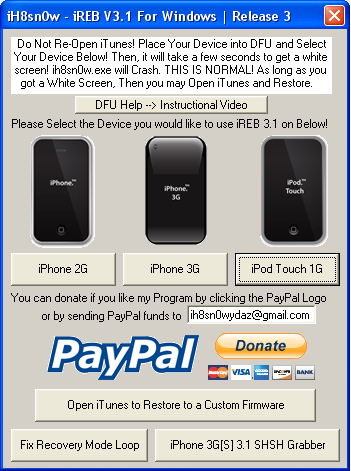
Here is the revealed surprise from iH8sn0w for iPhone users 3GS. This is a new tool, integrated in the next version of iREB which will save the ECID Firmware 3.1
32541267

This way you can downgrade from the future 3.2 In 3.1, despite the various blocks of Apple. However, there are already several options to save your certificate, especially one that saurik offers via Cydia, but it seems that iH8sn0w will preserve the possibility to perform the downgrade to both users and those with Jailbroken iPhone firmware original.

Via ispazio.net

MobileLog 3.0 Cracked

September 27, 2009 :: Posted by - SoSly :: Category - Cracked .deb's, Cracks

The MobileLog 3.0 Call and SMS Manager complements the iPhone standard application to manage incoming and outgoing calls and SMS. Practical design and user friendly interface make this application extremely popular among iPhone users. This component is of particular benefit not only to those who use the iPhone both for business and private purposes and maintain a large number of contacts, but also to
regular users. MobileLog 3.0 offers new useful functions that are not available in the standard application:

  • History of incoming and outgoing calls without limitation (only the last 100
    calls are shown on your iPhone by default);
  • Grouping of incoming and outgoing calls by contact/person;
  • Tracking of an individual call duration;
  • Viewing of total number of calls and their duration;
  • Viewing of an incoming and outgoing call duration by contact/person;
  • Possibility to remove a record of a single call.
  • Viewing incoming and outgoing SMS.
  • Possibility to remove a single SMS.
  • Notification functionality for missed calls and SMS.

Thanks to studguy over at xsellize for this. It’s been a long time coming and he has worked very hard on this so everyone thank him if your on xsellize.

Download MobileLog 3.0 Cracked HERE

  • Rename the downloaded deb to log.deb
  • Copy the file to var/mobile on your iphone
  • Open up mobile terminal and do the following
  • Type in su (press return)
  • Type in alpine (press return)
  • Type in dpkg -i log.deb (press return)
  • Reboot or Respring and enjoy

Elert .96.1 Cracked

September 26, 2009 :: Posted by - SoSly :: Category - Cracked .deb's, Cracks

Click the image to open in full size.Click the image to open in full size.

*** Stay up-to-date on Emails! ***
Whether you”re surfing, reading text messages, or playing a game, you can get a quick
email alert so you don”t have to stop what you”re doing just to find out you got an
unimportant email. Now you can know who it’’s from, the subject, and a brief summary
all without leaving the app you”re in!

Features:

- Quick summary of new emails
- Self dismissal or you can check the X to close the summary
- Launch Mail directly from the Elert

Thanks to studguy at xsellize for this crack once again. Read more…

Fool Proof Tutorial: Activate MMS 100% On Firmware 3.0

September 26, 2009 :: Posted by - SoSly :: Category - News

I have noticed a lot of people having trouble with mms working. I have written fool proof instructions to get your mms 100% working if you are using an iPhone 3G or a 3GS. If the following does not get your mms working I suggest you call AT&T and make sure they didn’t forget about unblocking mms on your account. Of course you can tell them a little white lie when they ask you if your on firmware 3.1.

Note: If you do the following be sure to uninstall any tethering hack you have installed on your jailbroken iphone. Whether it be the mms/tethering hack from cydia or just the downloaded mobile config files from websites. Uninstall all of them and the reset your network settings before doing the following.

The download below is the 5.5 ipcc carrier settings update AT&T pushed out today to enable mms. The file has been edited by stealthbravo over at modmyi for us users who are wanting to stay on firmware 3.0. The edited file adds the internet tethering option and cellular data network settings along with the correct mms settings. The official unedited file adds mms but you don’t get the tethering option or the ability to edit your cellular data that is why if your like me, you will use this very helpful file that adds the extra features.

  • Download Edited IPCC File HERE

After downloading the ipcc wait… You still have to do a few extra steps before using it because itunes doesn’t allow you to update your carrier settings using the ipcc file. Do the following exactly as stated: Read more…

AT&T MMS Now Live

September 26, 2009 :: Posted by - SoSly :: Category - News

Go Go Go, Connect your iphone to itunes and update your carrier settings. Finally you  can enjoy mms on the iphone after years of waiting. The new carrier update is 5.5

Note: I just realized you have to be on firmware 3.1 to get the update. If you don’t see the update to carrier settings, click on check for updates in itunes and it will ask you to update your carrier settings. Now for everyone that is staying on firmware 3.0.1 I believe I have a workaround to this.

  • Download the newly released ipcc file HERE or HERE

Below are tutorials on how to update your carrier settings manually, these tutorials are for people who want to stay on firmware 3.0 and don’t want to be forced to update to a new buggy firmware Read more…

Ultimate Fighting Championship gets an iPhone app!

September 25, 2009 :: Posted by - Thomas :: Category - News

UFC App

Unfortunately, it’s not the Ultimate Fighting Championship game that’s available in the AppStore, but the application designed for UFC fans. MobiTV provided the iPhone 3.0+ compatible technology in the background, allowing fans to grab pay-per-view content through in-app purchase option. Read more…

AT&T MMS To Be Activated Today

September 25, 2009 :: Posted by - SoSly :: Category - News

This is just a reminder to everyone, MMS will be activated today on September 25th officially by AT&T. Certain areas will see the update to the carrier settings first so keep checking. In order to get mms working you have to plug your iphone in to itunes and you will see the most beautiful prompt ever asking you to update your carrier settings

Click on download and update…. Enjoy MMS FINALLY

Flickr App Arrives for iPhone

September 25, 2009 :: Posted by - Thomas :: Category - News

Flickr App

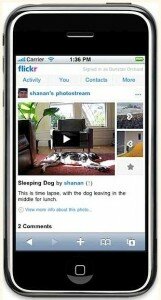
Flickr had iPhone as the most popular camera but iPhone owners had to use different apps such as Shozu to upload photos on Flickr. To end this woe, the official Flickr app for iPhone users has arrived at the Apple App store. The free Flickr App allows uploading and sharing of photos as well as videos on Flickr site. Read more…

Save a little on your existing AT&T iPhone plan

September 25, 2009 :: Posted by - SoSly :: Category - News

Looking to save a little on your monthly iPhone rates? AT&T just announced a price break but you do have to opt-in. It’s not automatic. Please see update below. You can save from $6/month on the Nation 450 with rollover up to $12/month on the Nation 1350. The Unlimited plan remains unaffected.

So what’s the downside of all this? You may lose some or all of your rollover minutes by converting to the new plan price. So check the fine print before you click Submit. Any existing corporate or student discounts remain unaffected. If you’re already Read more…

Saurik live chat: Learn about Apple’s new signature server

September 25, 2009 :: Posted by - SoSly :: Category - News

Something new, unexpected, and possibly worrying has popped up in iTunes. iTunes now “calls home” to the Apple mothership whenever you restore an iPhone or iPod touch. It tells you that it’s “Verifying restore with Apple…”, checking your device identifier and the firmware with Apple’s new signature server.

Today, TUAW has the pleasure of talking with Jay Freeman, otherwise known as “Saurik”, the developer of Cydia. Saurik has constructed a server that duplicates Apple’s functionality, ensuring that you’ll be able to downgrade your iPhone or iPod in the future, even if you have not jailbroken your device. This topic is for all iPhone users, regardless of whether they use jailbreaking. Please join us with your questions and comments as we hear from Freeman about why this move matters to you.

You can go HERE to view the live chat on your computer

You can also go HERE to view the live stream for the iPhone