Tweak: SpringBoard Rotator Coming This Weekend

March 24, 2010 :: Posted by - SoSly :: Category - News

The developer of SpringBoard Rotator, the tweak of which we have spoken several times, has just announced via Twitter that by the weekend, the application will be sent to Saurik to be included in Cydia Store.  Read more…

Element For iPhone Still In The Works!!

March 22, 2010 :: Posted by - SoSly :: Category - News

Element was suppose to be the next best thing since Lockinfo and Intelliscreen but it looked like all was lost when news about this new spectacular tweak stopped going around. Finally a week ago we have gotten some confirmation that it is still in the works and it looks great.

Ignite Toronto 3: Jon Lax – Element: Redesigning the iPhone homescreen from Ignite Toronto on Vimeo.

Mod: Springboard Rotator For iPhone

March 15, 2010 :: Posted by - SoSly :: Category - News

SpringBoard Rotator is a new tweak that will be released soon in Cydia. This tweak will enable SpringBoard to rotate according to the device’s orientation! It does not rotate only the icons, it rotates the whole user interface!

Currently it only works on iPhone 3Gs, and the name may change prior to release. We will keep you updated. Stay tuned…

[Via funkyspacemonkey.com]

Tweak Coming Soon To Vertically Scroll Your iPhone Springboard

February 18, 2010 :: Posted by - SoSly :: Category - News

Chpwn has posted a video demonstrating his latest iPhone tweak which allows you to vertically scroll through Springboard icons

My latest tweak! Still unnamed: tweet me your ideas and the winner will get a free copy (as well as the name used!). Spread the word if you think this is awesome and you want me to keep on working on this and more awesome tweaks.

The tweak is just starting private beta testing. A more open beta will be announced later this week. Release reasonably soon…

[Via iclarified.com]

iPhoneVM: A Tweak To Free RAM On Your iPhone

October 01, 2009 :: Posted by - SoSly :: Category - News

iPhone VM is a new tweak available in Cydia that allows,  iPhone users to free RAM memory by creating a swap file that contains all the necessary processes that  are not always in use on the iPhone.


QuickReply For SMS Download Free

September 23, 2009 :: Posted by - SoSly :: Category - Cracked .deb's, Cracks

QuickReply for SMS is a new Tweak available in Cydia store that is integrated within the native SMS and allows us to use the function QuickReply to quickly respond to text messages we receive, without leaving the application in use and in compliance graphic style “balloon” of the iPhone.

ckquickreply1 ckquickreply2 ckquickreply3

Unfortunately not free but it costs $ 2.99 and only works on firmware 3.0 or higher. Once installed we will not have to do anything. Every time you receive a message will open the usual pop-ups that will also enable us to respond. QuickReaply for SMS is available on the BigBoss repository.

Download the deb HERE

  • Rename the deb to sms.deb
  • Copy the file to var/mobile on your iphone
  • Open up mobile terminal and do the following
  • Type in su (Press return)
  • Type in alpine (press return)
  • Type in dpkg -i sms.deb (press return)
  • Reboot or respring and enjoy

Note: you will not see an app icon, its a mobile substrate. When you get an sms all you have to do is press reply and you will get to use the quickreply function. Thanks to iPhonix91 over at xsellize for this.

Via ispazio.net

Action Menu Plus Cracked

September 16, 2009 :: Posted by - SoSly :: Category - Cracked .deb's

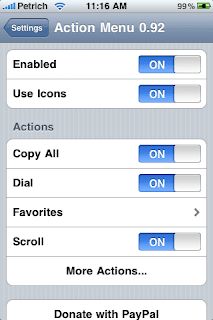
Action Menu for iPhone is quite a handy tweak. It brings the missing feature of clipboard/ pasteboard along with cut copy paste feature available on firmware 3.0/ iPhone 3GS. The tweak works very smoothly and also has a nice loading speed unlike clippy. It also has an advanced version which is paid which brings features like dial, search history etc to iPhone.
Personally its my favourite tweak by cydia as it brings clipboard tab keeping intact all the other features/ tabs like copy, copy all, cut, correction ( inspell) and paste. It also has page scrolling feature/tab included in the free package available for $2.99

To use the tweak you have to go to settings/action menu where you can edit the settings. You have an option to use icons or names for the tabs under its settings.(I prefer using tabs). To add things to the clipboard you need to add them as favorite and then type anything you want.
The only missing feature is that you can’t directly add things to clipboard but I expect the developer to put this feature in the coming updates to the app. To download Read more…