Apple claims that the iPad 3G isn’t carrier-locked, but it won’t be able to connect to T-Mobile 3G. Why? The short answer is that the iPad 3G does not support the band (1700 MHz) that T-Mobile 3G uses. However, it does support T-Mobile’s EDGE band, GSM/EDGE (850 and 1900 MHz). And it’s been confirmed to work by several users with some handiwork and a T-Mobile SIM card on EDGE data plan. Read more…

AT&T may have extended its iPhone exclusivity via an iPad data deal that Apple couldn’t refuse and competitors wouldn’t match.
“AT&T had to do something dramatic to get the iPad,” says Brian Marshall, a Wall Street analyst at BroadPoint AmTech. Read more…

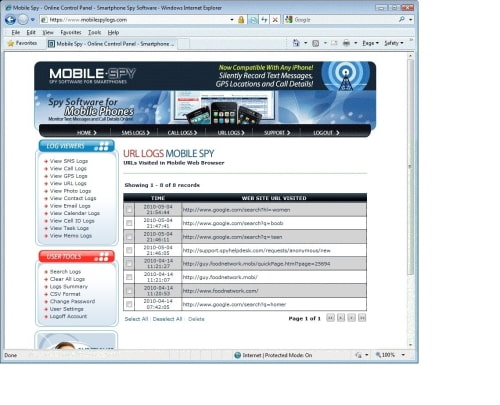
After the software is setup on your iPad, it will record URL website activity, E-mail activity, and Contacts and then silently upload the data to your private Mobile Spy account using the Internet.
When you want to view results, simply login to the secure Control Panel from any computer or phone web browser. Just enter your username and password to see the activity logs.
You can purchase 12 months of Mobile Spy for $99.97, 6 months for $69.97, or 3 months for $49.97.
To use this software you must jailbreak your device.
[Via iclarified.com]

Apple Stores are selling out of the iPad 3G according to checks done by AppleInsider.
All ten of the stores contacted by the site were sold out of the 3G model in all storage capacities. Some were even sold out of the Wi-Fi model.
Customers who want the iPad 3G, first released last Friday, can sign up for Apple’s “Notify Me” service, which will e-mail customers when the product comes back in stock. Those who sign up for the list have first priority on the iPad 3G, and will have 24 hours to pick up the device when it arrives in store.
Apple’s online store has a waiting list of 5-7 business days for models of the iPad.
[Via iclarified.com]
Installous, Hackulous’ application for the iPhone, iPod, and iPad which lets you browse for and install cracked apps straight on your device, is getting a major facelift. In previous announcements we discussed our plans, including native app installation, API polls, announcements, concurrent/multiple downloads and installation tasks, native interface for browsing, and graphical improvements. Read more…
![]()
We love our iPads. We wouldn’t dream of giving them up. And yet, there are ways and situations where the iPhone simply works better. Without taking potshots at our beloved iPad, here is TUAW’s respectful list of mega-win scenarios where the iPhone takes first place in usability.
Making phone calls. Yes, you can use line2 to convert your iPad into a quasi-phone that accepts incoming calls, or fire up the Skype app, but for real-world use, nothing beats a device that you can stick into your pocket and then forget about. It rings, you answer, you talk, you hang up. It’s a lot easier to use an iPhone than an iPad to make phone calls. Read more…

You’ve probably seen contactless payment terminals before. They’re used in many stores, restaurants, and other locations, with either a smart credit card containing a secure memory card or some sort of fob being used to make the payment. You just wave it at the terminal, and you’ve paid your bill.
Visa and DeviceFidelity are working on a way to let iPhone users make payments by waving their iPhones in front of contactless payment terminals. They’ll be offering an iPhone case with an embedded secure memory card that hosts Visa’s payment application, Visa payWave. Read more…
Comedian Ellen Degeneres claimed she upset Apple officials with a parody of the company’s iPhone commercials, prompting the talk show host to apologize for jokingly portraying the touchscreen device as difficult to use.
The host of the syndicated program “The Ellen DeGeneres Show” said on her program that representatives from Apple contacted her regarding a parody commercial she had aired on her program. Read more…

An iPod widget and orientation lock have been discovered in the latest iphone OS 4.0 Beta, according to 9to5Mac.
If you flick to the left of your first window of open apps, you are greeted with a few new buttons. A stationary iPod button to quickly launch the app, iPod music controls, and Orientation lock. The orientation lock is just like on the iPad, but instead is controlled via this new menu. Tap once to lock in portrait, and again to unlock. The iPod music controls are similar to the ones that used to appear when you double clicked the home button.
It’s possible that Apple could expand on this functionality with future betas providing widgets that could perform other tasks.
[Via iclarified.com]

Some of you might be wondering why the new jailbreak “Spirit” did not install the Rock App., Or why Appsidy did not work after the Cydia update. Well let me share with you what I know.
The first thing you should know is that Appsidy, Rock Your Phone (Rock App), IntelliBorn are all the same people. Yup thats right. Last year when Appsidy first hit the scene, I made a blog post about it and the man himself Saurik, actually commented on the blog post saying: Read more…